If you are building a smart home power cut backup India plan, do not start by buying random emergency gadgets. Start with the boring device that runs the whole house: your WiFi router.
In our Indian setups, the smart home usually fails in this order. The power drops, the router reboots, Alexa goes deaf, cameras stop sending alerts, and then smart bulbs or plugs return in whatever state their app remembers.
That is not a smart-device problem. It is a backup design problem.
This guide gives you the practical order: router and ONT first, security second, comfort third, heavy appliances last. If you are still setting up the basics, keep our first smart home setup in India guide open for the device-by-device foundation.
Here we will focus only on what happens when the grid drops, the inverter clicks, the router blinks, and everyone expects Alexa to still work.
Can a smart home power cut backup India setup actually work?
Yes, a smart home can keep its most important functions during Indian power cuts if the router, ONT, hub, and security devices stay powered. Do not expect every bulb, plug, AC, and appliance to run. The practical goal is continuity for internet, alerts, locks, cameras, and safe recovery after power returns.
That distinction matters.
A smart home is not one thing. It is a stack of powered devices, network devices, cloud services, local schedules, and old-fashioned wall switches. During a power cut, each layer fails differently.
The internet layer is the first weak point. If your JioFiber ONT or Airtel Xstream modem loses power, the router may still glow but the internet is dead.
The control layer is next. Alexa and Google Home need power, WiFi, and internet for most commands. A powered Echo with a dead router is just a speaker waiting for the network.
The device layer is mixed. Battery doorbells, smart locks, contact sensors, and some cameras can keep working. Plug-in smart bulbs, smart plugs, IR blasters, and most WiFi cameras stop unless they sit on inverter or UPS power.
The safety layer is the one people forget. When power returns, some devices come back off, some come back on, and some restore their last state. That can be harmless for a lamp and risky for a geyser, heater, pump, or AC.
So the right question is not, "Can my whole smart home work in a power cut?"
The right question is, "Which parts of my smart home must stay useful when power drops, and which parts must recover safely when power returns?"
That is the plan this guide builds.
The backup priority stack for Indian homes
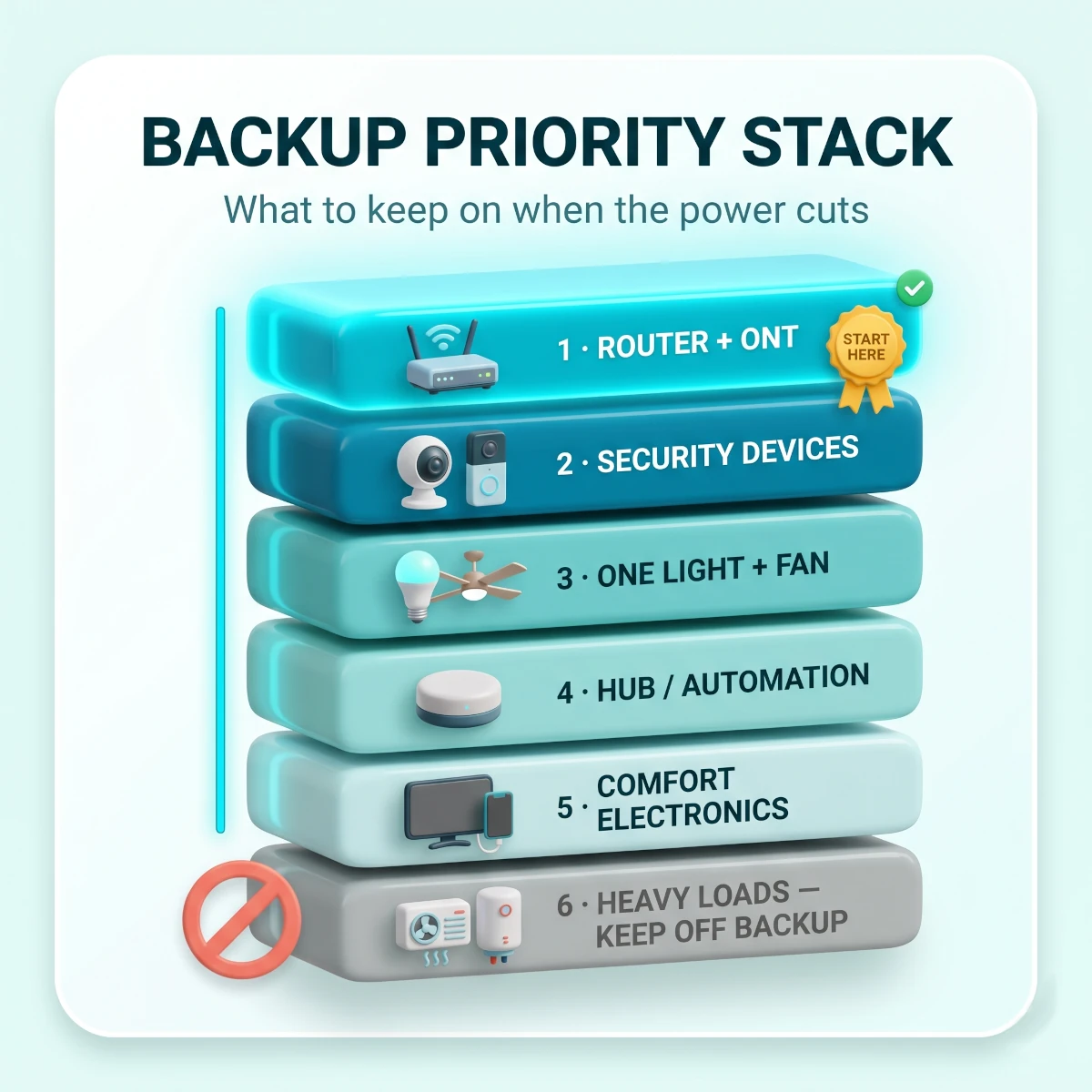
The best power-cut plan uses a priority stack: internet first, security second, essential comfort third, convenience last. This keeps cost and battery size under control. It also stops you from wasting inverter power on devices that are nice to have but not useful during an outage.
Here is the order we use in real homes.
Priority 1: router and fiber ONT. Without these, WiFi devices lose remote control, cameras cannot send alerts, and voice assistants cannot reach the cloud.
Priority 2: security devices. Cameras, doorbells, locks, and sensors matter most when the house is dark, empty, or asleep.
Priority 3: one light and one fan. A single LED light and one BLDC fan can keep a room usable for hours without draining the inverter quickly.
Priority 4: hubs and automation controllers. A Matter, Zigbee, or brand hub is useful only if the devices it controls also have power. Back it up when it controls security or local automation.
Priority 5: comfort electronics. TV, laptop charger, speaker, set-top box, and small chargers come after safety and connectivity.
Priority 6: heavy loads. AC, geyser, induction cooktop, kettle, iron, microwave oven, heater, washing machine, and pump should stay off unless the backup system was designed for them.
The smart home power cut backup priority stack for Indian homes: keep the router and fiber ONT alive first, security devices next, then one light and fan, with heavy AC and geyser loads kept off backup.
This stack is also how you control cost.
A router UPS can cost ₹1,500 to ₹3,000 and keep internet alive for a short outage. A full inverter and battery upgrade can run ₹20,000 to ₹80,000 depending on capacity. A portable power station can cost ₹15,000 to ₹70,000 and still may not suit heavy loads, so compare actual battery size and output in our portable power station home backup guide before buying.
Most homes do not need a giant backup system to make the smart home reliable. They need the right few devices on backup and the wrong few devices kept off it.
The second rule is restore behaviour.
Backup keeps devices alive during the cut. Restore settings decide what they do after the cut. A good setup needs both.
A camera that loses power but reconnects in 40 seconds may be acceptable. A geyser smart plug that turns on after a midnight outage is not acceptable. A bedroom bulb that turns on at 3 AM is not dangerous, but it is annoying enough that the family may remove it.
Power-cut reliability is not about buying the most expensive kit. It is about knowing which device can fail quietly and which device must not surprise you.
What should stay on during a power cut?
During a power cut, keep the internet path, security layer, essential sensors, and one comfort zone alive. Do not try to back up every smart plug and bulb. A small, deliberate backup circuit is safer than an overstuffed inverter circuit that trips when the family needs it most.
Use this table as your first filter.
TableSmart Home Backup Priority During Indian Power Cuts
Which smart home devices should stay powered during power cuts in India
Device or load
Backup priority
Best backup path
Why it matters
Avoid
Fiber ONT and WiFi router
Critical
Mini router UPS or inverter circuit
Keeps internet, alerts and remote control alive
Backing up router but not ONT
Smart hub or bridge
High if used for security
Router UPS, USB UPS or inverter socket
Keeps Zigbee, Matter or local automations reachable
Backing up hub when all devices are off
Security camera
High
Battery camera, solar camera, UPS or inverter
Records and alerts during outage
Mains-only camera with no router backup
Video doorbell or smart lock
High
Internal battery plus router backup
Entry control and visitor alerts
Ignoring battery level alerts
One LED light and BLDC fan
Medium
Home inverter
Basic comfort with low load
Too many rooms on backup
Smart plug for router or TV
Low to medium
Only if load is safe
Can restart or switch non-critical electronics
Geyser or heater restore to on
AC, geyser, iron, kettle, pump
Usually no
Dedicated system only
High load, safety risk, fast battery drain
Normal inverter or cheap plug control
Fiber ONT and WiFi router
Backup priority
Critical
Best backup path
Mini router UPS or inverter circuit
Why it matters
Keeps internet, alerts and remote control alive
Avoid
Backing up router but not ONT
Smart hub or bridge
Backup priority
High if used for security
Best backup path
Router UPS, USB UPS or inverter socket
Why it matters
Keeps Zigbee, Matter or local automations reachable
Avoid
Backing up hub when all devices are off
Security camera
Backup priority
High
Best backup path
Battery camera, solar camera, UPS or inverter
Why it matters
Records and alerts during outage
Avoid
Mains-only camera with no router backup
Video doorbell or smart lock
Backup priority
High
Best backup path
Internal battery plus router backup
Why it matters
Entry control and visitor alerts
Avoid
Ignoring battery level alerts
One LED light and BLDC fan
Backup priority
Medium
Best backup path
Home inverter
Why it matters
Basic comfort with low load
Avoid
Too many rooms on backup
Smart plug for router or TV
Backup priority
Low to medium
Best backup path
Only if load is safe
Why it matters
Can restart or switch non-critical electronics
Avoid
Geyser or heater restore to on
AC, geyser, iron, kettle, pump
Backup priority
Usually no
Best backup path
Dedicated system only
Why it matters
High load, safety risk, fast battery drain
Avoid
Normal inverter or cheap plug control
There are two common home types in India.
The first is a flat with a basic inverter circuit. It may power a few lights, fans, and one or two plug points. This is common in 1BHK and 2BHK homes. You can usually add the router, ONT, and one camera if the electrician confirms the socket is on backup.
Many gated societies also run a diesel generator, or DG, that powers common areas and sometimes one backup socket per flat during long load shedding. Ask the facility team which point is DG-backed before you plan your smart-home backup around it.
The second is a home with no inverter circuit near the router. This is common in rented flats and newer apartments where the router sits beside the fiber entry point. In that case, a mini router UPS is the cleanest fix.
Do not assume the socket near the router is on inverter backup. Test it.
Switch off mains from the MCB when someone is home. Check which sockets stay live. Label the router socket if it remains powered. If it dies, decide between a mini UPS and an electrician-run backup point.
For renters, the mini UPS route is safer because it needs no wiring change. The no-drilling logic from our smart home for renters in India guide applies here too.
Smart home power cut backup India setup: do this in order
The safe order is simple: map the loads, back up the internet path, protect security devices, set restore states, then run a planned outage test. Do not start with Alexa routines. Voice control is the last layer, because it depends on power, WiFi, internet, and device recovery.
Here is the full setup order.
Power-Cut Backup Setup Order
1
Map every device that matters
Walk through the home and list the router, ONT, Echo or Nest speaker, hub, cameras, doorbell, smart lock, smart plugs, smart bulbs, AC controllers, and inverter-backed lights or fans. Mark each as critical, useful, or optional.
Pro tip: If the device protects entry, internet, or elderly family members, mark it critical.
2
Read adapter labels before buying a UPS
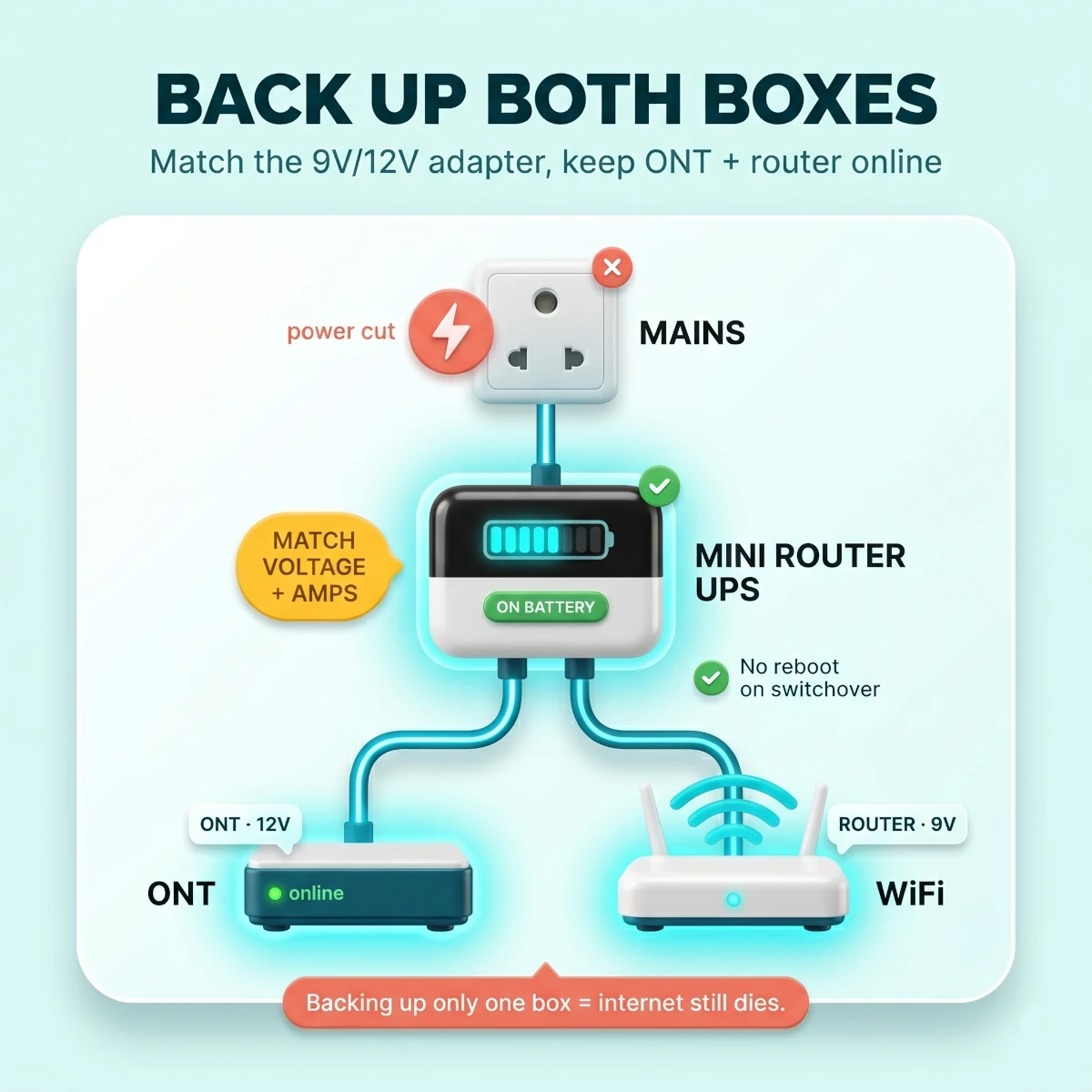
Look at the original adapter for the ONT and router. Note voltage and current, such as 12V 1A, 12V 2A, 9V 0.6A, or 5V 2A. The UPS output must match voltage exactly and support equal or higher current.
Warning: A 9V UPS on a 12V router is not a bargain. It is a wrong purchase.
3
Keep both ONT and router powered
If your broadband has two boxes, back up both. Some mini UPS units have two outputs. Others need a splitter or a larger model. Test with mains off and confirm the internet stays live on your phone.
Pro tip: Run a video call for five minutes during the test, not just a speed test.
4
Move security devices onto backup where possible
Put one key camera, the doorbell chime, and the hub on inverter or battery backup. If outdoor wiring is difficult, use battery or solar cameras for gates, balconies, and parking.
Pro tip: One reliable entry camera beats four cameras that all die together.
5
Set safe restore states
Open each device app and check power-on behaviour. Set bedroom bulbs to off or last state, router plugs to last state, and high-load smart plugs to off. Do not let heaters, geysers, pumps, or ACs restart without intent.
Warning: Restore state is a safety setting, not a convenience setting.
6
Build only simple power-return routines
Use routines to notify you when devices reconnect, turn off unnecessary lights after restoration, or re-arm cameras. Avoid automatic high-load restarts. A routine that saves ten seconds is not worth a risky restart.
Pro tip: Name routines plainly, such as Power Restored Check, so the family understands them.
7
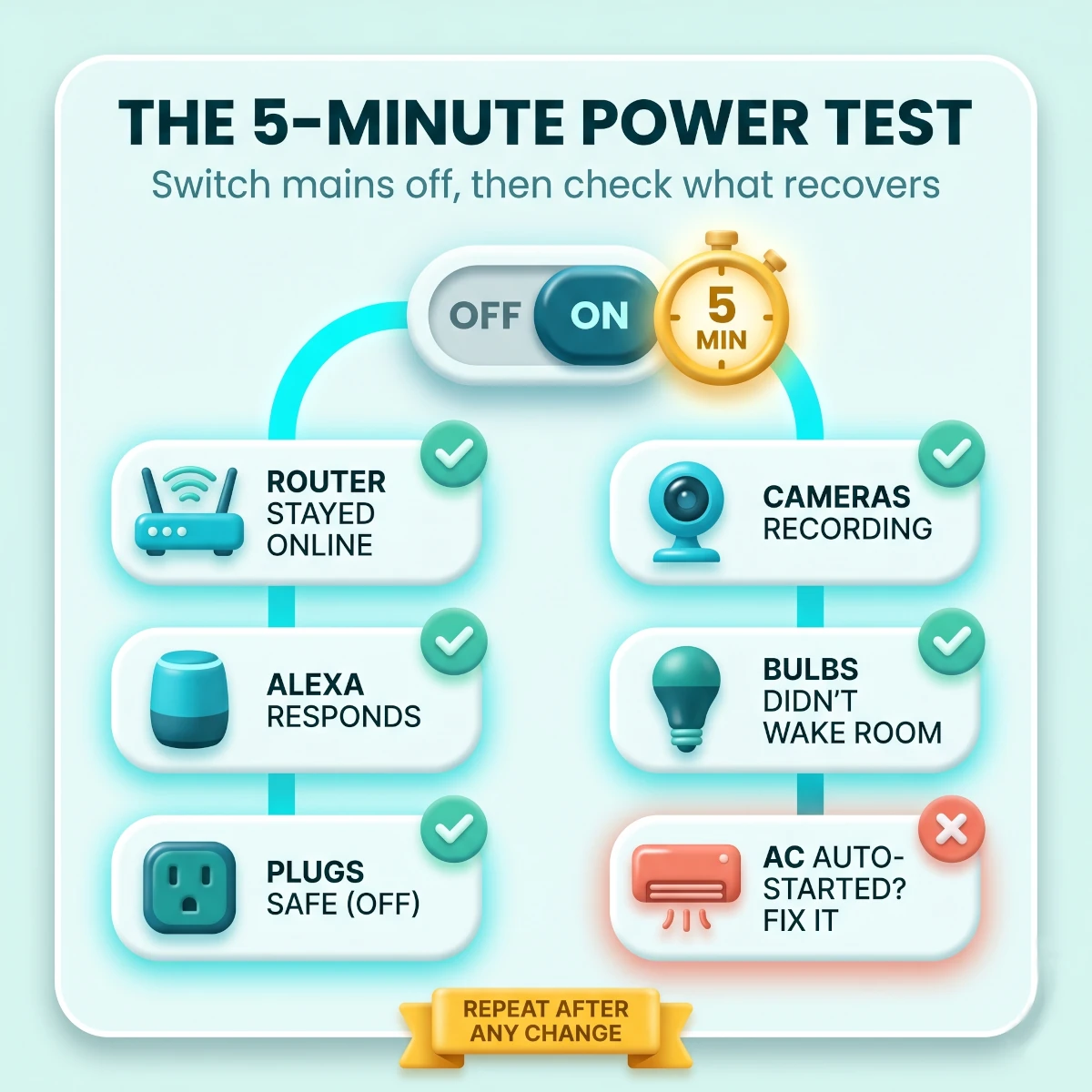
Run a planned five-minute outage test
Switch off mains, wait five minutes, then switch it back on. Watch router uptime, camera status, Alexa response, smart plug states, bulb restore behaviour, and AC controller recovery. Write down what failed.
Pro tip: Repeat this after changing router, inverter, camera, or major routines.
This order prevents the usual mistake: spending on visible smart devices while the hidden network layer remains fragile.
In one 2BHK setup, the family had three cameras, four smart plugs, two Echo speakers, and no router backup. Every power cut turned the home into a manual house. The fix was not more cameras. It was a ₹1,500 to ₹3,000 router UPS and moving one camera adapter to an inverter-backed socket.
That is the kind of boring fix that actually changes daily reliability.
Is router UPS enough for a smart home?
A router UPS is enough to keep internet alive, but not enough to keep the whole smart home alive. It should power the fiber ONT and router first. After that, you still need battery, inverter, or UPS power for cameras, hubs, doorbells, and any device you expect to use during the outage.
Most Indian smart-home failures after a power cut are router failures in disguise.
The camera may be fine. The plug may be fine. Alexa may be fine. But if the router reboots for three minutes, every cloud-connected device looks broken.
A mini router UPS solves that specific problem.
It sits between the wall adapter and the router. During normal power, it charges itself and passes power through. When mains drops, it switches to battery fast enough that the router should not reboot.
The important word is should.
Some home internet setups need two backed-up devices.
JioFiber, Airtel Xstream, ACT, BSNL FTTH, Hathway, Asianet, and local fiber providers may install an ONT, a modem-router combo, a separate WiFi router, or a PoE adapter. If the fiber box dies, the router alone cannot keep internet alive.
Read the 9V or 12V adapter label on both the fiber ONT and the WiFi router, then put both boxes on a matched router UPS so JioFiber or Airtel internet stays online through a power cut.
Before buying, check four things.
Voltage. The UPS output must match the adapter voltage exactly. A 12V router needs 12V. A 9V router needs 9V. Some UPS units support multiple voltage outputs, but you still need to plug into the correct output.
Current. If the adapter says 12V 2A, the UPS should support at least 2A on that output. Lower current can cause reboots under load.
Number of boxes. If you have an ONT and router, choose a dual-output UPS or plan two UPS units. Backing up only one box is the most common failed setup.
Switching behaviour. The point of a router UPS is no reboot during switchover. Test it by pulling mains from the UPS, not from the router.
Router UPS Buying Checklist
Voltage matches exactly12V to 12V, 9V to 9V, 5V to 5V
Current rating is equal or higherA 2A router needs at least a 2A capable output
ONT and router are both coveredFiber internet fails if either box loses power
Connector pins fit securelyLoose DC pins cause random drops
Backup claim suits your outagesExpect less than the marketing number with ONT plus router
Brand has Indian supportBattery devices need real warranty help after a year
If your smart plugs or AC controllers also fail to reconnect after outages, use our smart plug WiFi troubleshooting guide. The 2.4GHz, combined SSID, router reboot, and band-steering fixes apply to many smart devices, not just plugs.
Cameras, doorbells and sensors during outages
Smart security during a power cut needs two things: device power and network power. A battery camera without router backup records locally but may not alert you. A powered router with dead cameras is also useless. Build security backup as a pair.
Start with the entry points.
The main door should have either a battery video doorbell, a door sensor, or a camera with backup power. A smart lock already runs on internal batteries, so its main risk is not the power cut. Its risk is low battery, poor app access, or no physical key backup.
For most Indian flats, the most useful outage-ready security setup is this:
Main door: battery video doorbell or peephole camera.
Living room: one indoor camera on inverter power or a battery camera.
Balcony or parking: solar camera, battery camera, or camera powered from a backed-up socket.
Router and ONT: mini UPS, always.
That gives you alerts, visual confirmation, and basic recording during short cuts.
Doorbells deserve special attention because they sit at the most useful point in the house.
Battery doorbells keep the door side alive during power cuts. But if your router dies, the phone alert may not arrive. Some doorbells still record motion locally or on the device, but the live alert path needs internet.
That is why router backup comes before doorbell upgrades.
If you are comparing models, use our smart video doorbells for Indian homes guide and check battery life, chime support, and local storage before camera resolution.
Sensors are the quiet win.
Door sensors, window sensors, and motion sensors usually run on small batteries for months or years. During an outage, they can still detect events. Whether they can notify you depends on the hub and router backup.
If you use a Zigbee or Matter hub for sensors, back up the hub with the router. If the hub controls only convenience lights, it can wait. If it controls entry alerts, give it backup power.
Security backup also needs privacy discipline.
Do not turn every indoor camera into 24x7 recording just because it now has backup power. Keep bedroom cameras out of the plan. Use privacy schedules for living areas. Put outage backup where it protects entry, balcony, parking, elderly parents, pets, or valuables.
Does Alexa or Google Home work during a power cut?
Alexa and Google Home work during a power cut only when the speaker, router, ONT, and internet path all have backup power. Even then, most voice commands still depend on cloud access. Voice control is useful during backup, but it should not be the only way to control critical devices.
This is where many people get disappointed.
They plug an Echo Dot into the inverter and assume the smart home is alive. Then the router dies, the Echo says it cannot connect, and the family goes back to wall switches.
Voice assistants need a chain.
Echo or Nest speaker has power.
Router has power.
ONT or modem has power.
Broadband service remains active.
The smart device has power.
The device cloud is reachable.
Break any link and the command can fail.
This is why old-fashioned manual control still matters. A smart lock needs a key or keypad. A camera needs local recording if security matters. A fan should have a wall regulator or remote. A light should still respond to the switch.
For more local control, a proper hub can help. Zigbee, Matter, and some brand hubs can keep device-to-hub communication alive locally, but only if the hub and devices have power. Our smart home hubs for Indian homes guide is useful if you want less cloud dependence.
Do not expect magic from Matter either.
Matter can improve local device communication when the ecosystem supports it properly, but it does not power the device. It does not keep broadband alive. It does not make a dead smart bulb answer commands.
For Indian homes in 2026, Alexa is still the most practical voice layer. Google Home works well for many Android-heavy homes. But neither should be your only power-cut plan.
Use voice for convenience during short outages. Use restore states, battery devices, and manual fallback for safety.
Smart plugs, bulbs and switches after power returns
The most important setting for smart plugs, bulbs, and switches is power-on state. After a cut, each device may return off, on, or last state. Set this deliberately, especially for high-load appliances. A wrong restore state can waste power, wake the family, or create a safety risk.
Start with smart plugs.
For low-load electronics, last state is often fine. A router plug, TV strip, or lamp plug can usually return to the state it had before the cut.
For high-load appliances, off is safer. Geysers, heaters, pumps, irons, and kitchen appliances should not turn on just because power returned. If you automate a geyser, use a proper 16A plug and conservative schedules. Our smart plugs for Indian homes guide explains 10A and 16A use cases.
For geyser automation specifically, the restore setting matters more than the routine. A geyser that heats only when you ask is useful. A geyser that restarts after a power cut while nobody is home is bad automation.
Smart bulbs are less dangerous but more annoying.
Some bulbs turn on after power restoration because they treat the event like someone flipped the wall switch. In a bedroom, that can be a 3 AM wake-up. In a balcony, it can leave lights on all night after a monsoon trip.
Check the bulb app for power-on behaviour. Good apps offer off, on, or last state. If your bulb has no such setting, do not use it in bedrooms or kids' rooms where sudden restoration is irritating.
Smart switches depend on wiring and brand behaviour.
Some smart switches restore the previous relay state. Some come back off. Some reboot slowly and miss the first command after power returns. If the switch controls a heavy load, confirm its rating and restore behaviour before trusting it.
TableSafe Restore States for Smart Devices
Recommended power-on behaviour for common smart home devices after power returns
Device
Best restore state
Reason
Test
Router or ONT smart plug
Last state or on
Internet should recover automatically
Switch mains off and confirm no manual restart needed
Bedroom smart bulb
Off or last state
Avoid waking people after night cuts
Restore power at night with switch on
Living room lamp
Last state
Usually low risk and convenient
Check app state after power returns
Geyser smart plug
Off
High load and unattended heating risk
Confirm schedule does not override safety
Water pump switch
Off
Dry-run and overflow risk
Test with someone near the pump
Camera power plug
On
Security should resume quickly
Check recording within one minute
Router or ONT smart plug
Best restore state
Last state or on
Reason
Internet should recover automatically
Test
Switch mains off and confirm no manual restart needed
Bedroom smart bulb
Best restore state
Off or last state
Reason
Avoid waking people after night cuts
Test
Restore power at night with switch on
Living room lamp
Best restore state
Last state
Reason
Usually low risk and convenient
Test
Check app state after power returns
Geyser smart plug
Best restore state
Off
Reason
High load and unattended heating risk
Test
Confirm schedule does not override safety
Water pump switch
Best restore state
Off
Reason
Dry-run and overflow risk
Test
Test with someone near the pump
Camera power plug
Best restore state
On
Reason
Security should resume quickly
Test
Check recording within one minute
Inverter switchover can create small hiccups. Some devices ride through it. Some reboot. Some cheap WiFi plugs treat the dip as a full power cycle.
That is why you test with your actual inverter, not just with a wall switch.
Switching off a plug manually is not the same as a real mains-to-inverter transition. If your inverter has a delay, the router, camera, or hub may reboot unless protected by a mini UPS.
AC, fans and comfort loads on inverter backup
For cooling during power cuts, back up fans first and ACs last. A BLDC fan and one LED light can run for hours on a normal inverter. A split AC needs a properly designed high-capacity system. Smart control does not reduce the electrical load of the AC.
This point is non-negotiable.
A smart AC controller can make your AC easier to schedule, safer to recover, and less wasteful in summer. It does not make a regular home inverter capable of running a 1 ton or 1.5 ton AC.
If the AC is not on a properly sized backup system, leave it off during the cut. When power returns, use the controller or remote to restart it deliberately.
A BLDC ceiling fan can use much less power than an older induction motor fan. That matters during inverter backup because every watt affects runtime. In a practical home, one efficient fan often beats a fancy portable power station for comfort.
If you are upgrading old fans anyway, our BLDC ceiling fans in India guide is the right place to compare models.
Smart fans with app control are useful, but do not make the mistake of mixing comfort and critical backup.
If the fan is for a bedroom with elderly parents, it is critical comfort. Put it on inverter if possible. If the fan is for a guest room, it can wait.
Portable rechargeable fans are useful in rented flats, hostels, and rooms without inverter wiring. They are not smart-home devices, but they solve the actual problem. That is fine. A backup plan should be practical before it is smart.
Monsoon adds a second comfort problem: humidity.
In coastal cities like Mumbai, Chennai, Kochi, and Kolkata, the power may return but the room still feels damp. A smart AC controller can run dry mode after power returns, but only after you verify safe restart behaviour. Do not set automatic dry mode for every outage unless someone is home.
How much does a smart home power cut backup setup cost in India?
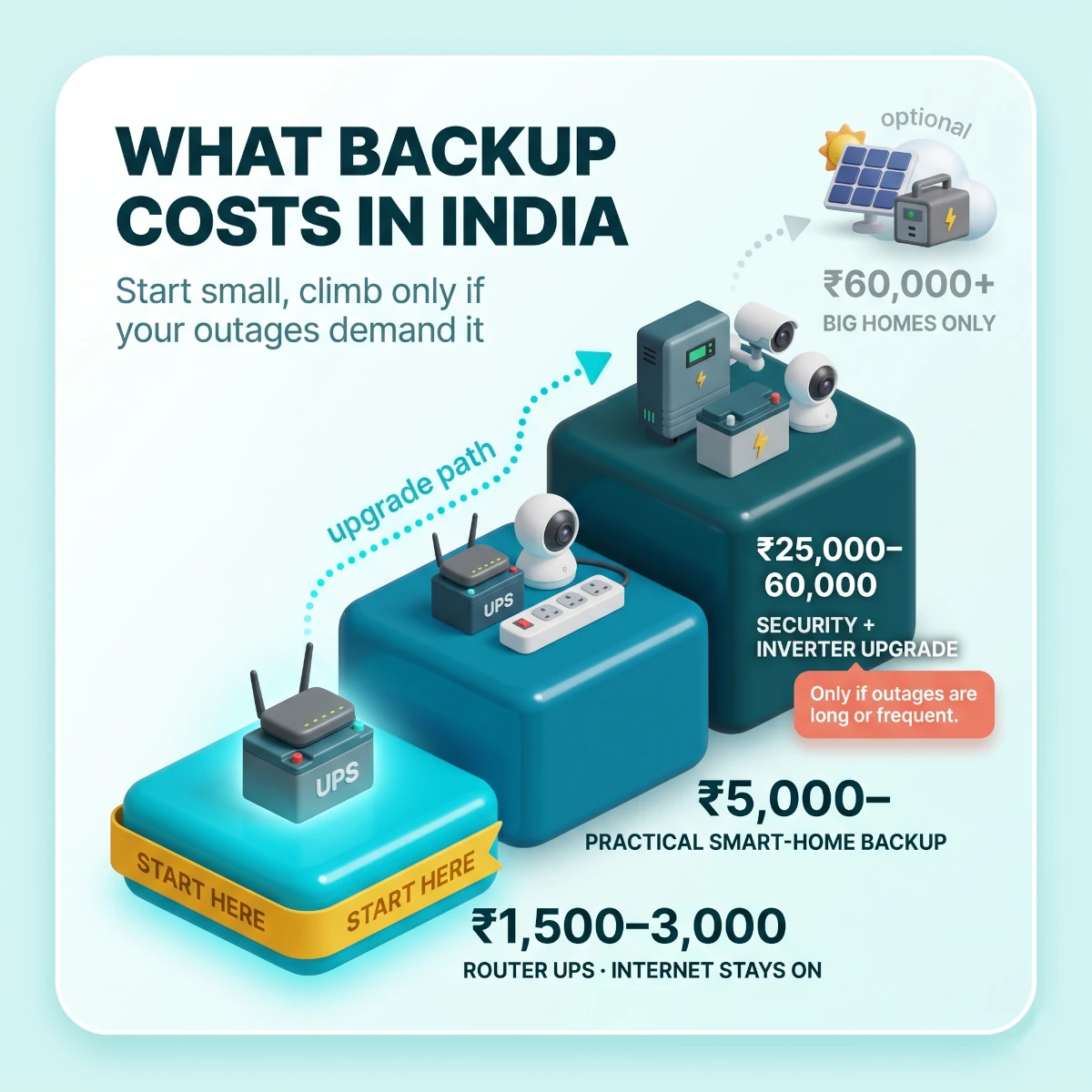
A basic smart-home power cut setup in India costs ₹1,500 to ₹3,000 for router backup. A practical setup costs ₹5,000 to ₹15,000 if you already have an inverter. A stronger security and comfort setup can cost ₹25,000 to ₹60,000 when it includes extra battery cameras, hub backup, and inverter circuit work.
Here is the realistic budget split.
TableSmart Home Power Cut Backup Cost in India
Typical smart home power cut backup budget tiers for Indian homes
Router UPS, battery or solar camera, sensor hub backup, doorbell, local storage
Best for
Ground-floor homes, parking, gates
Inverter cleanup and critical loads
Budget
₹20,000 to ₹60,000
What it includes
Pure sine wave inverter check, battery upgrade, labelled backup sockets, efficient fans
Best for
Families with frequent cuts
Large home backup plan
Budget
₹60,000 to ₹1,50,000
What it includes
Bigger inverter, professional load split, multiple cameras, possible solar or power station
Best for
Independent homes and villas
Smart home power cut backup budget ladder: start with a ₹1,500 to ₹3,000 router UPS, move up to a ₹5,000 to ₹15,000 practical setup, then a ₹25,000 to ₹60,000 security and inverter upgrade only if your outages demand it.
Do not spend the whole budget on a large inverter if the router still drops during switchover. A mini UPS can still be useful even in a home with inverter backup because it bridges that small delay.
Also do not spend on ten smart bulbs if one reliable backup light would solve the outage problem.
The smartest first purchase is usually a router UPS. The second is surge protection or a backed-up camera. The third is fixing inverter load mapping with an electrician.
If your goal is lower bills as well as better backup, pair this guide with our cut electricity bill with smart devices guide. Reducing standby waste and running efficient fans can make backup last longer too.
The payback is not only money.
If you work from home, one saved video call can justify a router UPS. If you have elderly parents, one working camera or doorbell alert during a cut can matter more than a small bill saving. If your area has monsoon surges, surge protection can save far more than it costs.
Buy for the failure you actually face.
In a Mumbai flat with rare short cuts, router UPS plus surge protection may be enough. In a Noida top-floor home during peak summer, fan backup and AC recovery matter more. In a tier 2 town with daily evening load shedding, router, camera, and inverter battery health become routine maintenance.
Power-return testing checklist
Power-return testing means checking what every smart device does when mains power comes back. It is the step most people skip. Test once, and you catch bad restore states, router reboot delays, camera recording gaps, and AC auto-restart surprises before they happen at night or while you are away.
Run this test when someone is home and no heavy appliance is mid-cycle.
Switch off mains from the main MCB or the room circuit, depending on what you are testing. Wait five minutes. Then restore power and watch the smart home recover.
Do not rush to fix things during the first test. Observe first. Write down what happens.
Power-Return Recovery Checklist
Router and ONT stayed onlinePhone internet should continue during the cut without waiting for router reboot
Alexa or Google Home recoveredTest one light command and one camera command after power returns
Cameras resumed recordingCheck live feed, motion alert, and last recording timestamp
Doorbell and lock battery status is healthyLow battery devices fail when you need them most
Smart plugs restored safelyHigh-load plugs should not turn on by surprise
Bedroom bulbs did not wake the roomSet restore state to off if they turn on after restoration
AC controller reconnectedConfirm it does not start cooling an empty room unless intended
Schedules did not overlapCheck app timers, Alexa routines, and device-native timers
Inverter load stayed stableNo beeping, tripping, buzzing, burning smell, or hot adapters
If the router reboots, fix that first.
If cameras do not record, check whether the camera or router lost power.
If bulbs turn on, change restore state.
If a smart plug turns on a risky appliance, change restore state to off or remove automation.
If Alexa commands fail but device apps work, the issue is voice assistant recovery, not the device.
If everything works except one brand app, that brand may take longer to reconnect after power returns. Do not build critical security around it until you trust it.
Power-return testing flow: run a planned five-minute outage, then check that the router, cameras, smart plugs, bulbs, Alexa, and AC controller all recover safely when power comes back.
Repeat the test after every major change.
New router? Test again.
New inverter battery? Test again.
New smart plug on the geyser? Test again.
New camera for the balcony? Test again.
The test takes 15 minutes. It prevents the kind of failure you only discover when you are away from home.
Common mistakes that make backup unreliable
Most smart-home backup failures come from simple mistakes: backing up only the router, buying the wrong voltage UPS, putting heavy loads on inverter, ignoring restore states, and assuming Alexa equals automation. Fix these and the setup becomes boring, which is exactly what you want.
Mistake 1: backing up the router but not the ONT.
This is the top failure in fiber homes. The WiFi name still appears, but the internet is gone. Back up both boxes.
Mistake 2: buying a router UPS by brand name only.
The adapter label matters more than the brand. Match voltage exactly. Support equal or higher current. Check connector fit.
Mistake 3: trusting advertised backup hours.
A UPS that claims six hours on one router may give much less with an ONT plus router. Treat backup claims as best-case numbers.
Mistake 4: putting too many rooms on inverter.
The family keeps adding lights, chargers, TV, cameras, router, and fans until the inverter starts beeping. Keep the critical load list small.
Mistake 5: running high-load appliances casually.
Geysers, ACs, heaters, kettles, irons, microwave ovens, and pumps need proper electrical planning. A smart plug does not make a high-load appliance backup-safe.
Mistake 6: ignoring restore state.
The device may work perfectly until power returns. Then the wrong restore state creates the real problem.
Mistake 7: no surge protection.
Voltage spikes on power return can hurt adapters, routers, cameras, and TV gear. Use a decent surge-protected strip for network and media devices.
Mistake 8: placing backup gear in hot corners.
Routers, UPS units, and adapters run warm. A closed TV cabinet in May is a bad place for batteries and networking gear.
Mistake 9: assuming local schedules always run.
Some WiFi devices store schedules locally. Many cloud-only devices do not. Test without internet before depending on a schedule.
Mistake 10: forgetting family usability.
If only you know how the backup works, it is not a home setup. Label sockets, write the inverter load list, and keep manual switches usable.
The mistakes are not technical for the sake of being technical. They are practical.
A router adapter moved from the UPS to a normal socket can break every alert. A camera charger placed on a non-backup plug can make the gate blind. A geyser restore state set to on can heat water when nobody needs it.
Backup is a system. Every small link matters.
What to buy now and what to skip
Buy only what fixes your real outage pattern. For most Indian smart homes, the first purchase is a router UPS. The second is security backup. The third is inverter load cleanup. Skip big-ticket backup gear until you know your outage length, load list, and family needs.
Here is the practical buying order.
Buy first: a router UPS that matches your ONT and router. This fixes the biggest smart-home failure point for ₹1,500 to ₹3,000.
Buy second: a surge-protected strip for router, ONT, hub, and camera adapters. Voltage spikes during power return are common enough to plan for.
Buy third: one reliable security device that survives cuts. A battery video doorbell, battery camera, solar camera, or backed-up indoor camera is better than four mains-only cameras.
Buy fourth: efficient fans or one comfort load plan. BLDC fans and LED lights extend inverter runtime more sensibly than trying to run everything.
Buy later: larger inverter battery, extra cameras, local hub, or solar backup. These make sense after the basic setup passes a planned outage test.
Skip cheap universal backup boxes with vague output specs. Skip imported devices that do not clearly support Indian voltage and local warranty. Skip using smart plugs as a shortcut for appliances that need real electrical planning.
If your home security plan is still being built, our smart home security system in India guide can help you place cameras and doorbells before deciding which ones deserve backup power.
If your home already has many smart plugs and bulbs, do a restore-state audit before buying more. The devices you own may be reliable enough once the router and power-return settings are fixed.
Final recommendation
A smart home power cut backup India setup should be small, deliberate, and tested. Keep the router and ONT alive first. Put one useful security layer on battery or inverter power. Set safe restore states for plugs, bulbs, cameras, and AC controllers. Then run a planned outage test.
Do not try to run the whole smart home during every power cut. That gets expensive and unreliable.
Build a critical layer that survives the cut, and a recovery layer that behaves safely when power returns.
For most Indian homes, that means a router UPS, one backed-up camera or battery doorbell, labelled inverter sockets, safe smart plug restore settings, and a clear rule that heavy loads stay off unless an electrician has designed the backup for them.
Do that, and your smart home will stop acting fragile every time the lights blink.
Quick answers
Frequently Asked Questions
Will my smart home stop working if the power goes out?
Most WiFi smart devices stop responding when power and internet go down, but the whole smart home does not have to fail. Keep the router, fiber ONT, hub, and security devices on battery or inverter backup. Battery sensors, smart locks, and battery doorbells can keep working even when lights and plugs are off. Treat power backup as a priority list, not a full-home promise.
Can I rely only on a router UPS for outages?
A router UPS is enough only for internet continuity. It keeps JioFiber, Airtel Xstream, ACT, or BSNL FTTH online if both the ONT and router receive backup power. It does not power smart bulbs, plugs, cameras, or hubs unless those devices also have battery or inverter power. Start with a router UPS, then add backup for security devices.
Do smart cameras work during power cuts in India?
A plug-in WiFi camera stops when mains power cuts out unless it is on an inverter or UPS circuit. A battery camera, solar camera, or camera connected to a local NVR with UPS backup can keep recording. Remote alerts still need the router and internet connection to stay powered. For gates and parking, battery or solar cameras are usually the cleaner choice.
Why does Alexa fail even when the Echo has power?
Alexa works during a power cut only if the Echo speaker, router, and internet connection all have backup power. Even then, Alexa still depends on cloud access for most commands. If only the Echo has power and the router is down, it will not control your home. For critical automation, prefer devices that keep manual control and safe restore states.
What happens to smart plugs after power returns?
Smart plugs usually return to one of three states: off, on, or last state. The safest setting depends on the appliance. For lamps and routers, last state is usually fine. For geysers, irons, heaters, pumps, or anything high-load, set restore state to off unless there is a clear reason to do otherwise.
Can I run an AC on inverter backup in India?
Do not run a split AC on a normal home inverter unless the inverter, battery bank, wiring, and electrician-approved load plan are designed for it. Most apartment inverters are meant for fans, lights, router, TV, and small electronics. A smart AC controller can help with recovery after power returns, but it does not make the inverter capable of running an AC.
Which devices should stay on during a power cut?
Keep the fiber ONT, WiFi router, smart hub, one or two security cameras, video doorbell chime, and essential sensors on backup first. Add one LED light and one BLDC fan if your inverter has spare capacity. Leave geysers, ACs, kettles, heaters, microwave ovens, washing machines, and water pumps off unless a qualified electrician has sized the backup system for them.
What budget should I keep for power-cut backup?
A basic router UPS setup costs about ₹1,500 to ₹3,000. A practical smart-home backup setup with router UPS, surge strip, camera or doorbell backup, and inverter load cleanup costs about ₹5,000 to ₹15,000 if you already have a home inverter. A larger setup with extra cameras, sensors, and professional inverter circuit work can reach ₹25,000 to ₹60,000.
Do smart bulbs turn on automatically after power returns?
Many smart bulbs can turn on after power returns, especially cheaper WiFi bulbs that treat power restoration like a wall switch action. Better bulbs and apps let you choose off, on, or last state. In bedrooms, set restore state to off so a midnight power return does not wake everyone. Keep one manual emergency light for true outages.
Should I use a pure sine wave inverter for smart devices?
A pure sine wave inverter is the safer choice for routers, hubs, cameras, TVs, fans, and sensitive electronics. Modified sine wave units can cause buzzing, heat, flicker, or random reboots in some devices. If your inverter is old, have an electrician check output quality and load wiring before adding more smart devices to the backup circuit.
Discussion
Be the first to comment
Have a question or experience to share? Scroll down to leave a comment.
Discussion
Be the first to comment