Building a smart home for elderly parents in India is less about clever gadgets and more about three quiet wins: knowing they are safe, helping them get assistance fast, and letting you check in without hovering over them.
This matters more every year. India will have over 170 million people aged 60 and above by 2026, and close to one in four urban elders now lives alone or with only a spouse. Many of their children live in another city, or another country.
If that is your family, you have probably felt the worry. A missed phone call at 9 PM. A parent who fell and waited an hour to tell anyone. A geyser or iron left on while they napped.
The good news is that a useful setup is cheaper and simpler than the glossy product pages suggest. You do not need a fully automated mansion. You need five or six well-chosen devices, placed with care, set up so your parents rarely have to learn anything new.
This guide is the full playbook. It covers which devices actually help, how to set them up for someone who will never open an app, how to manage it all remotely if you are an NRI, what it costs in rupees, and the honest limits of what technology can do. If your parents are still learning the basics, our first smart home in India beginners guide is a gentler starting point you can read alongside this one.
Why elderly parents need a different smart home plan
Most smart home advice is written for a 30-year-old who loves apps. That person wants scenes, dashboards, and voice macros. Your parents want a light that comes on by itself when they walk to the bathroom at 2 AM.
A smart home for seniors is designed around a different question. Not "what is the coolest automation," but "what removes a daily worry or a daily struggle." Every device has to earn its place against that test.
The second big difference is the user. A younger person will fix a glitch by opening an app and digging through settings. An 80-year-old will simply stop using the device the day it confuses them. So the setup has to work on its own, by voice and by automatic rules, with the app reserved for you.
The third difference is the stakes. If your smart light fails, it is an annoyance. If your parent's safety setup fails, it can be serious. That means backups matter. The old light switch, the physical door key, and the original remote all stay in place. A smart home for elders is a layer on top of what already works, never a replacement that leaves them stranded.
There is also a dignity question that the gadget blogs skip. Your parents are adults who ran a household for decades. A setup that treats them like a problem to be monitored will get resented and unplugged. A setup that gives them more independence, fewer struggles, and an easy way to call you, gets welcomed.
Keep all of this in mind and the device choices become obvious. You are not building a tech showcase. You are buying back peace of mind for two generations at once.
What problems should this setup solve first?
Before you buy a single device, list the real worries. For most Indian families with elderly parents living alone or semi-alone, the same five concerns come up again and again.
Falls, especially at night and in the bathroom. Fire and gas risk from forgotten appliances. Not knowing who is at the door. Feeling cut off and lonely. And the big one, not being able to get help fast when something goes wrong.
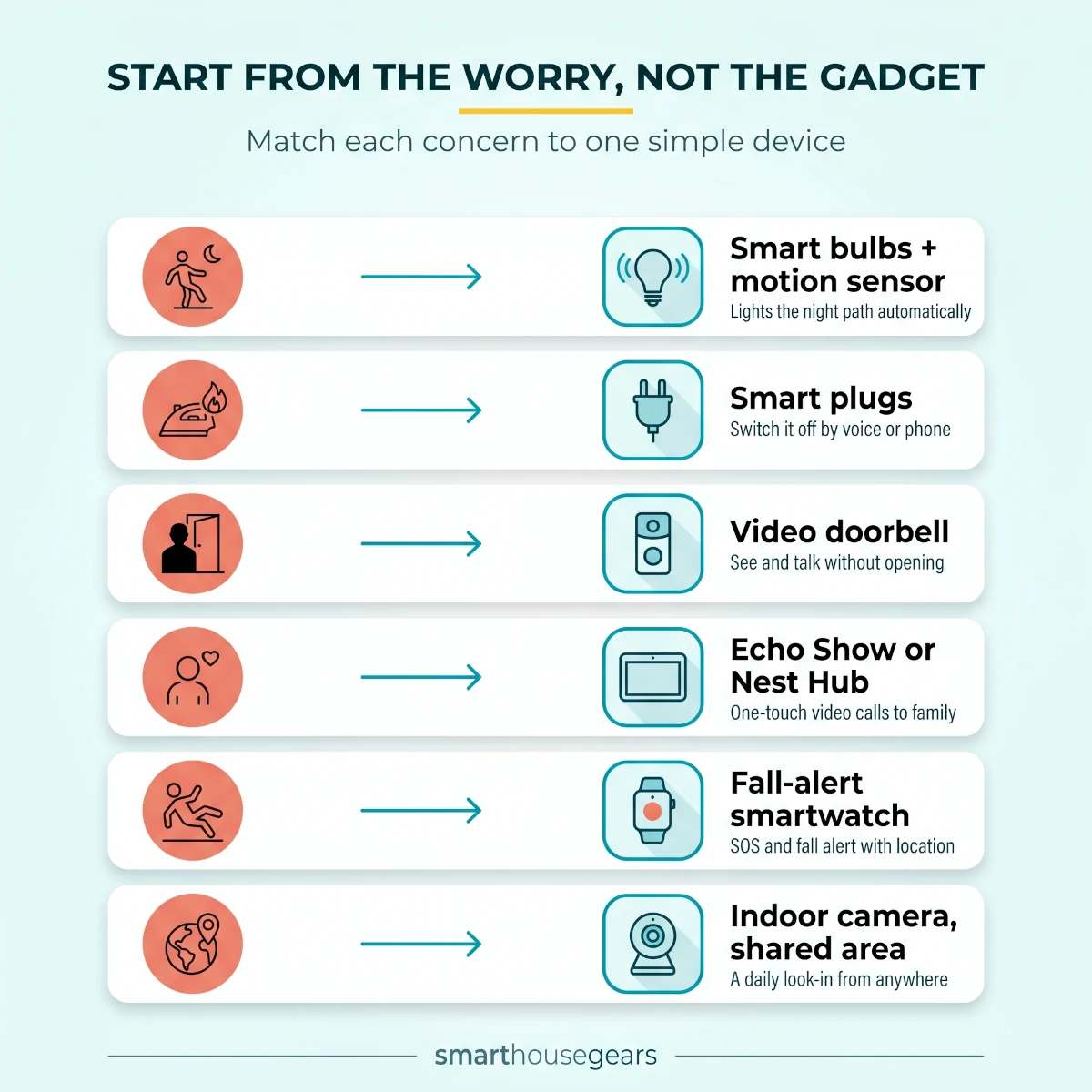
Map each worry to the device that fixes it, and the shopping list writes itself. Buy for the concern, not for the brand.
TableMatch the Worry to the Device
The main safety concerns for elderly parents in India and the smart device that addresses each one
Real concern
Device that helps
What it actually does
Night-time falls on the way to the bathroom
Smart bulbs plus motion sensor
Lights the path automatically so they never walk in the dark
Iron, geyser, or heater left switched on
Smart plugs
You or your parent switch it off by voice or from a phone
Opening the door to strangers
Video doorbell
They see and talk to the visitor without opening the door
Feeling alone and isolated
Echo Show or Nest Hub
One-touch or voice video calls to family, no smartphone needed
Falling with no one to call
Fall-alert smartwatch
SOS button and fall detection alert family with location
You live far away and cannot check in
Indoor camera in shared area
A quick daily look-in and two-way talk from anywhere
Night-time falls on the way to the bathroom
Device that helps
Smart bulbs plus motion sensor
What it actually does
Lights the path automatically so they never walk in the dark
Iron, geyser, or heater left switched on
Device that helps
Smart plugs
What it actually does
You or your parent switch it off by voice or from a phone
Opening the door to strangers
Device that helps
Video doorbell
What it actually does
They see and talk to the visitor without opening the door
Feeling alone and isolated
Device that helps
Echo Show or Nest Hub
What it actually does
One-touch or voice video calls to family, no smartphone needed
Falling with no one to call
Device that helps
Fall-alert smartwatch
What it actually does
SOS button and fall detection alert family with location
You live far away and cannot check in
Device that helps
Indoor camera in shared area
What it actually does
A quick daily look-in and two-way talk from anywhere
Notice what is not on this list: smart curtains, mood lighting, or a fridge that orders milk. Those are fine for a hobbyist. For elderly parents, they are clutter that adds confusion without removing a worry.
Start from the worry, not the gadget: each common concern for elderly parents maps to one simple device.
Before you order anything, do a quick readiness check on the home itself. Half of all smart device failures in Indian homes come down to weak WiFi or an unstable power supply, not the device.
Is the Home Ready for a Smart Setup?
WiFi reaches the door, kitchen, and bedroomWalk the house with your phone and watch the signal. Add a mesh node for dead spots.
The router supports a 2.4GHz bandMost Indian smart devices pair only on 2.4GHz, not 5GHz
There is a plan for power cutsA router UPS keeps WiFi and cameras alive during short outages
Your parent agrees to the setupEspecially where cameras go. Buy-in now prevents unplugging later
Someone local can do basic resetsA neighbour or relative who can power-cycle the router if needed
You have admin access on every appAdd yourself as a member so you can manage it remotely
The smart home devices that actually help elderly parents
This is the core of the guide. Seven device types do almost all the useful work. You do not need every one on day one, but this is the order that gives the most safety and comfort for the least money and the least confusion.
A voice assistant: the single best first device
If you buy only one thing, buy a voice assistant. For an elderly parent, voice is the friendliest interface ever made. No small buttons, no menus, no reading glasses needed for a tiny screen.
With one spoken command they can turn on lights, set a reminder for medicine, ask the time, listen to bhajans or old film songs, and call family. An Echo Show or Google Nest Hub adds a screen, which turns into the easiest video calling your parents have ever used. They say "Alexa, call Rahul," and your face appears. No app to open, no missed-call confusion.
For most Indian homes, Amazon Alexa is the better choice. It understands Hindi and Hinglish far better than Google does in 2026, so "Alexa, light band karo" simply works. Google Nest is a fine pick if your family already lives inside Google accounts and Android.
Place the speaker where your parent actually sits, usually the living room or the bedroom. If budget is tight, start with a basic Echo Dot around ₹3,000 to ₹4,000 and add a screen model later. The voice assistant also becomes the brain that ties lights, plugs, and routines together, so it is the natural foundation. Our smart home hubs for Indian homes guide helps if you later want sensors and locks to work together through one system.
Smart lights and motion sensors to stop night falls
Falls are the single biggest safety risk for elderly people living at home, and a huge share of them happen at night on the way to the bathroom. A dark room, a half-asleep parent, and an unseen step is all it takes.
Smart bulbs with a motion sensor fix this quietly. The bulb senses movement and turns on at a soft, low brightness so the path is lit before the first step. No fumbling for a switch on the wall, no harsh light that wakes them fully.
Set the bedroom, hallway, and bathroom approach as the priority. A dim warm light at 20 to 30 percent brightness through the night is gentle on the eyes and enough to prevent a stumble. Research on senior homes has found that good night-path lighting can cut night-time falls noticeably, and it is one of the cheapest upgrades you can make.
Stick to reliable 2.4GHz brands sold in India such as Philips WiZ, Wipro, TP-Link Tapo, Syska, or Mi. Expect ₹300 to ₹700 per bulb for warm white and a bit more for tunable models. Our WiFi smart bulbs under ₹2,000 roundup lists the ones that hold up over a year. For a soft floor-level glow along a long corridor, a low strip light works well too, and our smart LED strip lights guide covers options that stick on without any wiring.
The one rule to teach the family: leave the wall switch on. A smart bulb only works when its switch has power. Tape a small note next to the switch so a visiting grandchild does not flip it off and break the night light.
A video doorbell so they answer the door safely
For an elderly parent living alone, the front door is a moment of vulnerability. Opening it to an unknown face, struggling to hear through it, or missing a delivery are all daily frustrations.
A video doorbell solves all three. Your parent sees the visitor on the Echo Show, on their phone, or hears them through a chime, and can talk through two-way audio without opening the door. You get the same feed on your phone in another city, so you can even answer the door for them when they are resting.
Most good options in India are battery powered and stick on with strong adhesive, so there is no drilling and no electrician. Pick one that supports a plug-in indoor chime, because a loud chime inside the house matters when your parent's hearing is not what it was, or their phone is on silent.
This is genuinely one of the highest-value devices for seniors, which is why it leads our recommendations. The full list of battery life and chime tradeoffs is in our smart video doorbells for Indian homes guide.
Indoor cameras for a calm daily check-in
An indoor WiFi camera in a shared area is what lets you stop worrying between phone calls. Placed in the living room or hall, it gives you a quick look-in, two-way audio to say hello, and an alert if something seems off.
Use it the right way and it is a comfort to everyone. A morning glance to confirm your parent is up and moving, a quick "had your tea?" through the speaker, and you both feel connected across any distance.
Use it the wrong way and it becomes surveillance that breaks trust. The rules are simple and non-negotiable: cameras only in shared spaces, never in bedrooms or bathrooms, and your parents always know they are there and can switch them off. We cover this fully in the privacy section below.
Look for a camera with two-way audio, motion alerts you can tune so they do not spam you, and ideally local storage on a memory card so basic use does not need a subscription. Tapo and Mi tend to be lighter on monthly fees. Compare indoor and battery models in our WiFi security cameras for Indian homes roundup, and if the gate or main entrance needs covering where wiring is hard, a solar security camera avoids running cables.
Smart plugs to remove fire and gas hazards
A forgotten iron, a geyser left on for hours, a room heater running in an empty room. These are the quiet fire risks in a home where memory is starting to slip. Smart plugs turn each of them into a problem you can fix from your phone.
Plug the appliance into a smart plug, and now it can be switched off by voice, on a schedule, or remotely. If your parent calls worried that they left the iron on, you check the app from your office and switch it off in two seconds.
Match the plug rating to the load. Use a 16A smart plug for the geyser, which is a heavy appliance, and 10A plugs for the iron, the heater, and lamps. Never run a geyser through a 10A plug, because the pins will overheat over time. Our smart plugs for Indian homes guide explains the 10A versus 16A choice in detail.
You can also build a simple safety routine. A rule that switches off the geyser plug every afternoon, or the iron plug 30 minutes after it turns on, means a forgotten appliance switches itself off even if nobody remembers. That is the kind of automation that quietly prevents an accident.
A fall-alert smartwatch as the safety net
Everything above keeps the home safer. A fall-alert smartwatch is the device that helps when something still goes wrong, anywhere, even outside WiFi range.
The watch sits on the wrist and offers two safety features. An SOS button your parent can press to call or message family with their location, and automatic fall detection that triggers an alert if it senses a hard fall. For many elders the SOS button is the more dependable of the two, because automatic detection can miss a slow slump or raise a false alarm.
Set up two family contacts, ideally one local and one who is you. Walk your parent through the single button that calls for help, and test it together until they are confident. A watch with its own connectivity or a linked phone keeps working on battery during a power cut, which is exactly when a camera cannot help.
This is the one category where you should not over-buy on features. A clear button, reliable alerts, decent battery life, and a comfortable strap beat a watch crammed with sports modes your parent will never use. Our budget smartwatches under ₹3,000 roundup covers affordable options with SOS and heart-rate features.
Voice control for the fan, AC, and TV
Small struggles add up. A stiff remote, a fan regulator across the room, an AC remote with tiny buttons. For a parent with arthritis or weak eyesight, these are daily irritations that a little voice control erases.
A smart IR blaster sits in the room and copies the signals of the existing remotes, so a single spoken command can turn on the fan, switch on the AC, or change the TV channel. Nothing gets replaced, and the original remotes still work as a fallback. Our smart IR blaster universal remote guide covers the pucks that handle AC, TV, and set-top boxes from one app.
For the air conditioner specifically, a smart AC controller gives proper temperature and mode control by voice, which suits elders who find the remote menus confusing. Our guide to making an AC smart in India walks through the setup, and if the ceiling fan is old and noisy, a smart ceiling fan with app control can be set to a comfortable speed by voice too.
This tier is about comfort and ease rather than safety, so add it after the safety basics are in place. But for a parent who struggles to get up and adjust the fan on a hot afternoon, "Alexa, turn on the fan" is a genuine quality-of-life upgrade.
How to set up a smart home for elderly parents step by step
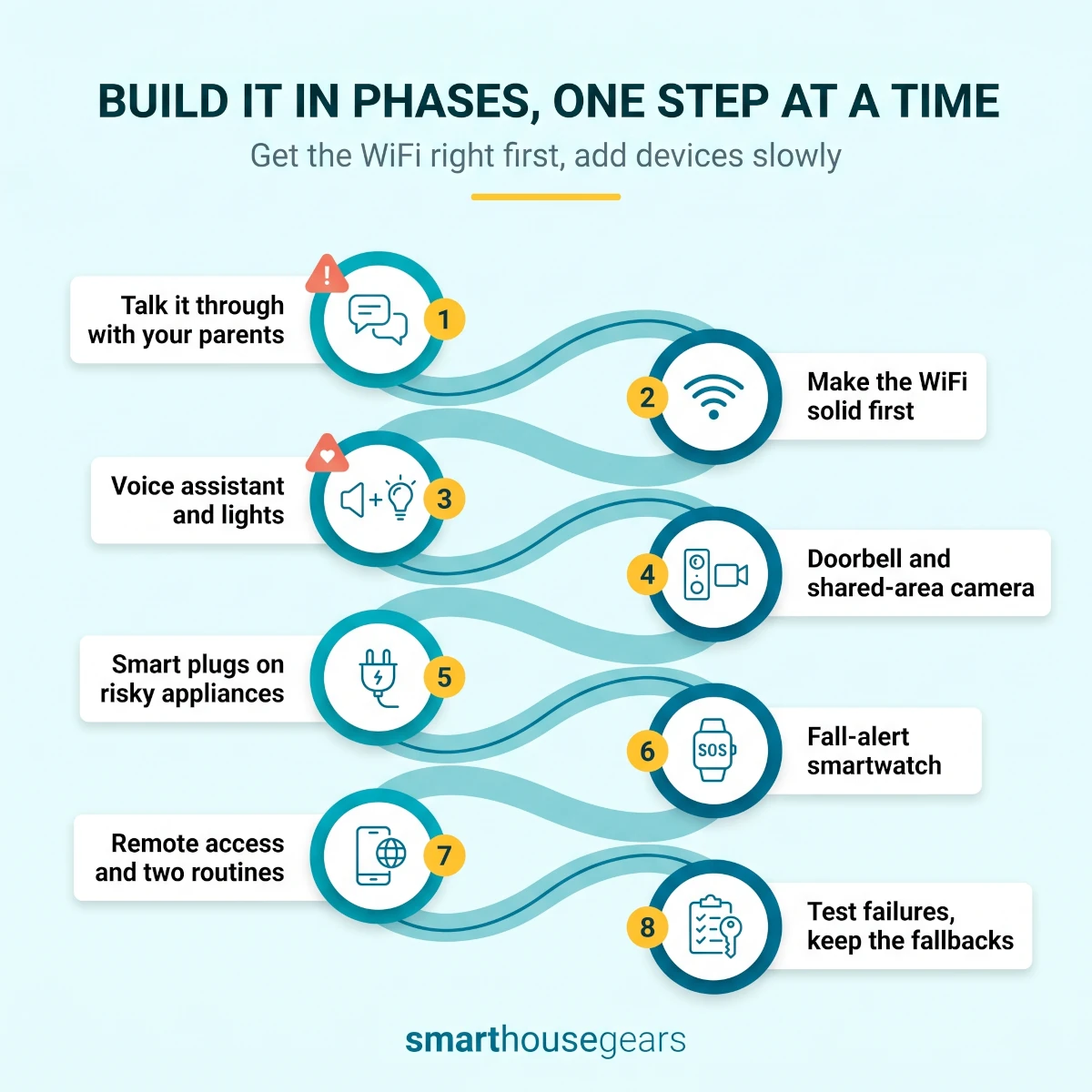
The safe way to set this up is to go slow, get the WiFi right first, and add devices one at a time so each one is tested and understood before the next arrives. Build it around voice and automatic routines, keep every old control working, and finish by giving yourself remote access.
Do it in this order. Rushing the whole thing in one weekend leads to a pile of half-paired devices and a confused parent.
Smart Home Setup Order for Elderly Parents
1
Talk it through with your parents first
Sit down and agree on what this is for: easier living and safety, not watching them. Decide together which rooms get a camera and which never will. This conversation is the single biggest reason a setup gets used instead of unplugged a week later.
Pro tip: Frame each device as something that helps them stay independent in their own home, which is what most elders want most.
2
Make the WiFi solid before anything else
Walk the home with a phone and check the signal at the door, the kitchen, and the bedroom. Most smart devices need 2.4GHz WiFi. Fix weak spots with a mesh node or a better router position now, because a flaky network will make every device look broken later.
Warning: If pairing fails, it is almost always the phone sitting on 5GHz. Move it to the 2.4GHz network during setup.
3
Set up the voice assistant and lights
Place the Echo or Nest where your parent sits most. Add three to five smart bulbs and one motion sensor for the night path to the bathroom. Test that lights respond to voice and that the motion light comes on softly at night. Stop here for day one.
4
Add the video doorbell and one shared-area camera
Fit the doorbell at the entrance and place one indoor camera in the living room or hall, never a bedroom or bathroom. Turn on two-way audio. Show your parent how to see and talk to a visitor without opening the door.
5
Add smart plugs on the risky appliances
Put a 16A plug on the geyser and 10A plugs on the iron and heater. Set a simple auto-off rule for the geyser and iron. Show your parent the voice command to switch each one off.
Pro tip: Name them plainly, like Geyser and Iron, so voice commands and your remote checks are foolproof.
6
Set up the fall-alert smartwatch
Charge and pair the watch, add two emergency contacts, and turn on fall detection and SOS. Sit with your parent and practise the SOS button until they are comfortable. Test that the alert actually reaches the contacts.
7
Give yourself remote access and build two routines
Add yourself as a member on every app so you can view cameras, unlock for help, and switch off appliances from anywhere. Create one Good Morning routine and one Good Night routine. Resist building more until the family has lived with these for a week.
8
Test the failures, then leave the fallbacks in place
Run a power-cut test, an SOS test, and a remote-access test from your own phone. Confirm the old switches, the door key, and the remotes still work. A smart home for elders must never be the only way to do a basic task.
The whole setup takes about three hours of hands-on time spread across a weekend, plus a week of living with it before you add anything more. The slow pace is the point. Each device gets understood before the next one lands.
Build it in phases: voice and lights first, then the doorbell and safety devices, then remote access. One step at a time.
How NRIs and far-away children can set this up remotely
If you live abroad or in another city, a smart home is one of the best tools you have for caring at a distance. The trick is to do the physical setup in person, then run everything remotely afterwards.
The plan is simple. Set up as much as you can on your next visit home. If you cannot visit soon, ship the devices and guide a trusted local relative or a hired technician through the install over a video call. Once the devices are on the WiFi and you are added as an admin, distance stops mattering.
Add yourself to every app as a member or admin. That gives you the ability to look in on the shared-area camera, answer or screen the door, unlock the door to let in a maid or a nurse, switch off a forgotten appliance, and receive fall alerts, all from another country.
The home's internet is the lifeline, so protect it. Remote access dies the moment the WiFi does, so a stable connection and a router on backup power matter more for an NRI than for anyone. Our smart home power cut backup guide shows how to keep the router and a camera alive through Indian outages, which is exactly what keeps your remote access working.
A light monthly routine keeps the whole thing healthy from a distance.
The NRI Monthly Remote Check
Open each camera and doorbell feedConfirm they are online and the view has not shifted
Check the smartwatch battery and SOS contactsA flat watch helps no one. Remind your parent to charge it
Test one smart plug and one light by remoteProves your remote access still works end to end
Confirm the router and backup power are fineAsk your local contact to glance at the router lights
Update any app that is asking toSkipped updates are a common cause of devices dropping off
One more piece of the NRI playbook is having a human on the ground. Technology can alert you, but someone local still has to walk over when an alert fires. Keep a neighbour, relative, or building guard in the loop, with a key or a smart lock code, so help can reach your parent within minutes. The fuller security side of this, including alarms and entry monitoring, is in our smart home security system guide.
Where cameras belong, and where they never should
Cameras are the most useful and the most sensitive devices in this whole setup. Get the placement and the honesty right, and they protect your parents. Get it wrong, and you damage trust in a way that is hard to repair.
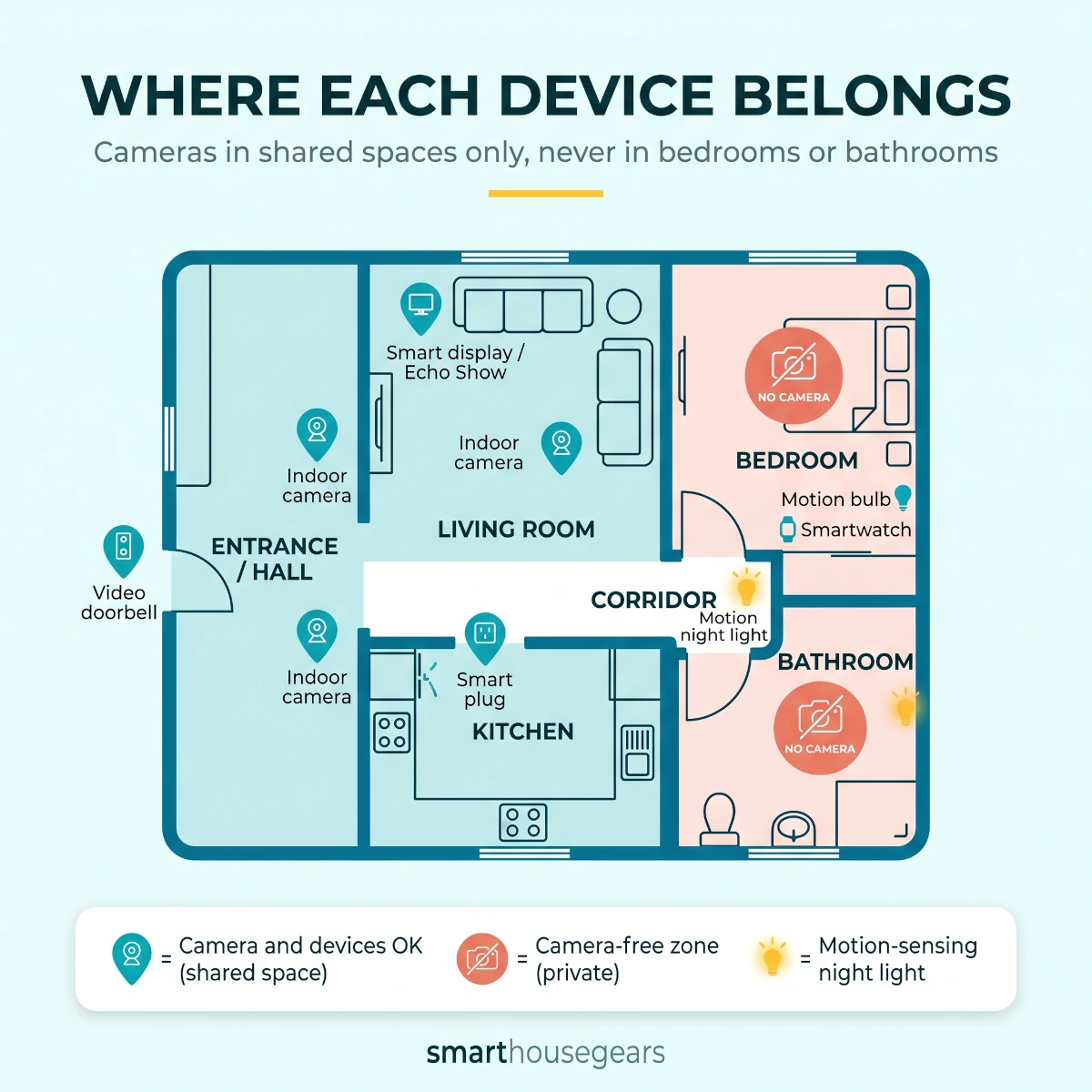
The rule is short. Cameras go in shared spaces only. The living room, the hall, the entrance, the kitchen if the family agrees. They never go in bedrooms or bathrooms, full stop. Those are private spaces and putting a camera there, even with good intentions, is a violation your parent will feel.
Be open about every camera. Show your parents the feed you see, tell them when you check it, and make sure they know how to switch it off or cover it when they want privacy. A camera your parent understands and controls is a safety tool. A hidden one is surveillance.
There is a practical reason to respect this beyond ethics. A parent who feels watched will unplug the camera, and then it protects no one. A parent who feels the camera is theirs, on their terms, leaves it on. Consent is not just the right thing here. It is what makes the safety actually last.
Place cameras in shared areas only. Bedrooms and bathrooms are always camera-free, lit instead by motion-sensing bulbs.
What a realistic setup costs in India
The numbers are far smaller than people expect. You can make a real safety difference for a parent's home for the price of a mid-range phone, and you can spread even that across festival sales.
Think in three tiers. A safety-first starter, a comfortable everyday setup, and a fuller home. Each tier is additive, so you can stop at any level and nothing breaks.
TableSmart Home Cost Tiers for Elderly Parents in India
Typical budget tiers for an elderly parents smart home setup in India, using ranges rather than spot prices
Tier
Budget
What it includes
Best for
Safety starter
₹6,000 to ₹10,000
Voice speaker, 3 to 4 smart bulbs, motion sensor, video doorbell, 2 smart plugs
First setup, the essential worries covered
Everyday comfort
₹12,000 to ₹18,000
Adds an Echo Show, an indoor camera, a fall-alert smartwatch
Parents living alone, family checking in often
Fuller home
₹20,000 to ₹30,000
Adds a smart lock, IR blaster for fan and AC, extra camera or sensor
Larger homes and long-distance or NRI families
Safety starter
Budget
₹6,000 to ₹10,000
What it includes
Voice speaker, 3 to 4 smart bulbs, motion sensor, video doorbell, 2 smart plugs
Best for
First setup, the essential worries covered
Everyday comfort
Budget
₹12,000 to ₹18,000
What it includes
Adds an Echo Show, an indoor camera, a fall-alert smartwatch
Best for
Parents living alone, family checking in often
Fuller home
Budget
₹20,000 to ₹30,000
What it includes
Adds a smart lock, IR blaster for fan and AC, extra camera or sensor
Best for
Larger homes and long-distance or NRI families
A few honest notes on the money. The voice assistant and smart bulbs are cheap and high-impact, so start there. The smartwatch and a good camera are where the cost climbs, but they are also where the safety value sits, so do not cut those to save a few hundred rupees.
Time your buying around the Great Indian Festival, Republic Day, and Prime Day sales, when smart bulbs, plugs, and Echo devices regularly drop 30 to 50 percent. Building the setup across two or three sale events can cut the total bill meaningfully.
If you want to bring down running costs at the same time, several of these devices pay for themselves. The savings logic for plugs, lights, and schedules is laid out in our guide to cutting your electricity bill with smart devices, and the same logic helps a fixed-income retired household keep bills predictable.
Power cuts, voltage, and WiFi: the India reality check
Here is where most foreign guides fall apart. They assume the power and internet never go down. In much of India, both do, and a safety setup that ignores this is a setup that fails at the worst moment.
When the power cuts, the WiFi goes with it, and every camera, doorbell, and voice command stops. For a setup meant to keep a parent safe, that gap is exactly when you need it to work. So you plan for it instead of hoping.
Put the router and the main indoor camera on a small router UPS or a mini inverter. These cost a few thousand rupees and keep your WiFi and one camera alive through the short, frequent cuts most areas see. This is the single most important reliability upgrade, and it is why the fall-alert smartwatch matters so much, because it runs on its own battery and does not depend on home WiFi at all.
Voltage swings are the second India reality. Cheap devices can fail or behave oddly during fluctuation. Buy locally sold brands built for the 220V to 240V range, and put valuable gear behind a basic stabiliser in areas with bad power. Every smart plug also adds a small layer of over-current protection that a bare wall socket does not give.
The WiFi band trap catches almost everyone. Indian smart devices want 2.4GHz, and combined-band routers often push the phone onto 5GHz during pairing, which makes setup fail. If a device will not pair, split the bands temporarily, pair on 2.4GHz, and merge again later.
Plan for all three, power, voltage, and WiFi, and the setup keeps working on the bad days, not just the good ones. Our power cut backup guide has the full router UPS and inverter load plan if you want to get this part right.
Mistakes families make with elder-care tech
The same avoidable mistakes show up again and again. Knowing them in advance saves money, arguments, and the risk of a setup nobody trusts.
Buying too much at once. A pile of ten devices delivered together overwhelms an elderly parent and never gets learnt. Add one device at a time, let it become normal, then add the next.
Designing for the app instead of the person. If your parent has to open an app to do anything, they will stop. Lean on voice and automatic routines, and keep the app for you. The device that gets used is the one that asks nothing of them.
Hiding cameras or skipping consent. A secret camera feels like a betrayal the day it is discovered. Be open, agree on placement, and give your parent a way to switch it off. Trust is what keeps the safety net plugged in.
Removing the old controls. Pulling out the manual switches, the door key, or the AC remote because "it is smart now" leaves your parent stranded the first time the WiFi drops. Always keep the manual fallback.
Ignoring power cuts. A safety setup with no backup power is a safety setup that fails during an outage. Put the router and a camera on a UPS, and rely on the watch for the moments WiFi cannot cover.
Treating it as a substitute for human contact. A camera is not a phone call, and a routine is not a visit. The tech should make your regular calls and a local helper easier, not replace them.
Forgetting who maintains it. Devices need the odd reset, charge, and app update. Decide upfront who does that, whether it is you remotely or a local relative, so the setup does not quietly rot.
What a smart home cannot do for elderly parents
It is worth being plain about the limits, because overselling this technology is its own kind of risk.
A smart home does not provide medical care. A fall-alert watch can call for help, but it cannot lift your parent off the floor, give them medicine, or treat a stroke. A human still has to respond to every alert.
It is not a hospital-grade medical alert service either. If your parent has a serious heart condition or a high fall risk, a dedicated medical alert system with a monitoring centre and ambulance dispatch is a different and more capable tool. Smart home devices complement that, they do not replace it.
And it is not company. The deepest need of many elders living alone is connection, and no camera or speaker meets that the way a real visit or a long phone call does. Use the video calling and the easy contact shortcuts to call more often, not to call less.
Hold the technology in its proper place. It is a strong layer of safety, comfort, and reach that sits on top of regular human care, a trusted neighbour, and a good local doctor. That is a lot, and it is genuinely valuable. It is just not everything.
Final recommendation
If you want to build a smart home for elderly parents in India, start small and start with safety. Buy a voice assistant and a few motion-sensing smart bulbs first, add a video doorbell and a fall-alert smartwatch next, and grow from there only once the basics are part of daily life.
Set it up around your parents, not around an app. Lean on voice and automatic routines, keep every old switch and key working, and add yourself to every device so you can check in and help from your own city or country. Agree on where cameras go, and never put one where it does not belong.
Done this way, a setup that costs less than a single phone gives your parents more independence and gives you fewer sleepless nights. That trade, peace of mind on both sides for a few thousand rupees, is the whole point. Buy the first two pieces this month, set them up on your next visit home, and grow it one careful step at a time.
Quick answers
Frequently Asked Questions
What are the best smart home devices for elderly parents in India?
The most useful starter set is a voice assistant, motion-sensing smart lights, a video doorbell, two or three smart plugs, and a fall-alert smartwatch. A voice speaker like an Echo handles lights and calls hands-free, motion lights cut night-time falls, the doorbell lets your parent see visitors safely, smart plugs kill fire risks from a forgotten iron or geyser, and the watch calls for help after a fall. Add a smart lock only if your parent is comfortable with it. Start with two or three of these and grow slowly.
How can I check on my elderly parents living alone in India?
Use a WiFi camera in a shared area like the living room with two-way audio, plus a video doorbell, both added to your phone. You can look in, talk to them, and see who visits, all from another city or country. Pair this with a fall-alert smartwatch so you get an alert if they fall. Keep cameras out of bedrooms and bathrooms, and tell your parents exactly what you can and cannot see. The goal is a quick daily check-in, not constant watching.
Can a smartwatch detect a fall and call for help in India?
Yes. Several smartwatches sold in India have fall detection and an SOS button that calls or messages saved contacts with the wearer's location. For elderly parents, the SOS button is often more reliable than automatic fall detection, which can miss soft falls or trigger false alarms. Set up two family contacts, teach your parent the one button to press, and test it. A watch works even when the person is away from home WiFi, which a camera cannot do.
Are smart cameras a privacy problem for elderly parents?
They can be if you place them wrong or hide them. Put cameras only in shared spaces like the living room, hall, or entrance, never in bedrooms or bathrooms. Tell your parents the cameras exist, show them what you see, and let them switch off or cover a camera when they want privacy. Treated this way, a camera becomes a safety tool both sides trust. Treated as secret surveillance, it breaks trust and the whole setup gets unplugged.
How much does it cost to set up a smart home for senior citizens in India?
A safety-first starter setup costs about ₹6,000 to ₹10,000: a voice speaker, three or four smart bulbs with a motion sensor, a video doorbell, and two smart plugs. A fuller setup with an indoor camera, a fall-alert smartwatch, and a smart lock runs ₹15,000 to ₹25,000. You do not need to buy it all at once. Start with the voice assistant and lights, add the doorbell and watch next, and spread the rest across the Great Indian Festival or Prime Day sales.
Is Alexa or Google Home better for elderly parents in India?
For most Indian families, Amazon Alexa is the safer pick because it handles Hindi and Hinglish commands better and works with the widest range of devices sold here. Google Nest is strong if the family already uses Android and Google accounts heavily. Either way, an Echo Show or Nest Hub with a screen adds video calling, which many elders find easier than a smartphone. Pick one ecosystem and stay in it so everything answers to the same voice.
Can I set up and manage my parents' smart home from another country?
Yes, and this is one of the strongest reasons to build it. Add yourself as a member or admin on every device app so you can view cameras, unlock the door for a helper, switch off appliances, and get fall alerts from anywhere. Set everything up in person on a visit if you can, or guide a local relative through it. After that, a five-minute monthly check keeps it healthy. Make sure the home WiFi is stable, because remote access dies when the internet does.
Do smart home safety devices work during power cuts?
Most stop working when power and WiFi go down, which is a real issue in many Indian areas. Put the router and main camera on a small router UPS or inverter so they ride through short cuts. A fall-alert smartwatch with its own SIM or phone link still works on its own battery, which is why it matters most for safety. Plan for outages instead of assuming the power stays on, and test what each device does when power returns.
Will elderly parents who are not tech-savvy actually use these devices?
They will if you design the setup around them, not around an app. Lean on voice commands and automatic routines so your parent rarely has to tap anything. Keep the old light switches, door key, and remotes working as a fallback. Use one wake word, simple device names like Bedroom Light, and large on-screen buttons on an Echo Show. The devices that get used are the ones that ask the least of the person using them.
Can a smart home replace a medical alert system or a caregiver?
No, and it is important to be honest about this. A smart home helps with safety, comfort, and staying in touch, but it cannot give medicine, lift someone who has fallen, or provide medical care. A fall-alert watch can call for help, but a human still has to respond. Treat smart devices as one layer on top of regular phone calls, a trusted neighbour, a local doctor, and proper medical alert services where needed, not as a substitute for any of them.
Which is the most important first device for an elderly parent's smart home?
A voice assistant with a screen, like an Echo Show, is usually the best first buy. It lets your parent control lights and make video calls by voice, with no app and no small buttons. It also becomes the hub that ties lights, plugs, and routines together later. If budget is tight, start with a basic Echo Dot and a few smart bulbs, then add the screen model when you can.
Discussion
Be the first to comment
Have a question or experience to share? Scroll down to leave a comment.
Discussion
Be the first to comment