If you are searching for how to make AC smart in India, you probably have a normal split AC that cools fine but behaves like it is stuck in 2012. You still hunt for the remote, forget to switch it off, wake up freezing at 3 AM, and then wonder why the electricity bill jumped after one hot week.
You do not need to replace that AC just to get WiFi control. In most Indian homes, the cleaner upgrade is a small IR smart AC controller that sits in the room, connects to 2.4GHz WiFi, and sends the same commands as your original remote.
This guide shows the safe way to do it. It covers compatibility, placement, Alexa and Google Home, power cuts, voltage fluctuation, 1BHK to 3BHK layouts, savings math, and the mistakes that make cheap smart plugs a bad idea for ACs.
For product shortlisting, keep our smart AC controller shortlist for Indian homes open in another tab. This page is the setup guide. That page is where you compare the actual controllers.
Can you make a normal AC smart in India?
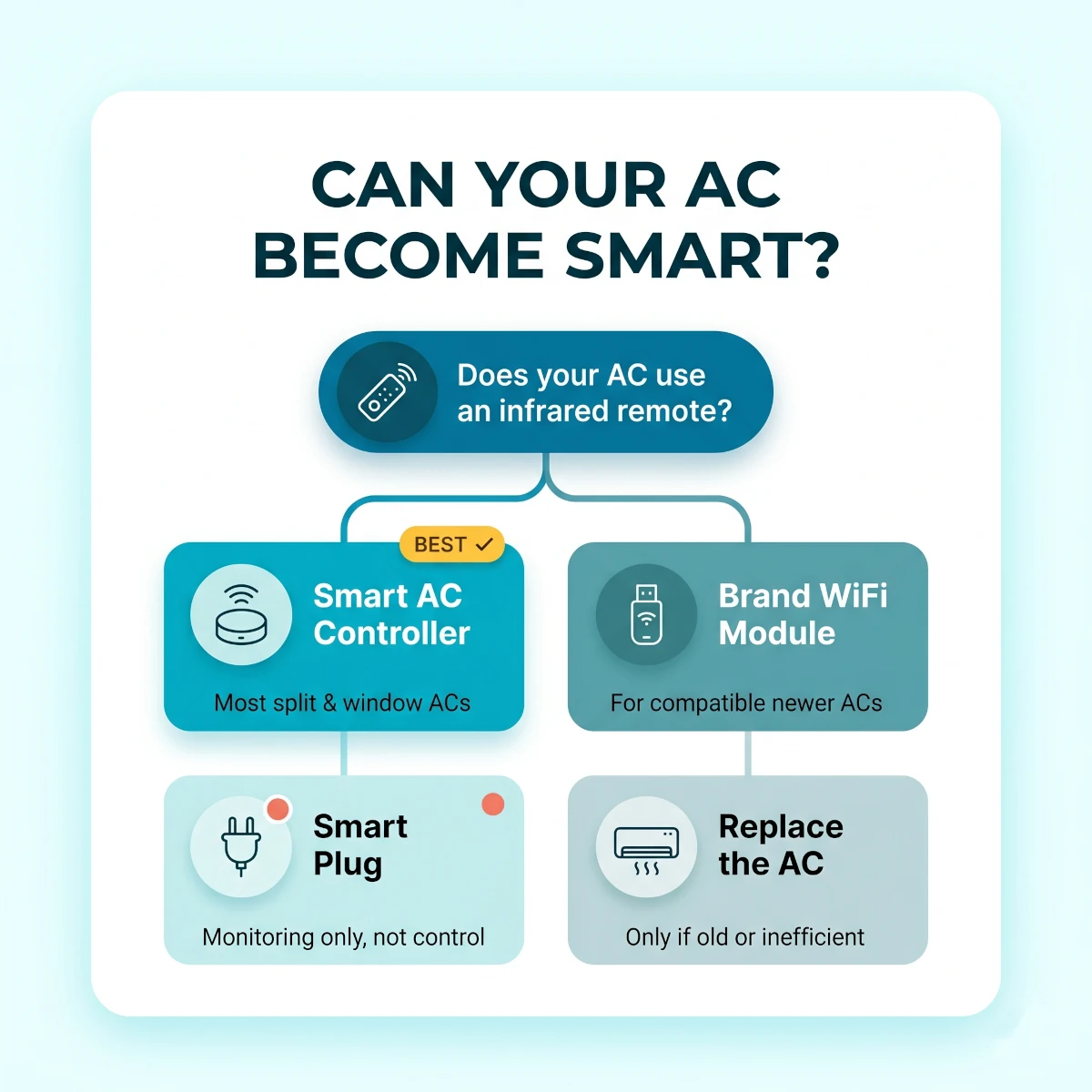
Yes, you can make most normal ACs smart in India if they use an infrared remote. A smart AC controller learns or mimics that remote, connects to your WiFi, and lets you control the AC from a phone, Alexa, or Google Home. It works best with split and window ACs that already have a digital remote.
The key word is infrared. If your remote needs to point at the AC and the AC beeps when it receives a command, you are in the right category.
Most Indian split ACs from the last 10 to 15 years use IR remotes. That includes common models from Voltas, LG, Samsung, Blue Star, Panasonic, Daikin, Carrier, Hitachi, Lloyd, Whirlpool, Haier, Godrej, IFB, and Onida.
The smart controller does not touch the 230V wiring. It does not open the indoor unit. It does not replace the thermostat board. It just sends commands across the room.
That is why this upgrade is renter-friendly. You can place the controller on a shelf, plug it into USB power, and take it with you when you move.
There are limits. If your AC uses a wired wall controller, a proprietary RF remote, or a cassette/ducted system with no visible IR receiver, a basic IR controller may not work. Some premium ducted ACs need brand-specific modules or professional automation hardware.
For a normal Indian bedroom split AC, though, the odds are good. In our setups, the most common issue is not AC compatibility. It is poor controller placement or a combined WiFi network that confuses pairing.
Smart AC compatibility flow: start with the remote type, then choose IR controller, brand WiFi module, or replacement.
What type of AC can become smart?
Any AC that accepts full commands from a handheld IR remote is a good candidate. The controller needs to know not just power on and off, but also mode, temperature, fan speed, swing, and sometimes sleep mode. A remote with a small display is a strong sign because it sends the full state with every press.
Here is the practical breakdown.
Split ACs are the easiest. The indoor unit is visible, the IR receiver is usually near the display panel, and the controller can sit on a bedside table, TV unit, study desk, or shelf.
Window ACs also work. The controller needs a clear path to the front panel. Placement can be trickier because curtains often block the window area.
Inverter ACs work well. The smart controller does not interfere with inverter logic. The AC still controls compressor speed internally. You are only changing the same settings you would change with the remote.
Old fixed-speed ACs can work too. They may not expose every mode cleanly, but power, cool mode, temperature, fan speed, and timer commands usually work.
Brand WiFi-ready ACs need a separate check. Some Panasonic, LG, Samsung, Blue Star, Daikin, Voltas, and Lloyd models have built-in WiFi or support a brand dongle. If the brand app works reliably, use it. If the module is missing, discontinued, or app pairing is painful, an IR controller is often simpler.
Cassette and ducted ACs are the exception. If the main control is a wired wall panel, a regular IR controller may not know what to do. Do not buy first and hope. Check the controller brand's compatibility list or ask support with your AC model number.
The simplest test takes one minute. Stand where you want to place the controller, point the original remote from that spot, and press power, mode, temperature, fan, and swing. If every command works from that position, the smart controller has a good chance too.
Smart AC Compatibility Checklist
The AC has a handheld remoteA remote with a display is best because it sends the full AC state
The remote works only with line of sightThat usually means infrared, which smart AC controllers can mimic
The indoor unit beeps when commands arriveThe beep confirms the AC receives IR commands cleanly
Power, mode, fan, swing, and temperature workDo not settle for power-only control unless that is all you need
There is a shelf or table facing the ACThe controller needs a clean view of the AC's IR receiver
Your WiFi has a 2.4GHz optionMost controllers sold in India still pair on 2.4GHz
The AC is not controlled only by a wired wall panelWired cassette and ducted units need a different path
You can test before mountingNever stick the controller permanently until every command works
Smart AC controller vs smart plug vs new WiFi AC
A smart AC controller is the safest retrofit for most Indian homes because it controls the AC through IR, just like the original remote. A smart plug should not be your main AC controller because it cuts mains power and cannot change temperature or mode. A new WiFi AC makes sense only when the old unit already needs replacement.
This is the part people get wrong.
A smart plug feels cheaper and simpler. It turns power on and off. That is fine for lamps, routers, TVs, kettles, and geysers when the plug rating matches the appliance.
An AC is different. A split AC has a compressor, indoor blower, control board, auto-restart logic, and a designed shutdown sequence. Cutting power every hour through a plug is crude control.
It also does not solve the main comfort problem. A plug cannot set 25°C. It cannot switch from cool to dry mode. It cannot reduce fan speed at night. It cannot move swing. It cannot tell whether someone changed the setting with the remote.
Use a smart AC controller when you want actual AC control. Use a smart plug only if you have a specific need to measure power and you are using a properly rated 16A plug on a sound socket.
If you do need plug-based monitoring for another appliance, our smart plugs for Indian homes guide explains 10A and 16A use cases. For AC control, the IR route is cleaner.
TableBest Way to Make an AC Smart in India
Comparison of smart AC controller, smart plug, brand WiFi module, and new smart AC for Indian homes
Option
Typical cost
What it controls
Best for
Watch out for
Smart AC controller
₹1,500 to ₹8,000
Power, mode, temperature, fan, swing, routines
Most split and window ACs
Needs line of sight and 2.4GHz WiFi
Smart IR blaster
₹800 to ₹3,500
AC plus TV, set-top box, soundbar, fan remote
Budget multi-device rooms
May have weaker AC-specific features
Brand WiFi module
₹2,000 to ₹8,000
Brand app, full AC features, warranty-safe path
Compatible newer ACs
Module availability and app quality vary
16A smart plug
₹900 to ₹2,500
Power on and off, sometimes power monitoring
Monitoring only on safe sockets
Bad for daily temperature control
New smart AC
₹30,000 to ₹70,000
Built-in WiFi and brand app
Old or inefficient AC replacement
Costs far more than a retrofit
Smart AC controller
Typical cost
₹1,500 to ₹8,000
What it controls
Power, mode, temperature, fan, swing, routines
Best for
Most split and window ACs
Watch out for
Needs line of sight and 2.4GHz WiFi
Smart IR blaster
Typical cost
₹800 to ₹3,500
What it controls
AC plus TV, set-top box, soundbar, fan remote
Best for
Budget multi-device rooms
Watch out for
May have weaker AC-specific features
Brand WiFi module
Typical cost
₹2,000 to ₹8,000
What it controls
Brand app, full AC features, warranty-safe path
Best for
Compatible newer ACs
Watch out for
Module availability and app quality vary
16A smart plug
Typical cost
₹900 to ₹2,500
What it controls
Power on and off, sometimes power monitoring
Best for
Monitoring only on safe sockets
Watch out for
Bad for daily temperature control
New smart AC
Typical cost
₹30,000 to ₹70,000
What it controls
Built-in WiFi and brand app
Best for
Old or inefficient AC replacement
Watch out for
Costs far more than a retrofit
There is one more option: a broad universal IR remote. These are useful if you want one puck to control the AC, TV, set-top box, and soundbar. Our smart IR blaster universal remote guide covers those multi-device setups.
For serious AC scheduling, pick a controller with an inbuilt temperature sensor, AC-specific app screens, and Alexa or Google Home support. For a guest room AC used twice a month, a basic IR blaster is enough.
What do you need before setup?
Before setup, you need the original AC remote, a stable 2.4GHz WiFi network, a controller with clear line of sight to the indoor unit, and the right app account. Do not start pairing while the AC remote is missing, the router is switching bands, or the controller is hidden behind the TV.
The original remote matters because the smart controller may need to learn commands. Even if the app has your brand in its database, manual learning saves you when swing, dry mode, or fan speed does not map correctly.
Replace the remote batteries before setup. Weak batteries make IR learning flaky and waste time.
Next, confirm your WiFi. Most smart AC controllers sold in India still need 2.4GHz for pairing. A combined SSID can work after setup, but pairing often fails when the phone jumps to 5GHz.
If your router has one name for both bands, temporarily create separate names such as Home-2G and Home-5G. Pair on Home-2G. You can merge later if your router handles band steering well.
The controller also needs USB power. Some controllers include an adapter. Some include only a cable. Use a reliable phone charger or USB adapter, not a loose old plug that disconnects when the cable moves.
Placement is not decoration. The controller must face the AC. If you hide it behind a plant because it looks nicer, commands will fail.
Do not mount it on day one. Place it loose, test everything, live with it for two nights, then use removable tape or a stand if needed.
Before You Pair Anything
Original AC remoteNeeded for testing and manual learning
Fresh remote batteriesWeak IR signals create false setup failures
2.4GHz WiFi name and passwordKeep the password simple enough to type correctly
Controller app accountCreate it before standing near the AC with the device blinking
Alexa or Google Home appOptional, but useful for room assignment and voice control
Free shelf or table spotThe controller needs to face the AC without being blocked
AC model numberHelpful if the app asks for brand or support details
Two hours without interruptionSetup is simple, but testing every mode takes time
If WiFi pairing has failed before with other smart gear, read our smart plug WiFi troubleshooting guide first. The same 2.4GHz, phone hotspot, router band, and password mistakes show up with AC controllers too.
How to make AC smart in India: the safe setup order
The safe way to make AC smart in India is to test compatibility first, pair the controller on 2.4GHz WiFi, learn the AC remote, verify every command, then link Alexa or Google Home. Build only three routines at first: pre-cool, bedtime, and away mode. Test power-cut recovery before trusting schedules.
Do it in this order. It prevents the two most common mistakes: mounting the controller before IR testing and building routines before the basic app control works.
Smart AC Setup Order for Indian Homes
1
Check the AC remote from the planned controller spot
Stand where the controller will sit and use the original remote from that exact place. Test power, cool mode, dry mode, temperature up and down, fan speed, and swing. If the AC misses commands from that spot, move the controller spot before buying or pairing anything.
Pro tip: A bedside table often works better than a TV unit because it has a cleaner angle to the indoor unit.
2
Pair the controller on 2.4GHz WiFi
Plug in the controller, open the app, and add a new device. Choose the 2.4GHz WiFi network. If the app says connection failed, do not reset everything at once. First move your phone to the same 2.4GHz network and check that the password has no extra spaces.
Warning: Many Indian routers broadcast one combined name. Split the bands temporarily if pairing fails twice.
3
Select the AC brand and test the code set
Choose the AC brand in the app and let the controller try the common remote code sets. When the AC responds, test more than power. Check mode, 24 to 26°C temperature changes, fan speed, swing, and dry mode if you use it during monsoon.
4
Use manual learning for missing buttons
If a mode or fan command does not work, use the app manual-learning option. Point the original remote at the controller, press the requested button, and save the learned command. Label it clearly so future routines do not use the wrong action.
5
Place the controller permanently only after testing
Once all commands work, choose a permanent position. Keep it facing the AC, away from direct sun, hot windows, curtains, lamps, and the AC airflow blast. Use removable tape or a stand, not screws.
6
Link Alexa or Google Home
Open Alexa or Google Home, link the controller brand account, discover devices, and assign the AC to the right room. Rename it Bedroom AC or Hall AC. Avoid cute names because voice assistants mishear them.
7
Build three routines only
Create a pre-cool routine, a bedtime routine, and an away routine. Keep them simple for the first week. A good starter set is: pre-cool at 25°C, bedtime at 26°C with low fan, and away mode off after 30 minutes of no one home.
Pro tip: If you already use a smart fan, add the fan to the bedtime routine instead of dropping the AC to 20°C.
8
Test a power-cut recovery
Switch off wall power to the AC and controller for five minutes, then restore power. Check whether the controller reconnects, whether the AC stays off or restores its last setting, and whether the next schedule runs correctly.
The setup should take about two hours if your router is ready and the AC remote works. The controller app may claim five minutes. That is marketing time. Real setup includes testing, naming, routine building, and recovery checks.
After the first week, review the logs or app history. Delete any routine that annoys the family. Smart AC control should reduce friction, not create a house where everyone is fighting the app.
How should you place the IR controller?
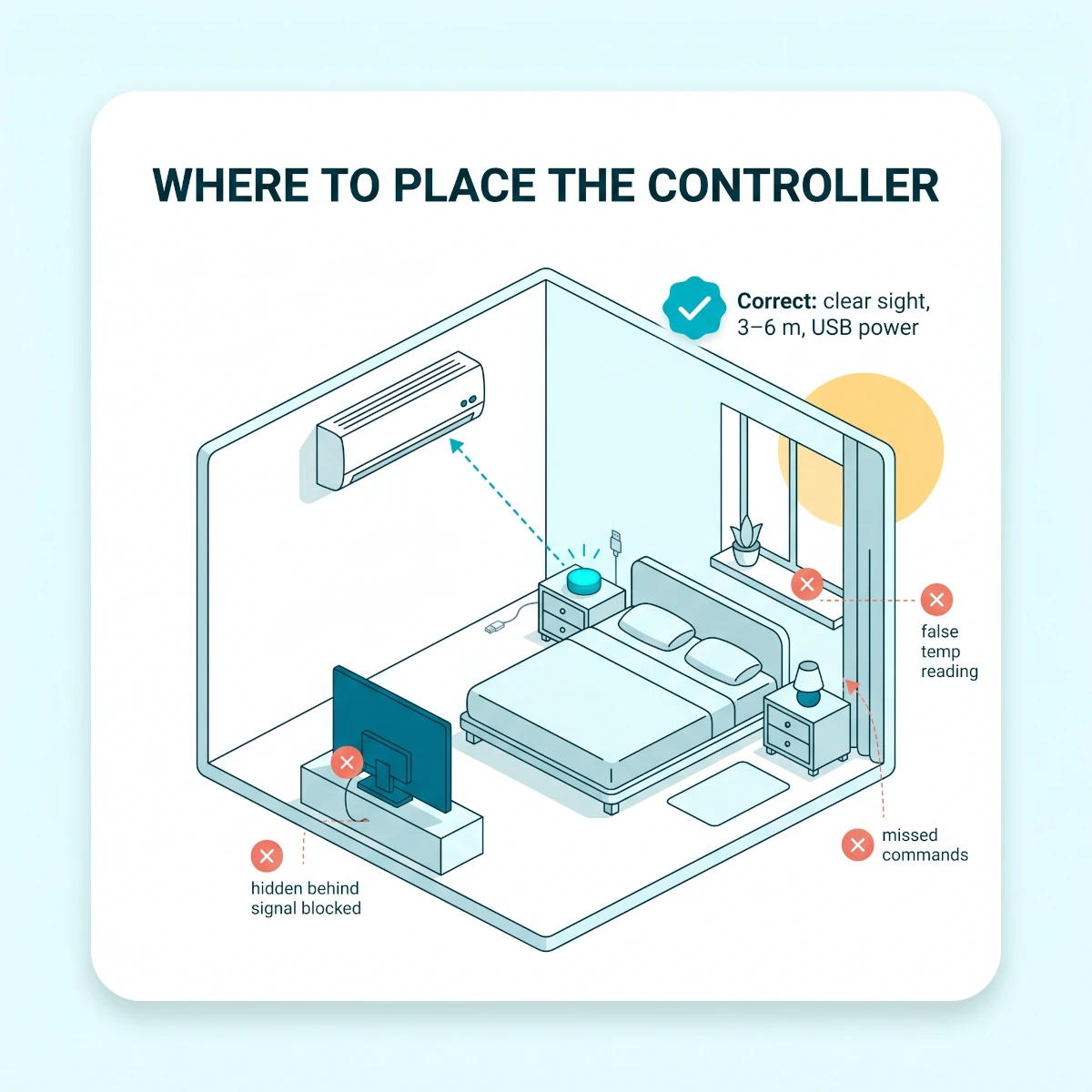
Place the IR controller where it can see the AC's indoor unit clearly, usually within 3 to 6 metres and facing the display side. Keep it away from direct sunlight, curtains, hot windows, lamps, and AC airflow. Bad placement causes missed commands and wrong temperature readings.
The controller has two jobs. It sends IR commands and reads room temperature. A hidden location hurts both.
A common bad setup is placing the controller behind the TV because the USB port is nearby. The TV blocks the signal, the controller reads heat from electronics, and the AC behaves strangely.
Another bad setup is placing it on a window sill. Afternoon sun heats the controller, so it thinks the room is hotter than it is. The AC then runs longer than needed.
Put it at breathing height if possible. A side table, bookshelf, study table, or wall shelf works well. For a bedroom, the bedside table is often ideal because it reads the sleeping zone better than the wall near the AC.
Keep it out of the direct cold-air blast. If the AC throws cold air onto the controller, the sensor may think the room reached 24°C while the bed area is still warm.
Correct IR controller placement: clear sight to the AC, stable USB power, and a sensor position close to where people sit or sleep.
If you must use adhesive, use removable strips. Do not drill for a small controller. The entire point of this upgrade is that it does not touch wiring, walls, or the indoor AC unit.
Alexa and Google Home routines that are worth building
The routines worth building are the ones that remove repeated AC decisions: pre-cool before you reach home, set a stable bedtime temperature, turn off when everyone leaves, and pair the AC with a ceiling fan. Skip fancy mood routines until the basic cooling schedule has worked for a full week.
Alexa is still the easier path for most Indian smart homes because device support is wide and voice commands handle Indian phrasing better. Google Home is strong if your family uses Android phones and Google speakers.
Matter is rising, but it is not the main AC control path in India yet. Most retrofit AC controllers still depend on their brand app plus Alexa or Google Home cloud linking.
If you already have a hub layer, keep the AC routines simple. Our smart home hubs for Indian homes guide is useful when you want lights, sensors, fans, and AC to behave together.
Start with these routines.
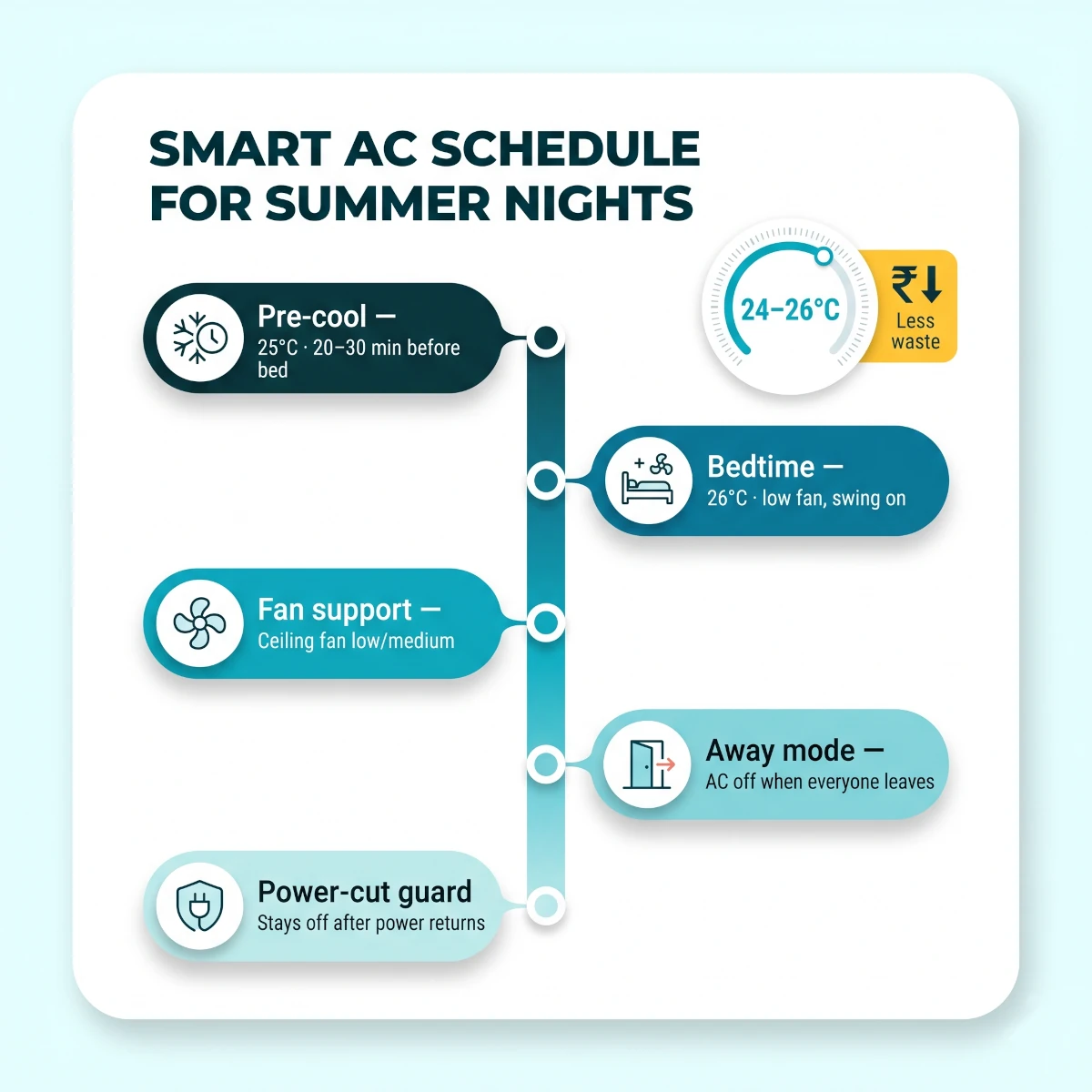
Pre-cool routine. Turn on bedroom AC at 25°C for 20 to 30 minutes before bedtime or before you reach home. Do not run it for two hours before arrival. That is not comfort. That is a bill shock.
Bedtime routine. Set AC to 26°C, fan on low or medium, swing on, and lights off. This is the routine most families keep using after the novelty fades.
Away routine. Turn off AC when the door locks, when everyone leaves a geofence, or at a fixed time after office hours. Geofencing can be useful, but test it for a week before trusting it.
Power-cut guard. After a power cut, some ACs restore the last state. If your controller app supports a power-on rule, set the AC to stay off until you deliberately start it again.
Humidity routine. During monsoon nights in Mumbai, Chennai, Kolkata, Kochi, and Bengaluru, dry mode for a short window can feel better than aggressive cooling. Use dry mode only when the room feels clammy. Do not run it all night blindly.
Voice commands should be boring and clear.
Say "Alexa, turn on Bedroom AC." Say "Hey Google, set Bedroom AC to 25 degrees." Avoid names like "Snow Machine" because the assistant will mishear it at the worst time.
For families with elders, add one physical fallback. Keep the original remote on the same side table every day. Smart control is a convenience layer, not a reason to hide the remote.
How much electricity can a smart AC setup save?
A smart AC setup can save about ₹500 to ₹1,500 per month in heavy summer use if it stops forgotten AC runs, reduces overcooling, and pairs the AC with a fan at 24 to 26°C. It will not make a dirty, undersized, or inefficient AC magically efficient. It saves by cutting waste.
The biggest saving is not voice control. Voice control is convenience.
The saving comes from three habits.
First, stop cooling empty rooms. If the AC keeps running after you leave for dinner, office, or a school pickup, remote shutoff and away routines pay for themselves quickly.
Second, stop sleeping at 18 to 21°C. Many Indian bedrooms become too cold at 2 AM because the AC was set for quick cooling at 11 PM and never adjusted. A smart schedule can start at 24°C, move to 25°C, then settle at 26°C.
Third, use the ceiling fan. A fan at low or medium speed lets most people sleep comfortably at 25 to 26°C. That matters more than chasing a colder set point.
If your fan is old and power-hungry, consider a BLDC upgrade. Our smart ceiling fans with app control guide covers models that can pair with AC routines, and the broader BLDC ceiling fans for Indian homes roundup is useful if you care more about power savings than app control.
This also lines up with India's own energy guidance. The Bureau of Energy Efficiency pushed 24°C as the sensible default AC setting precisely because most wasted cooling comes from running the room too cold, not from the compressor itself. A smart AC controller simply makes that 24 to 26°C habit automatic. The controller does not change the compressor. It changes the human habits around the compressor.
TableWhere Smart AC Savings Actually Come From
Realistic electricity-saving paths from a smart AC setup in Indian homes
Habit fixed
Smart fix
Likely monthly saving
Reality check
AC forgotten after leaving
Away routine or remote shutoff
₹300 to ₹1,000
Biggest saving for busy families
Sleeping at 18 to 21°C
Night schedule at 24 to 26°C
₹300 to ₹900
Works best with ceiling fan support
Cooling before room is occupied
20 to 30 minute pre-cool
₹200 to ₹700
Avoid long pre-cool windows
Running cool mode during damp nights
Short dry-mode routine
₹100 to ₹400
Best in monsoon humidity, not peak heat
No usage awareness
App logs or energy reports
₹100 to ₹500
Only helps if you act on the data
AC forgotten after leaving
Smart fix
Away routine or remote shutoff
Likely monthly saving
₹300 to ₹1,000
Reality check
Biggest saving for busy families
Sleeping at 18 to 21°C
Smart fix
Night schedule at 24 to 26°C
Likely monthly saving
₹300 to ₹900
Reality check
Works best with ceiling fan support
Cooling before room is occupied
Smart fix
20 to 30 minute pre-cool
Likely monthly saving
₹200 to ₹700
Reality check
Avoid long pre-cool windows
Running cool mode during damp nights
Smart fix
Short dry-mode routine
Likely monthly saving
₹100 to ₹400
Reality check
Best in monsoon humidity, not peak heat
No usage awareness
Smart fix
App logs or energy reports
Likely monthly saving
₹100 to ₹500
Reality check
Only helps if you act on the data
For a full home-level plan, use this guide with our how to cut electricity bill with smart devices article. AC is usually the summer spike, but geysers, fans, lighting, standby loads, and appliances matter across the rest of the year.
The best schedules for Indian summers and monsoon nights
The best smart AC schedule in India uses 24 to 26°C, short pre-cooling, ceiling fan support, and a later-night temperature rise. In peak summer, cool the room before sleep and relax the set point later. During monsoon humidity, use dry mode for short windows instead of overcooling the room.
There is no one perfect schedule because Delhi, Mumbai, Chennai, Bengaluru, Kolkata, Pune, and Jaipur do not behave the same.
North Indian summers can hit 45°C or more. A top-floor room in Delhi-NCR may need stronger pre-cooling than a shaded Bengaluru bedroom.
Coastal homes fight humidity more than raw heat. In Mumbai, Chennai, Kochi, and Kolkata, 25°C can feel sticky if humidity is high. Dry mode for 30 to 60 minutes can help before switching back to cool.
For most homes, this is the starting schedule.
TableStarter Smart AC Schedules for Indian Homes
Practical smart AC schedule templates for summer and monsoon use in India
Scenario
AC setting
Fan support
Routine idea
Peak summer bedtime
24°C for 30 minutes, then 25 to 26°C
Low or medium
Start before sleep, relax later
Top-floor room
24 to 25°C pre-cool
Medium
Close curtains first, then cool
Coastal monsoon night
Dry mode for 30 to 60 minutes
Low
Remove dampness, then cool if needed
Work-from-home room
25 to 26°C blocks
Low
Run during work blocks only
Kids' bedroom
25 to 26°C with off timer
Low
Avoid sudden cold air at night
Hall AC in evening
25°C when occupied
Medium
Turn off at dinner or bedtime
Peak summer bedtime
AC setting
24°C for 30 minutes, then 25 to 26°C
Fan support
Low or medium
Routine idea
Start before sleep, relax later
Top-floor room
AC setting
24 to 25°C pre-cool
Fan support
Medium
Routine idea
Close curtains first, then cool
Coastal monsoon night
AC setting
Dry mode for 30 to 60 minutes
Fan support
Low
Routine idea
Remove dampness, then cool if needed
Work-from-home room
AC setting
25 to 26°C blocks
Fan support
Low
Routine idea
Run during work blocks only
Kids' bedroom
AC setting
25 to 26°C with off timer
Fan support
Low
Routine idea
Avoid sudden cold air at night
Hall AC in evening
AC setting
25°C when occupied
Fan support
Medium
Routine idea
Turn off at dinner or bedtime
Do not set the AC to 16°C because you want faster cooling. Most split ACs do not cool faster just because the target is extreme. They run longer. Start with 24°C and use turbo mode briefly if your AC supports it.
If your room faces west or sits under the terrace, fix heat gain before blaming the controller. Curtains, roof insulation, shaded outdoor unit placement, and clean filters beat any smart routine.
Summer smart AC schedule: pre-cool briefly, sleep at 25 to 26°C, run the fan, and keep away mode simple.
What breaks in Indian homes?
The common smart AC failures in India are 2.4GHz pairing issues, poor IR placement, power-cut recovery problems, voltage fluctuation, weak router coverage, and remote-app desync. Most are setup problems, not product defects. Fix the network and placement before factory-resetting the controller.
Here is what we see most often.
The controller pairs once, then disappears. This is usually a router band issue or weak WiFi near the AC. Move the controller closer to the router for pairing, or add a better router position before blaming the AC controller.
Alexa says the AC is on, but the AC is off. Someone used the original remote from another angle, so the app state and real AC state drifted apart. Use the remote facing the controller or rely on app commands for scheduled actions.
The AC turns on after a power cut. That is usually the AC's auto-restart setting, not the controller. Some Indian ACs restore the last cooling state after power returns. Decide whether you want that behaviour, especially if power cuts happen while you are out.
Temperature feels wrong. The controller is too close to sunlight, TV heat, the AC airflow, or a hot exterior wall. Move it closer to where people sit or sleep.
Dry mode does not appear. The selected remote code set may be incomplete. Try another code set for the same brand or use manual learning.
Voice commands change only power. Alexa or Google Home may expose limited thermostat controls for that controller. Use the brand app for detailed fan, swing, and special mode settings.
The controller misses commands in the afternoon. Curtains, harsh sunlight, or a moved object may be blocking the IR path. IR is light. It needs a path.
TableSmart AC Problems and Fixes
Troubleshooting common smart AC controller problems in Indian homes
Problem
Likely cause
Fix
Pairing fails
Phone is on 5GHz or password typo
Use 2.4GHz, shorten password, retry before resetting
AC ignores app commands
Bad IR line of sight
Move controller until original remote works from same spot
App state is wrong
Original remote used away from controller
Point remote at controller or use app for scheduled changes
Room overcools
Schedule stays at low temperature
Raise to 25 to 26°C after first cooling window
AC starts after outage
Auto-restart setting in AC
Test recovery and set a power-on guard if app supports it
Wrong temperature reading
Controller near heat or cold airflow
Move sensor to bedside or seating zone
Pairing fails
Likely cause
Phone is on 5GHz or password typo
Fix
Use 2.4GHz, shorten password, retry before resetting
AC ignores app commands
Likely cause
Bad IR line of sight
Fix
Move controller until original remote works from same spot
App state is wrong
Likely cause
Original remote used away from controller
Fix
Point remote at controller or use app for scheduled changes
Room overcools
Likely cause
Schedule stays at low temperature
Fix
Raise to 25 to 26°C after first cooling window
AC starts after outage
Likely cause
Auto-restart setting in AC
Fix
Test recovery and set a power-on guard if app supports it
Wrong temperature reading
Likely cause
Controller near heat or cold airflow
Fix
Move sensor to bedside or seating zone
Voltage fluctuation is a separate issue. A smart controller does not protect an AC from bad power. If your area has severe voltage swings, use the stabiliser advice from your AC brand or electrician.
Do not put the controller and stabiliser conversation in the same bucket. The controller sends commands. The stabiliser protects power. One does not replace the other.
Setup plans for 1BHK, 2BHK, and 3BHK homes
For a 1BHK, one smart AC controller in the bedroom is usually enough. For a 2BHK, use one controller per bedroom AC and skip the hall unless it runs daily. For a 3BHK, automate only the rooms that actually sleep, work, or host people. Empty-room AC automation is wasted money.
A smart AC controller is cheap compared with an AC, but buying one for every indoor unit is still not always sensible.
1BHK flat. Put the first controller in the bedroom. That is where bedtime schedules save the most discomfort and money. If the hall AC runs daily in summer, add a second controller later.
2BHK flat. Start with the master bedroom and the room used by children or parents. Add the hall only if evening use is regular. If the second bedroom is a guest room, keep it manual.
3BHK flat. Treat each bedroom separately. Do not try to control two ACs from one IR controller. You will get missed commands, wrong sensor readings, and routines that annoy someone.
Rented flat. Use shelf placement, removable tape, and USB power. No drilling. No wiring. No switchboard changes. If you are renting and building the broader smart-home layer, the no-drilling rules in our renter guide still apply.
Top-floor home. Use a slightly longer pre-cool and better curtains. The controller can automate comfort, but it cannot undo a hot roof.
Home with inverter backup. Do not run a split AC from a normal home inverter unless the inverter, wiring, and battery bank are designed for that load. Keep the controller on normal power and let it recover after mains returns.
If power cuts also take your router, cameras, or Alexa offline, use our smart home power cut backup India guide before adding more AC routines.
If your AC is old, inefficient, underpowered, or due for replacement, compare replacement costs before spending on accessories. Our 1.5 ton split ACs under ₹35,000 guide is a better next step when the machine itself is the weak point.
How much does it cost to make AC smart in India?
It costs about ₹1,500 to ₹8,000 to make one AC smart in India, depending on whether you buy a basic IR blaster, an AC-specific controller, a premium controller with better sensors, or a brand WiFi module. Most homes should start in the ₹2,000 to ₹5,000 range and upgrade only if they need advanced features.
Do not buy the cheapest controller only because it says Alexa. Check four things first: AC brand support, temperature sensor quality, 2.4GHz pairing reliability, and whether the app exposes AC-specific controls.
A ₹1,000 generic IR blaster can switch many ACs on and off, but it may not show a proper thermostat screen. That is fine for a guest room. It is frustrating for your bedroom.
A ₹3,000 to ₹6,000 AC-specific controller usually gives a better experience. You get clearer mode controls, schedules, temperature readings, and easier Alexa or Google Home linking.
Premium controllers in the ₹5,000 to ₹8,000 range make sense if you care about geofencing, better sensor behaviour, usage reports, or a stronger app. They are not mandatory for every room.
Brand WiFi modules can be excellent when available. The problem is availability and app quality. Some brands support only certain model years, and some app setup flows are poorly documented.
TableSmart AC Setup Cost in India
Typical cost tiers for making one AC smart in India
Tier
Budget
What you get
Best for
Basic IR blaster
₹800 to ₹2,000
Power, mode, simple schedules, multi-device IR
Guest rooms and budget setups
AC-specific controller
₹2,000 to ₹5,000
Thermostat-style app, schedules, Alexa, Google Home
Bedrooms and daily AC use
Premium controller
₹5,000 to ₹8,000
Better sensors, geofencing, reports, stronger app
Heavy users and hot cities
Brand WiFi module
₹2,000 to ₹8,000
Brand-native AC control
Compatible newer ACs
New smart AC
₹30,000 to ₹70,000
Built-in smart features and new cooling hardware
Old AC replacement
Basic IR blaster
Budget
₹800 to ₹2,000
What you get
Power, mode, simple schedules, multi-device IR
Best for
Guest rooms and budget setups
AC-specific controller
Budget
₹2,000 to ₹5,000
What you get
Thermostat-style app, schedules, Alexa, Google Home
Best for
Bedrooms and daily AC use
Premium controller
Budget
₹5,000 to ₹8,000
What you get
Better sensors, geofencing, reports, stronger app
Best for
Heavy users and hot cities
Brand WiFi module
Budget
₹2,000 to ₹8,000
What you get
Brand-native AC control
Best for
Compatible newer ACs
New smart AC
Budget
₹30,000 to ₹70,000
What you get
Built-in smart features and new cooling hardware
Best for
Old AC replacement
Payback depends on use. A heavy AC user in Delhi, Jaipur, Ahmedabad, Lucknow, Hyderabad, or Chennai can recover the controller cost in one summer if it stops waste. A light user in Bengaluru may take much longer.
That is fine. Convenience has value too. Pre-cooling the bedroom before sleep, turning off a forgotten AC from the office, and giving elders a voice command can justify the device even if the savings are modest.
Common mistakes that waste money or damage the AC
The biggest mistakes are using a smart plug as the main AC controller, placing the IR controller where it cannot see the AC, building too many routines, setting very low temperatures, and ignoring power-cut recovery. Fix these and a smart AC setup becomes boring in the best possible way.
Mistake 1: Controlling the AC with a cheap plug. A plug cuts power. It does not control the AC. Repeated hard power cuts are not a thoughtful cooling strategy.
Mistake 2: Buying one controller for two rooms. IR does not bend through walls. One AC, one room, one controller.
Mistake 3: Hiding the controller. If you cannot see the controller from the AC, the controller may not see the AC either.
Mistake 4: Setting 18°C as the default. This is the fastest way to lose any saving. Use 24 to 26°C and fan support.
Mistake 5: Trusting geofencing on day one. Phone location can be delayed. Test geofencing for a week before using it to turn on AC automatically.
Mistake 6: Forgetting the original remote. Keep it. Label it. Put it in the same place. Smart control is not a reason to make the home unusable during an app outage.
Mistake 7: Ignoring filters and service. A dirty AC at 24°C can waste more power than a clean AC at 23°C. Clean filters every few weeks during heavy use and service before peak summer.
Mistake 8: Overlapping schedules. A bedtime routine, app timer, AC internal timer, and Alexa routine can fight each other. Pick one scheduling layer.
Mistake 9: Not testing after a power cut. India-specific reality matters. If the AC restarts in an empty room after power returns, the controller setup is incomplete.
Mistake 10: Buying smart features instead of fixing tonnage. If a 1 ton AC is trying to cool a hot 180 sq ft top-floor bedroom, no controller will save it. Fix sizing, shading, and service first. For a genuinely large room, size the machine first with our 2 ton inverter AC picks for large Indian rooms rather than bolting a controller onto an undersized unit.
Troubleshooting when the smart AC controller does not work
When a smart AC controller does not work, check WiFi band, IR line of sight, remote code, controller power, app state, and AC auto-restart before resetting the device. Factory reset should be the last step because it removes room names, learned commands, routines, and voice assistant links.
Use this order.
Smart AC Controller Troubleshooting Checklist
Check controller power firstA loose USB cable can look like a WiFi or app problem
Move your phone to 2.4GHz WiFiPairing often fails when the phone sits on 5GHz
Test the original remote from the controller positionIf the remote fails from that spot, the controller will fail too
Try a second remote code setMany brands have several code sets across model years
Learn missing commands manuallyFan, swing, dry mode, and sleep mode often need manual learning
Rename the AC clearlyBedroom AC works better for voice than nicknames
Delete duplicate routinesOne app schedule and one Alexa routine can fight each other
Test power-cut recoverySwitch power off for five minutes and confirm what comes back
Factory reset only after the above checksResetting too early creates more setup work
If only Alexa or Google Home fails but the controller app works, the AC setup is fine. The issue is account linking, device discovery, or room naming.
If the app works but the AC ignores commands, the issue is IR path, remote code, or controller placement.
If the app cannot see the controller, the issue is WiFi, USB power, router coverage, or the controller itself.
If the AC responds to some commands but not others, do manual learning. This is common with swing, dry mode, turbo, sleep, and display-light buttons.
If everything works in the evening but fails in the afternoon, check sunlight. Strong sunlight on the receiver area or controller can reduce IR reliability.
If schedules run at strange times, check app timezone and phone location permissions. Some apps default poorly after reinstalling or after a router change.
When should you skip this upgrade?
Skip a smart AC controller if your AC is already unreliable, incorrectly sized, badly installed, or near replacement. Smart control will not fix weak cooling, gas leaks, dirty coils, bad drainage, noisy bearings, undersized wiring, or a poor outdoor-unit location.
Also skip it if the room does not use AC regularly. A guest room that runs five nights a year does not need automation.
Skip it for family members who hate app control unless you keep the original remote visible. A smart home that makes elders uncomfortable is not a better home.
If your AC already has a stable brand app, Alexa, Google Home, energy reports, and good schedules, you may not need a third-party controller. Improve the routine instead of adding another device.
If your only goal is to save electricity, service the AC first. Clean filters, clear outdoor airflow, proper curtains, and a 24 to 26°C habit often save more than any gadget.
Final recommendation
If your split AC still cools well, the smartest path is simple: add an IR smart AC controller, place it properly, pair it on 2.4GHz WiFi, test every remote command, and build only three routines at first.
That is the practical answer to how to make AC smart in India. Do not replace a working AC for WiFi. Do not use a cheap smart plug as your main AC control. Do not chase 18°C and then blame the electricity bill.
Start with the bedroom AC, because that is where comfort and savings meet. Add the hall or second bedroom only after the first setup survives a week of real summer use and one power-cut recovery test.
Quick answers
Frequently Asked Questions
Can an old split AC work with a smart AC controller?
Yes, if the AC uses an infrared remote and the remote shows the current mode, temperature, and fan settings. Most Indian split ACs from LG, Samsung, Voltas, Blue Star, Daikin, Panasonic, Carrier, Hitachi, Lloyd, and Whirlpool work this way. The controller does not modify the AC. It sends the same IR commands your original remote sends.
Can Alexa control a normal AC in India?
Yes, Alexa can control a normal AC when you add a compatible smart AC controller or IR blaster. The controller connects to WiFi, learns the AC remote, and exposes the AC as a device in the Alexa app. You can then say commands such as turn on bedroom AC, set bedroom AC to 25 degrees, or turn off AC after one hour.
Is a smart plug safe for a 1.5 ton AC?
A smart plug is usually the wrong tool for daily AC control. A 1.5 ton AC can draw a heavy startup load, and loose Indian wall sockets make that risk worse. A high-quality 16A plug can monitor power on some setups, but it cannot change mode, temperature, fan speed, or swing. Use an IR smart AC controller for control.
Do smart AC controllers work during power cuts?
They stop while power and WiFi are down, just like any plug-in smart device. When power returns, most controllers reconnect to WiFi and resume scheduled rules. The important test is what your AC does after power restoration. Some ACs stay off, some restore the last state, and some follow the brand's auto-restart setting.
Will a smart AC controller work without internet?
The original AC remote will always work without internet. App control, Alexa, Google Home, geofencing, remote access, and cloud schedules usually need internet. Some brand apps can still send local commands over home WiFi, but you should not depend on that unless the product clearly supports local control.
How much can I save with a smart AC controller?
A realistic saving is ₹500 to ₹1,500 per month during heavy summer use if your current habit includes overcooling, forgotten ACs, or long night runs at 18 to 22°C. Light users may save much less. The controller saves money by cutting waste, not by making the compressor more efficient.
Can I use one smart AC controller for two ACs?
Usually no. One controller can technically send IR in one room, but two ACs need separate line of sight, separate temperature readings, and separate schedules. If you have two bedrooms, buy one controller per room. A hall and dining space with one visible AC can share one controller because there is only one indoor unit.
Does a smart AC controller work with inverter ACs?
Yes, inverter ACs work well with smart AC controllers because the controller only replaces the remote signal. The inverter compressor still decides how fast to run based on the AC's own sensors and logic. Keep the AC in cool, auto, eco, or sleep mode as needed, and avoid crude power cycling through a plug.
What WiFi band do smart AC controllers need?
Most smart AC controllers sold in India need 2.4GHz WiFi for pairing and daily control. They often fail on combined router names where the phone jumps to 5GHz during setup. If pairing fails, temporarily split the router into two names, connect your phone to 2.4GHz, pair the controller, then merge the router again if needed.
Should I buy a smart AC or add a smart controller?
If your current AC cools well, add a smart controller first. It costs far less than replacing the unit and gives you app control, Alexa or Google Home, schedules, and basic automation. Buy a new smart AC only if your old unit is inefficient, noisy, underpowered, out of warranty, or due for replacement anyway.
Discussion
Be the first to comment
Have a question or experience to share? Scroll down to leave a comment.
Discussion
Be the first to comment