Every storm season, smart home power outage preparation jumps to the top of the to-do list for US homeowners, and usually for the same reason. The lights blink, the router dies, the cameras go offline, and the app says half the house is unavailable exactly when you want the house to be useful.
The fix is not buying every backup gadget Amazon shows you before a hurricane. The fix is deciding which parts of your smart home actually matter when the grid is unstable, then giving those parts clean power, local control, and a recovery order.
This guide is built for US homes with 120V power, dual-band routers, Alexa or Google Home, Apple Home, Matter, SmartThings, Ring, eufy, Reolink, Nest, ecobee, Honeywell, Rachio, Levoit, Coway, and the normal mix of brands that real homes accumulate over years.
It also assumes you care about storms beyond hurricanes. The same setup helps during winter outages in the Midwest and Northeast, wildfire smoke days in the West, thunderstorm outages in the South, and utility shutoffs in places where the grid gets stressed.
Will a smart home work during a power outage?
Most smart homes only partly work during a power outage. Battery locks, contact sensors, smoke alarms, and some cameras can keep running. Plug-in devices, WiFi routers, hubs, smart speakers, displays, and cloud routines stop unless they have backup power. Internet outages are a separate problem, and they break remote control even when local power is still available.
That distinction matters because people use "power outage" to describe three different failures.
A full power outage means wall power is gone. Your modem, router, hubs, smart displays, plug-in cameras, WiFi bulbs, smart plugs, and mesh nodes shut off unless they are connected to backup power. Battery locks still open. Battery sensors still sense. Battery cameras may keep recording, but they may not send alerts if WiFi is down.
An internet outage means your house still has power, but the connection from your ISP is down. The router may still broadcast WiFi, so local devices can talk to each other. Cloud services, remote app access, voice assistants, weather-based routines, and push notifications may fail.
A brownout or flicker is often the worst for smart homes. Power drops for a second, comes back, drops again, then returns. Routers reboot before modems, hubs boot before the network is ready, cameras grab weak WiFi, smart bulbs may turn on at full brightness, and routines run in a strange order.
In our setups, the devices that cause the most post-outage problems are not the expensive ones. They are the cheap WiFi plugs, old mesh nodes, cloud-only cameras, and smart bulbs with default power-on behavior. The best outage plan treats the network as the foundation.
If the network comes back cleanly, most devices recover. If the network comes back in a broken order, you waste the next hour deleting devices that only needed a router reboot.
Smart home power outage preparation USA: what should stay powered first?
Your backup power plan should protect communication first, security second, comfort third, and convenience last. The modem, router, primary hub, alarm base, phone charging, and one light matter more than a smart display, TV, robot vacuum, or decorative LED strip. In a real outage, fewer powered devices usually means longer runtime and cleaner recovery.
The mistake is trying to keep the whole smart home alive. That burns battery on devices that do not help you make decisions, stay reachable, or protect the house.
Start with the network stack. In most US homes, that means the modem or fiber ONT, the router, one main mesh node if you use mesh, and the hub that controls your local devices. If your smart home is Matter-first, that hub might be an Apple TV 4K, HomePod, Aqara M3, Echo Hub, SmartThings hub, or Home Assistant box.
Our large-home Wi-Fi 7 mesh guide compares port layouts, wired backhaul and node counts if an aging router is the weak part of that stack. Size the UPS from the nodes you truly need during an outage, not every satellite included in the box.
Next comes security. A monitored alarm base with cellular backup is ideal, but many DIY homes use battery cameras and local storage instead. The practical target is simple: keep at least one camera or alarm path alive long enough to know what is happening outside.
A wired NVR can keep recording through an internet outage when its cameras and recorder share backup power. Our large-home PoE camera system guide compares eight kits and explains how to place the NVR, router and PoE switch on the same outage plan.
Then handle indoor comfort and air. A smart thermostat is useful before the outage, not during a full outage unless your HVAC system also has whole-home backup power. A smart air purifier can matter during wildfire smoke, dusty cleanup, or a long shelter-in-place day, but it should not outrank the router and phone charging.
Finally, think about outdoor systems. Smart sprinkler controllers, garage doors, yard lights, and outdoor plugs should usually be shut down, paused, or protected before a storm. The exception is security lighting or cameras that protect entry points.
TableSmart Home Outage Priority Order
Priority order for smart home devices during a power outage in a US home
Priority
Devices
Why it matters
Backup target
1
Modem, router, main hub
Keeps alerts, local control, and app access alive
UPS or power station
2
Phones, alarm base, one camera
Protects communication and security
Battery plus network backup
3
One lamp, leak sensors, locks
Supports safe movement and basic home protection
Battery or small UPS
4
Air purifier, thermostat display, extra mesh nodes
Useful in smoke, heat, cold, or large homes
Only after network is covered
5
TVs, speakers, robot vacuums, decorative lights
Convenient but not outage-critical
Unplug or leave off
1
Devices
Modem, router, main hub
Why it matters
Keeps alerts, local control, and app access alive
Backup target
UPS or power station
2
Devices
Phones, alarm base, one camera
Why it matters
Protects communication and security
Backup target
Battery plus network backup
3
Devices
One lamp, leak sensors, locks
Why it matters
Supports safe movement and basic home protection
Backup target
Battery or small UPS
4
Devices
Air purifier, thermostat display, extra mesh nodes
Why it matters
Useful in smoke, heat, cold, or large homes
Backup target
Only after network is covered
5
Devices
TVs, speakers, robot vacuums, decorative lights
Why it matters
Convenient but not outage-critical
Backup target
Unplug or leave off
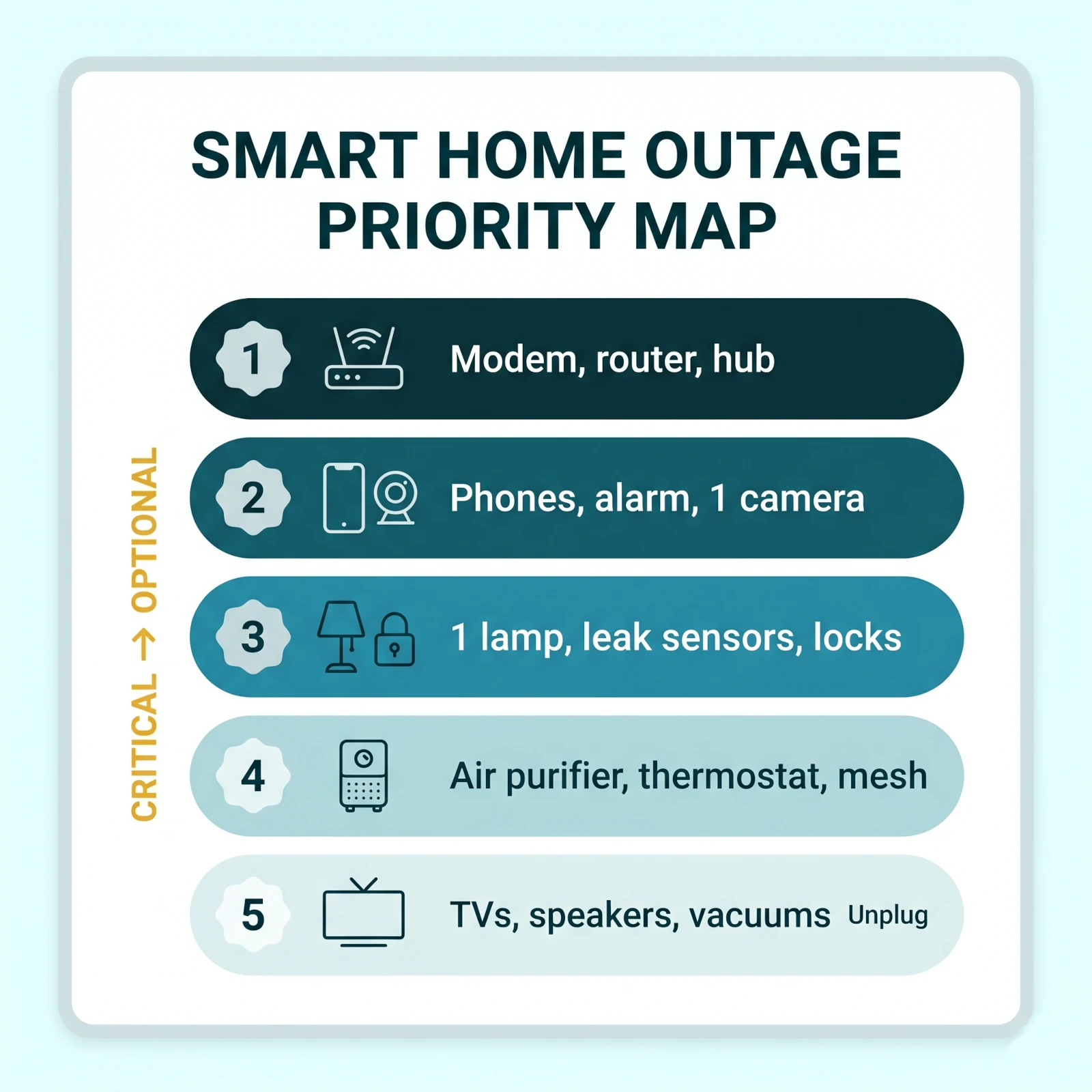
Smart home outage priority map: rank devices by survival value so backup power protects communication and security first.
If you are building a hub layer from scratch, our Matter smart home hubs that keep local automations cleaner guide is the right next read. Pick the hub before you buy more sensors, because outage behavior depends heavily on the controller.
How do you keep WiFi, hubs, and alerts online for 72 hours?
To keep WiFi online during a power outage, put the modem, router, and main smart hub on a UPS or LiFePO4 power station. Do not power every mesh node at first. Test runtime with your actual equipment, label the plugs, and keep the network stack on one protected circuit so it boots in a predictable order.
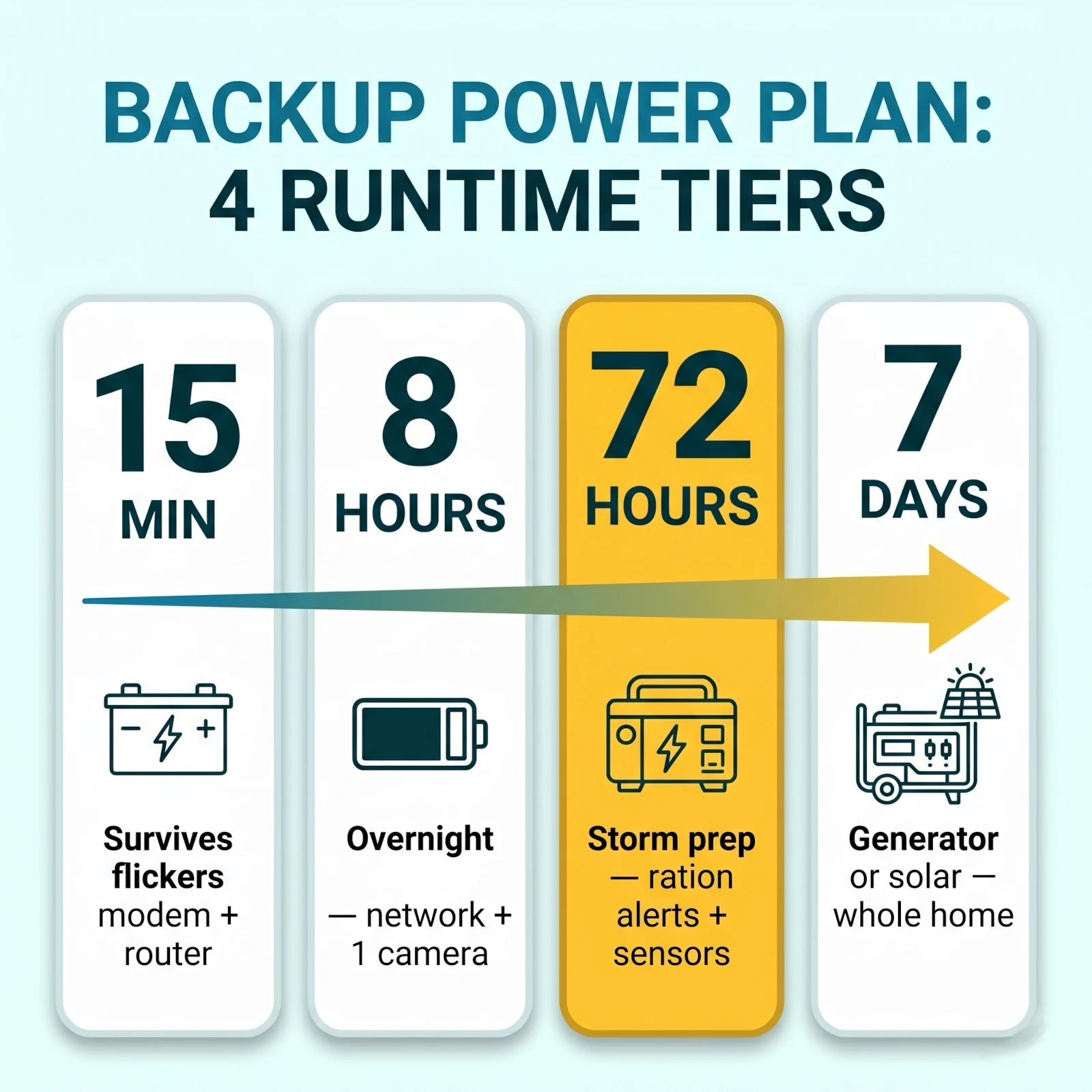
For most homes, the first target is not 72 hours. It is the first 15 minutes.
That short window covers flickers, transformer resets, summer thunderstorms, and the brief gaps before a standby generator starts. A basic UPS can handle that. It stops the modem and router from rebooting, which prevents half your smart home from falling offline for no reason.
The second target is 8 hours. This covers the common "power went out overnight" situation. You want phone charging, WiFi, one hub, and maybe one camera or alarm base to last until morning. A larger UPS or small LiFePO4 power station makes more sense here than a tiny computer UPS.
The third target is 72 hours. This is storm-prep territory. At that point, you are not running the whole house. You are rationing battery for communication, alerts, a few sensors, one or two cameras, and short bursts of fan or purifier use.
The fourth target is 7 days. Do not pretend a small battery will do that. You need a generator, whole-home battery, solar charging, vehicle charging plan, or a very strict rotation schedule. This guide keeps the smart-home layer realistic: keep control and awareness alive, not every appliance.
Use a plug-in power meter before buying backup power. Measure the combined draw of your modem, router, main mesh node, and hub. Many network stacks sit between 20W and 60W. Some mesh systems and fiber ONTs draw more. Once you know your wattage, battery math becomes simple.
Runtime in hours is roughly watt-hours divided by watts, then reduced by real-world losses. A 500Wh power station running a 40W network stack may look like 12.5 hours on paper. In practice, plan closer to 8 to 10 hours after inverter loss, battery reserve, and aging.
Keep the backup wiring boring. Modem, router, hub, and maybe one Ethernet switch. Avoid plugging in a TV, smart display, printer, NAS, gaming console, or charging brick because "there is an empty outlet." Empty outlets are how a 10-hour plan becomes a 90-minute plan.
72-Hour Network Backup Checklist
Put modem, router, and main hub on the same backup sourceThis keeps the boot order simple and prevents hub-before-router failures
Label every plug before storm seasonUse painter's tape if you do not own a label maker
Use Ethernet for the hub if possibleEthernet reduces WiFi congestion and reconnect problems after flickers
Keep only one mesh node powered at firstExtra nodes can drain battery fast and may confuse reconnection order
Test by unplugging wall power for 10 minutesConfirm alerts, camera live view, and app control still work
Write the runtime on the UPSFuture you should know whether the network lasts 45 minutes or 9 hours
If your current hub is the weak point, choose the best Matter hub for your outage plan based on where your family actually controls the house. A beautiful wall panel in the hallway is useless if the router in the basement dies first.
The four runtime tiers of a smart home backup power plan, from a 15-minute UPS to a 7-day generator or solar setup.
Which smart home ecosystem works best without internet?
Apple Home, Matter with a local controller, SmartThings with local-capable routines, Hubitat, and Home Assistant usually handle internet outages better than cloud-only Alexa or Google Home setups. Still, no ecosystem beats a full power outage unless the controller, router, and accessories stay powered. Local control needs local power.
Alexa is excellent for daily convenience in US homes. It is also the least reliable layer during an internet outage because voice processing and many routines depend on Amazon's cloud. If the internet is down, an Echo speaker may still sit there powered on, but many commands will fail.
Google Home has similar limits. Matter support has improved, but Google Assistant is still cloud-centered. In a storm plan, Google Home should not be your only way to open, light, monitor, or shut down anything important.
Apple Home is stronger for local control because a HomePod or Apple TV can run many automations inside the home. The key phrase is "inside the home." The hub needs power, the router needs power, and accessories still need power or batteries. Remote access and some Siri requests still need the internet.
Matter helps because it gives devices a common local language. Matter-over-Thread devices can talk through a Thread border router. Matter-over-WiFi devices use your local IP network. But Matter does not make voice assistants local, does not power devices, and does not guarantee every brand feature works offline.
SmartThings is mixed. It has improved local routine handling for some device types, and it remains useful for Zigbee and Z-Wave homes. But cloud paths still exist, and your exact devices matter. If you rely on Z-Wave locks and Zigbee sensors, a powered SmartThings or Aeotec hub can be useful during internet outages.
Home Assistant and Hubitat give the most control to people willing to maintain them. They can run more locally than consumer cloud platforms, but they add responsibility. During a storm, a local system is only better if you have tested it before the warning.
TableSmart Home Ecosystems During Internet and Power Outages
How major smart home ecosystems behave during outages
Ecosystem
Internet outage
Power outage
Best storm role
Alexa
Weak for voice and cloud routines
Stops unless Echo and network are powered
Convenience, not core control
Google Home
Weak for Assistant commands
Stops unless hub and network are powered
Daily control layer
Apple Home
Good for many local automations
Needs powered HomePod or Apple TV
Best mainstream local option
Matter
Good for basic local device control
Needs powered controller, router, and devices
Cross-platform local layer
SmartThings
Mixed, depends on device and routine type
Needs powered hub and devices
Zigbee and Z-Wave bridge
Home Assistant or Hubitat
Strong if built locally
Needs backup for server, hub, and network
Best for advanced local control
Alexa
Internet outage
Weak for voice and cloud routines
Power outage
Stops unless Echo and network are powered
Best storm role
Convenience, not core control
Google Home
Internet outage
Weak for Assistant commands
Power outage
Stops unless hub and network are powered
Best storm role
Daily control layer
Apple Home
Internet outage
Good for many local automations
Power outage
Needs powered HomePod or Apple TV
Best storm role
Best mainstream local option
Matter
Internet outage
Good for basic local device control
Power outage
Needs powered controller, router, and devices
Best storm role
Cross-platform local layer
SmartThings
Internet outage
Mixed, depends on device and routine type
Power outage
Needs powered hub and devices
Best storm role
Zigbee and Z-Wave bridge
Home Assistant or Hubitat
Internet outage
Strong if built locally
Power outage
Needs backup for server, hub, and network
Best storm role
Best for advanced local control
The practical recommendation is blunt. Use Alexa or Google Home for everyday voice control. Use Apple Home, Matter, SmartThings, Hubitat, or Home Assistant for the routines that must still make sense when the internet gets flaky.
Storm routines should be boring. Turn on hallway light when motion is detected. Notify when leak sensor trips. Keep one porch camera recording. Shut off nonessential smart plugs before the battery drains. Avoid routines that depend on weather APIs, cloud scenes, music services, or multiple brand accounts.
How do you keep cameras, locks, and alarms useful during a blackout?
Battery cameras, smart locks, and alarm sensors can stay useful during a blackout, but only if their hub, storage, and alert path still work. Charge batteries before storm season, confirm local storage, keep the router online, and do not depend on cloud-only video history as your only record of what happened.
Security is where smart homes fail in the most visible way. The camera is on the wall, the app icon is on your phone, but the live view spins because the router has no power.
For outdoor cameras, divide your system into three groups.
Battery cameras with local storage are the best outage candidates. eufy, Reolink, Tapo, Lorex, and Aqara models can record motion clips locally if you set them up before the storm. If the router stays powered, you may also get alerts. If the router dies, the camera may still record but you may not see clips until the network returns.
Wired WiFi cameras are fragile unless they sit on backup power. A hardwired floodlight camera may look like the serious choice, but it dies instantly if that circuit loses power. If you want it alive during outages, it needs a protected circuit, whole-home backup, or a different camera type.
PoE cameras can be excellent if the PoE switch and recorder are on backup power. This is more common in serious security installs than basic smart-home setups, but it is the cleanest local-recording path for larger homes.
Smart locks are simpler. Most run on AA, CR123A, or rechargeable batteries. The lock should still open with keypad, fingerprint, NFC, or physical key during a power outage. The part that fails is remote access if the hub, WiFi bridge, or internet is down.
That offline-entry check matters even more at a remotely managed property. The vacation rental smart home setup for US hosts adds timed guest codes, cleaner access, a physical-key fallback, separate IoT WiFi, and a 48-hour failure test to this outage plan.
Alarm systems vary by brand. A monitored alarm with cellular backup is stronger during outages than a WiFi-only DIY system. If you use a DIY system, put the base station and router on backup power and know how long the base battery lasts.
For a no-subscription setup that still makes sense during storms, read our no-fee outdoor camera setup. Cameras with local storage are not only cheaper over time, they are more useful when cloud access is the weak link.
How should you protect HVAC and indoor air during storm season?
Use smart thermostats before the outage, not as backup HVAC power. Pre-cool or pre-heat when a storm warning is credible, protect the HVAC controls from surges, and keep a filter and air purifier plan ready for wildfire smoke, dusty cleanup, or hot shelter-in-place nights. Do not run central HVAC from small batteries.
Smart thermostats are excellent storm-prep tools in the hours before an outage. They are poor storm-survival tools after the grid is down.
If a hurricane, severe thunderstorm, or winter storm is likely, use the thermostat while power is still stable. In summer, pre-cool the house a few degrees below your normal setting if your utility has not asked for conservation and your HVAC is healthy. In winter, pre-heat a little before the worst weather arrives.
Do not push the system into unsafe extremes. A stressed AC condenser running flat-out during voltage flicker is not a win. If lights are dimming, breakers are tripping, or the outdoor unit sounds wrong, shut down the HVAC and protect the equipment.
The C-wire question also matters. Many smart thermostats rely on the HVAC transformer for power. If that circuit goes down, the thermostat may go dark or preserve only basic settings. Some Nest models have internal batteries for brief periods, but that does not mean your furnace or AC can run.
If your home already needs a thermostat upgrade, our smart WiFi thermostats for US HVAC systems guide covers ecobee, Nest, Honeywell, Sensi, and Amazon options. For storm prep, room sensors help most in large homes where one hallway thermostat misreads the rooms where people sleep.
Indoor air is the second half of comfort. Wildfire smoke, dusty post-storm cleanup, wet drywall, and long closed-window periods can make indoor air rough even when the house itself is safe.
A large-room smart air purifier helps because you can place it where people are sheltering. During wildfire smoke, run it before indoor PM2.5 climbs. During cleanup, run it in the room where dust is being stirred. During a power outage, run it in short bursts from a power station only if the battery budget allows.
Pre-cool or pre-heat only while power is stableDo not force HVAC during flickers or brownouts
Replace or inspect the HVAC filter before wildfire and storm seasonA clogged filter makes poor-air days worse
Keep one clean purifier filter on handFilters sell out quickly during smoke events
Do not run central HVAC from a small batteryUse whole-home backup or a properly installed generator for large loads
Put the thermostat schedule in a storm modeAvoid aggressive setback schedules during shelter-in-place days
What outdoor smart devices need storm prep before the wind arrives?
Outdoor smart devices need a shutdown plan before a storm. Pause irrigation, secure cameras and solar panels, unplug exposed outdoor plugs, disable decorative lighting, and test garage access manually. Outdoor devices see wind, water, surge, and WiFi dropouts before indoor gadgets notice anything is wrong.
Start with irrigation. A smart sprinkler controller can save water all summer, but storm week is not the time to trust a stale schedule. Pause watering before heavy rain. Confirm rain skip is active. If your area has watering restrictions, keep those rules in the controller even after the storm passes.
Large yards add another issue: zone wiring. Irrigation valve wires often run outdoors and can pick up surge during lightning storms. If your controller sits in a garage or exterior box, use surge protection where appropriate and do not leave the cabinet open.
Our smart sprinkler controllers for large US yards guide covers Rachio, Orbit B-hyve, Hunter Hydrawise, Rain Bird, Yardian, and Netro. For storm prep, the most important feature is not voice control. It is weather skip plus easy manual zone shutdown.
Outdoor cameras need a physical check. Tighten mounts, clean solar panels, confirm battery level, and check the field of view after trimming trees or moving patio furniture. A camera pointed at a swinging branch will waste battery all night.
Garage doors need a manual plan. Smart garage controllers depend on power, opener hardware, and often WiFi. Make sure every adult in the house knows where the manual release is and how to open the door if the opener fails. If you park outside during storm warnings, you avoid trapping the car behind a dead opener.
Outdoor smart plugs should usually be unplugged before severe weather unless they are powering something essential and properly weather-protected. The cheap holiday-light plug on the patio should not be part of an outage plan.
The 7-day smart home power outage preparation plan
The best smart home power outage preparation happens before the warning. Spend one week mapping critical devices, putting the network on backup power, moving key routines toward local control, charging cameras, setting HVAC and air quality plans, unplugging nonessential gear, and writing a recovery order. Do not build the plan while the lights are flickering.
7-Day Smart Home Storm Prep Plan
1
Day 7: Map what must work
Walk through the house and list every device that matters during an outage: modem, router, mesh nodes, hub, alarm base, cameras, locks, thermostat, air purifier, leak sensors, garage controller, and phone chargers. Mark each one as wall-powered, battery-powered, or both.
Pro tip: If a device protects safety, communication, security, indoor air, medication, pets, or water leaks, it belongs near the top.
2
Day 6: Put the network stack on backup power
Connect the modem, router, primary mesh node, and main smart home hub to a UPS or LiFePO4 power station. Use short cables, avoid overloaded strips, and keep the backup source in a ventilated spot.
Warning: Do not plug space heaters, coffee makers, microwaves, or window AC units into a computer UPS.
3
Day 5: Test WiFi and app access during a simulated outage
Unplug the backup source from wall power for 10 minutes. Confirm your phone stays on WiFi, your main hub stays visible, and at least one camera or sensor alert still works. Write down the battery percentage drop.
4
Day 4: Simplify storm routines
Create or edit routines that matter during a storm. Use local triggers where possible: motion turns on hallway light, leak sensor triggers alert, door sensor turns on entry light, and sunset lights use a simple schedule instead of a cloud scene.
5
Day 3: Prepare cameras, locks, and sensors
Charge battery cameras, clean solar panels, replace weak lock batteries, clear local camera storage, and confirm every important device has a physical fallback. Keep spare batteries in one labeled bag.
6
Day 2: Set HVAC, air purifier, and outdoor modes
Pre-cool or pre-heat only if conditions are safe. Replace the HVAC filter if needed, place the air purifier in the shelter room, pause irrigation, secure outdoor camera mounts, and unplug nonessential outdoor smart plugs.
7
Day 1: Shut down convenience gear and print the recovery order
Unplug TVs, gaming consoles, decorative lights, robot vacuums, and unused smart speakers. Leave the network stack, alarm base, phone charging, and critical camera path protected. Put the recovery order near the router.
This plan takes about two hours of hands-on work if you already own the backup power hardware. The hard part is not plugging in the UPS. The hard part is deciding what you will not power.
Most homes waste backup capacity on comfort gadgets because they are already plugged into the same strip. That is why labeling matters. In a storm, nobody wants to trace which black brick feeds the modem and which one feeds a smart display.
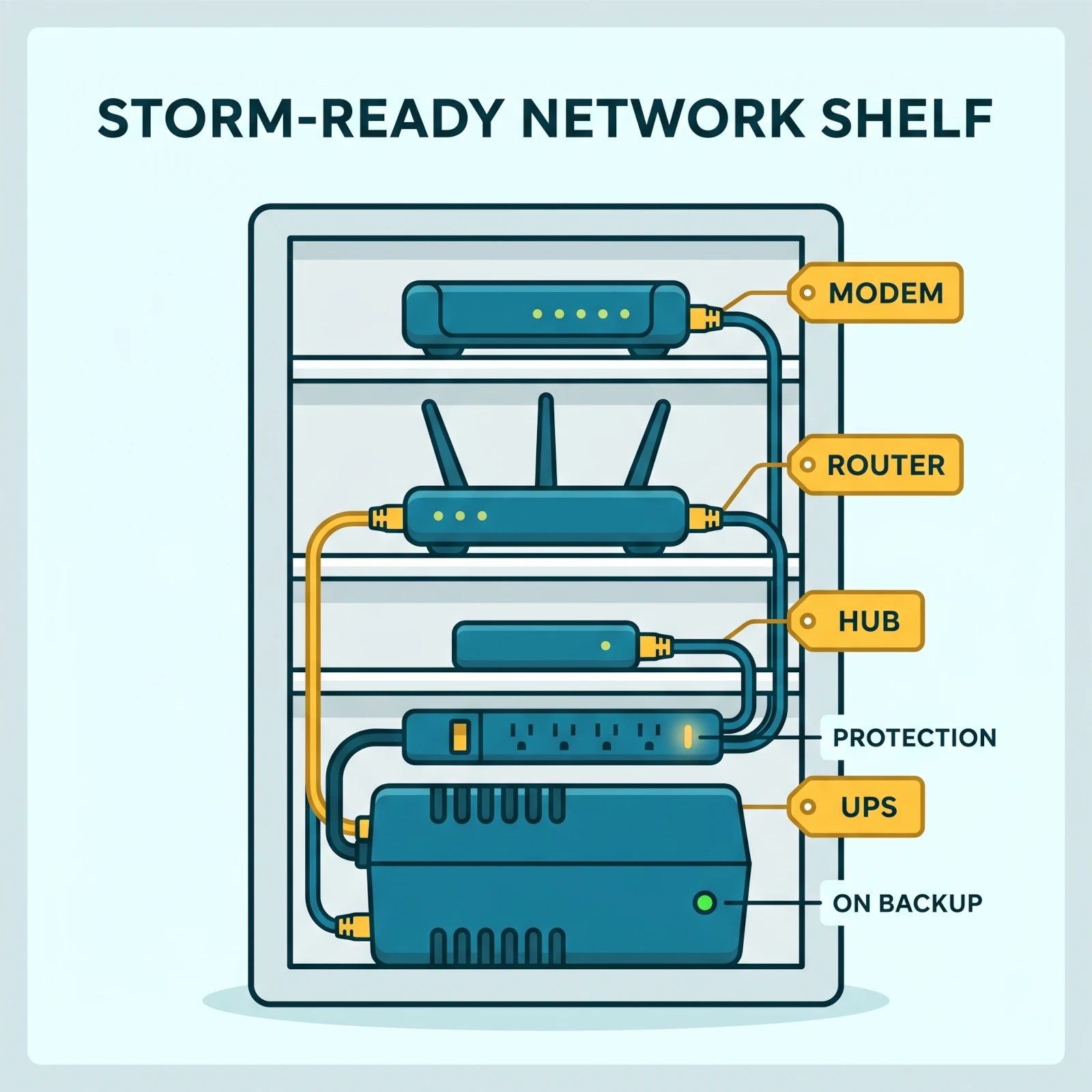
A storm-ready network shelf keeps the modem, router, hub, and UPS on one labeled, protected circuit so the smart home boots back in order.
What should you unplug, shut down, or leave running before a storm?
Before a storm, unplug nonessential electronics and leave only critical devices on protected power. Keep the modem, router, main hub, alarm base, one camera path, phone chargers, and one lamp available. Shut down TVs, game consoles, robot vacuums, decorative lights, outdoor plugs, and smart displays that drain battery without improving safety.
This is where convenience fights resilience. A smart home that feels rich on a normal Tuesday can become messy during a storm because everything wants power, WiFi, updates, and app attention.
Use three buckets.
Leave running means a device gets backup power or fresh batteries. This includes the network stack, one hub, alarm base, essential cameras, leak sensors, locks, phone charging, and one practical lamp.
Set and pause means a device should finish its job before the storm and then stay quiet. Smart thermostats, sprinkler controllers, robot vacuums, and air purifiers often fit here. Set the mode, pause the routine, and avoid surprises.
Unplug means the device can wait. TVs, streaming boxes, gaming consoles, smart speakers in spare rooms, decorative light strips, desktop PCs, printers, and patio plugs do not need storm power.
Storm Warning Device Checklist
Leave modem and router on backup powerNetwork first
Leave the main hub poweredMatter, HomeKit, SmartThings, or Home Assistant
Charge phones and battery camerasDo this before the lights flicker
Pause irrigation schedulesHeavy rain should not meet automatic watering
Set thermostat holds before unstable powerAvoid aggressive schedules during storm hours
Unplug nonessential entertainment gearTVs and consoles are surge targets
Unplug exposed outdoor smart plugsEspecially cheap patio and holiday-light plugs
Leave one lamp availableA boring lamp beats five app-only lights
Do not use a gas oven, grill, or generator indoors to keep smart devices running. Generator safety is not a smart-home preference. It is life safety. Portable generators belong outside, away from doors, windows, and vents, with working carbon monoxide alarms inside.
How do you recover smart devices after power comes back?
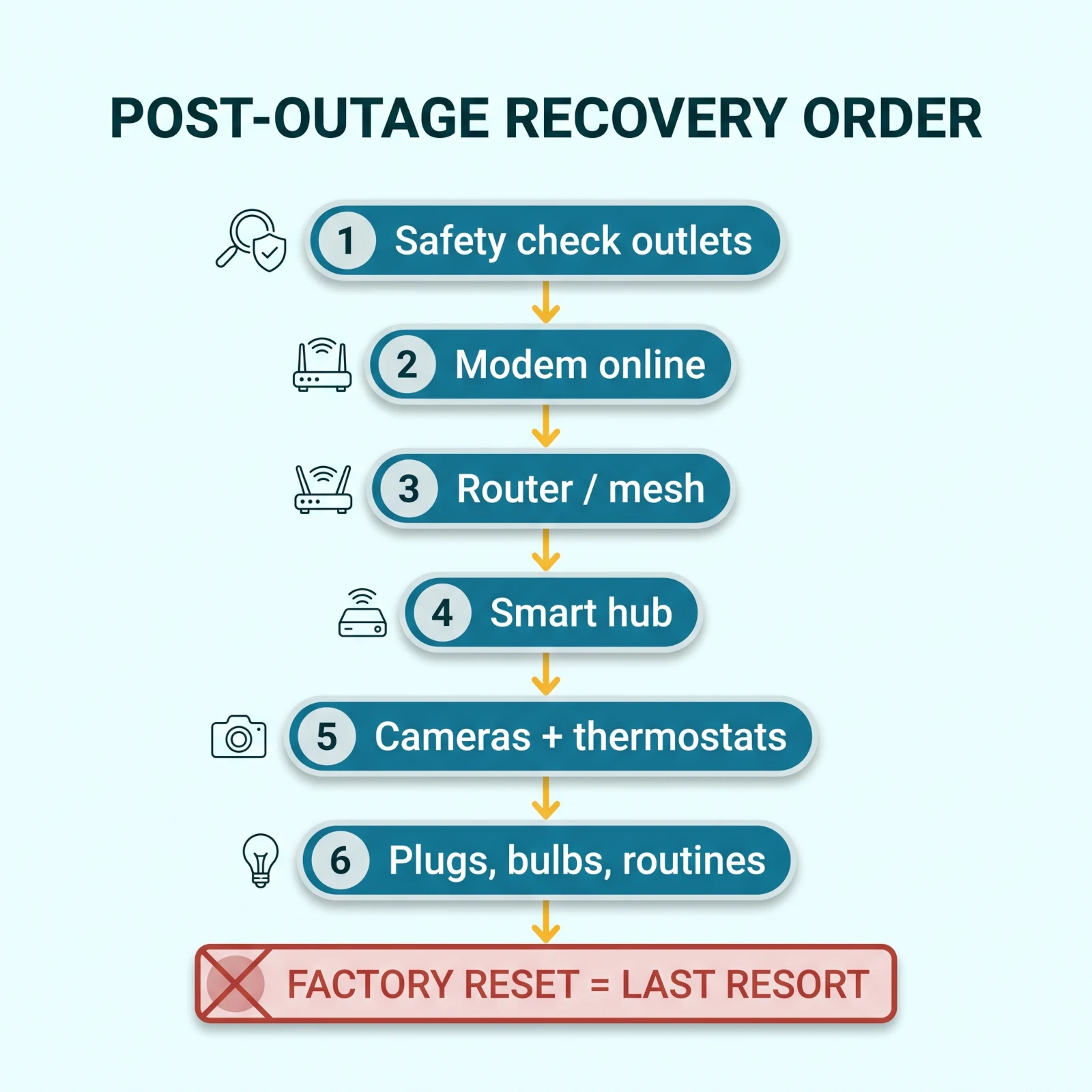
Recover smart devices after power returns by checking safety first, then restoring the network in order. Inspect outlets and adapters, boot the modem fully, then the router, then hubs, then cameras, thermostats, plugs, bulbs, and routines. Avoid factory resets until the network has been stable for at least 15 minutes.
Most post-outage smart-home problems are timing problems. The device is not dead. It booted before the router was ready, missed the hub, grabbed a weak mesh node, or got stuck waiting for a cloud service.
Start with a physical safety check. If you smell heat, see discoloration, hear buzzing, or notice a cracked adapter, stop using that device. Surge damage can be subtle. A $15 to $30 power brick is not worth a fire risk.
Then bring back the internet path. If you have cable internet, the modem can take several minutes to lock onto the ISP signal. Fiber ONTs can also take time. Do not reboot the router five times while the modem is still negotiating upstream service.
Once the modem is stable, reboot the router or mesh controller. Wait for the WiFi network name to appear and for your phone to connect. Then power the hub. Then check cameras, locks, sensors, plugs, and bulbs.
If you have mesh WiFi, bring up the main node first. Add secondary nodes after the main router is stable. This prevents devices from attaching to a node that is alive but not yet connected back to the internet.
After the network is stable, open each brand app and wait. Many apps show devices offline for a few minutes after the device has already rejoined WiFi. Refreshing is fine. Deleting is not.
Factory reset is the last step, not the first. A reset removes pairing, automations, names, room placement, and sometimes ownership. Most post-outage problems need a power cycle, a router lease refresh, or patience.
Recover in order after power returns: safety check, modem, router, hub, then devices, and save the factory reset for last.
If outdoor security is the thing that fails after every storm, move at least one camera to local storage and battery power. The wireless outdoor security camera guide focuses on models that do not need a monthly cloud plan to save useful footage.
Smart home power outage preparation USA costs by budget
A useful smart home outage setup in the USA can cost about $120 to $1,500+, depending on runtime. The best starter plan is a router UPS, surge protectors, spare batteries, and local camera storage. Spend more only after the network, hub, phone charging, and one security path are covered.
Do not start with a giant battery because the marketing looks comforting. Start with loads.
If your modem, router, and hub draw 40W together, even a modest battery can buy useful runtime. If you add three mesh nodes, a smart display, laptop, NAS, and TV, the same battery drains fast.
The cost ranges below are realistic for US buyers, but they are not product prices. They are planning ranges because brands, capacity, and sales change constantly. Prime Day, Labor Day, Black Friday, and Cyber Monday can all shift the math.
TableSmart Home Outage Budget Tiers USA
Budget tiers for smart home power outage preparation in the USA
Larger UPS or small power station, local camera storage, better surge protection
Best for
Overnight outages
Storm-ready
Typical Cost
$700 to $1,500
What it includes
LiFePO4 power station, solar input option, network runtime testing, extra camera battery plan
Best for
72-hour planning
Whole-home
Typical Cost
$5,000 to $20,000+
What it includes
Standby generator or home battery, transfer switch, pro installation
Best for
HVAC, fridge, well pump, longer outages
The best value is usually the practical tier. It keeps the network alive, gives you a real phone-charging plan, protects the hub, and buys enough time to make decisions.
The storm-ready tier is for hurricane zones, wildfire areas, rural homes with wells, or families with medical devices. If someone uses a CPAP, oxygen concentrator, refrigerated medicine, or powered mobility equipment, treat that as the power plan. The smart home comes second.
Whole-home backup is a different decision. It can run HVAC, refrigeration, well pumps, and more, but it needs professional installation and safety planning. Do not improvise a generator connection through a wall outlet. That can backfeed lines and endanger utility workers.
Well households should plan the water side as carefully as the power side. A pump with no electricity means no pressure at any tap, and our guide to the best whole house water filters for well water covers the filtration and freeze protection that keep that supply usable once power returns.
Common mistakes that break smart homes after outages
The most common smart-home outage mistakes are powering too many devices, skipping the router and hub, trusting cloud routines, ignoring local storage, forgetting bulb power-on behavior, leaving outdoor plugs exposed, and factory-resetting devices too early. Most failures are preventable if you test once before storm season.
Mistake 1: Backing up the wrong outlet strip. People plug the UPS into the office strip because it is convenient, then discover the modem is in the living room and the fiber ONT is in the garage. Follow the actual internet line.
Mistake 2: Keeping every mesh node alive. Mesh nodes are useful in daily life, but they draw power and can complicate recovery. During an outage, one central node may be enough. Add more only if coverage truly fails.
Mistake 3: Trusting voice commands as the fallback. Alexa and Google Home are great until the internet is down. Every storm-critical action needs another path: app, physical switch, keypad, local automation, or manual control.
Mistake 4: Forgetting smart bulb power-on behavior. Many bulbs turn on after power returns. That can wake the house at 3 AM or make an empty home look occupied in a strange way. Set power-loss recovery in Hue, LIFX, Wiz, or the brand app before storm season.
Mistake 5: Leaving camera storage unconfigured. A battery camera with no local storage and no active cloud plan may give you live view on a normal day and nothing useful during an outage. Confirm recording before the storm.
Mistake 6: Putting the hub in a bad radio location. A hub next to a breaker panel, metal rack, water heater, or concrete basement wall will struggle even with power. Outage prep is a good excuse to move it.
Mistake 7: Using old surge strips forever. Surge protectors wear out. If the strip has no working protection light, feels hot, crackles, or is older than you can remember, replace it before storm season.
Mistake 8: Factory-resetting while the ISP is down. A device that says offline may only be waiting for internet. Resetting it can turn a 10-minute outage recovery into a full reinstall.
Mistake 9: Forgetting outdoor devices. Sprinkler controllers, patio plugs, low-voltage transformers, and outdoor cameras sit closer to lightning, water, and wind. Pause, unplug, cover, or secure them before severe weather arrives.
Mistake 10: Planning for gadgets before people. Water, food, medication, safe heat, cooling, and carbon monoxide safety matter more than app control. A smart home should support the emergency plan, not replace it.
Final Recommendation
Smart home power outage preparation USA is not about making every gadget work in a blackout. It is about keeping the few systems that protect communication, security, indoor air, and recovery alive long enough to matter.
Start with the modem, router, main hub, phone charging, one security path, and one practical light. Test that setup before hurricane, wildfire, winter storm, and thunderstorm season. Then add local control, camera storage, thermostat prep, purifier readiness, and outdoor shutdowns.
The best setup is boring when the storm hits. The router stays up. The hub stays visible. The camera records. The lock still opens. The house recovers in order. That is the goal.
Quick answers
Frequently Asked Questions
Will Alexa work during a power outage?
Alexa needs power, WiFi, and an internet path for normal voice commands. If the Echo device, modem, and router are on backup power but the internet line is still active, Alexa can keep working for a while. If the internet drops, most Alexa voice commands and cloud routines stop. Use local app controls, physical switches, and battery devices as your backup.
Will Google Home work if the internet goes out?
Google Home still depends heavily on Google's cloud for voice commands and many app actions. Some Matter and local network features may keep limited control working, but you should not count on Google Assistant during a true internet outage. Treat Google Home as a convenience layer, not the core storm-control system.
Does Apple HomeKit work better during an outage?
Apple Home can be stronger than cloud-only systems because many automations run through a HomePod or Apple TV hub on the local network. It still needs power for the hub, router, and accessories. Remote access, Siri requests that need the cloud, camera streaming, and notifications can fail if your internet service is down.
Does Matter work without internet?
Matter is designed for local device communication, so basic control can work without internet if your controller, router, and devices still have power. The catch is setup, voice assistants, app accounts, firmware updates, and brand cloud features. Matter helps most when you pair it with a powered local hub and simple local routines.
How long will a router UPS keep WiFi running?
A small router UPS can keep a modem and router running for 30 minutes to 3 hours, depending on battery size and equipment draw. A larger LiFePO4 power station can stretch that to 8 to 24 hours for the network stack alone. Runtime drops fast if you also power mesh nodes, displays, cameras, or laptops.
Do smart security cameras record during a blackout?
Battery cameras can keep recording motion clips if their batteries are charged and local storage is configured. Wired cameras stop unless they have backup power. Cloud-only cameras may capture nothing if the router or internet connection is down, even if the camera itself has battery power. Local storage matters during storms.
Should I keep my smart thermostat on backup power?
Usually no. Most smart thermostats use 24V HVAC power and cannot run your furnace, central AC, or heat pump without the larger HVAC system having power. Focus backup power on the router, hub, cameras, phones, lights, and medical devices. Use the thermostat to pre-cool or pre-heat before a storm if safe.
Can a power station run a smart air purifier?
Yes, but only if the power station output and battery capacity match the purifier load. A large-room purifier on high speed can drain small batteries quickly. During wildfire smoke or dusty cleanup, run the purifier from wall power while available, then use battery power in shorter bursts for the room where people are sleeping or sheltering.
What smart devices should I unplug before a storm?
Unplug nonessential TVs, gaming consoles, smart speakers in unused rooms, decorative lights, robot vacuums, desktop computers, and outdoor smart plugs that do not protect security. Leave the modem, router, main hub, alarm base, essential cameras, phone chargers, and one or two lamps on protected backup power.
What should I do after power comes back?
Do not start by factory-resetting devices. First inspect outlets, surge protectors, and adapters for heat or damage. Then let the modem boot fully, then the router, then the hub, then cameras and thermostats. Many devices recover once the network returns in the right order.
Discussion
Be the first to comment
Have a question or experience to share? Scroll down to leave a comment.
Discussion
Be the first to comment