A vacation rental smart home setup has a harder job than the system in your own house. It must work for a first-time guest at 11 PM, a cleaner carrying linens, and a host who may be 600 miles away. It also has to recover from a dead battery, a cable outage, and someone unplugging the router.
That changes what deserves your money. A clever routine that impresses you is worth nothing if a guest cannot turn on a lamp. A lock with ten integrations is a liability if it has no keypad or physical backup. A camera that breaks a platform rule can cost more than the device ever protected.
This guide builds the property in the order that reduces real host calls: network and account ownership, entry, climate, water and noise alerts, outdoor security, then booking automations. It also shows what to skip.
The goal is not a house full of gadgets. The goal is a rental that handles routine work quietly and gives you a clear response when something fails.
What Makes a Vacation Rental Smart Home Setup Different?
A vacation rental smart home must be easier for a stranger than a normal switch, keep essential functions available without internet, and separate guest access from owner control. The best system is almost invisible during a stay. It automates access, vacancy settings, and alerts without asking a guest to install an app or learn your preferred ecosystem.
In your own home, you can tolerate a bulb that needs a reset. You know which app controls it and where the router lives. A guest sees a dark room, presses the wall switch twice, and messages you because the light still does not work.
That is why the right standard is guest-invisible automation. Every guest-critical action needs a familiar local control. The keypad opens the door without a phone. The thermostat changes temperature at the wall. Lights respond to ordinary switches. The television does not need your personal streaming account.
Remote management runs behind those controls. You can issue a new door code, see a leak alert, set the vacant property to an efficient temperature, or confirm that the exterior camera is online. The guest does not need access to those owner functions.
Subscriptions also matter more in a rental. One low-cost monthly plan feels small. Five plans across three properties become a serious annual expense. Use our guide to build a smart home without monthly fees as the filter for cameras, hubs, storage, and automations that should keep working after a trial ends.
The last difference is consequence. A failed color scene is annoying. A failed lock, frozen pipe, overheated house, silent leak, or undisclosed camera is an operations problem.
Rural properties on a private well carry that risk twice over, because the water is untreated and the filter housings can weep unnoticed for weeks. Our guide to the best whole house water filters for well water covers the freeze protection and sensor placement those installs need.
What Should You Automate First in a Vacation Rental?
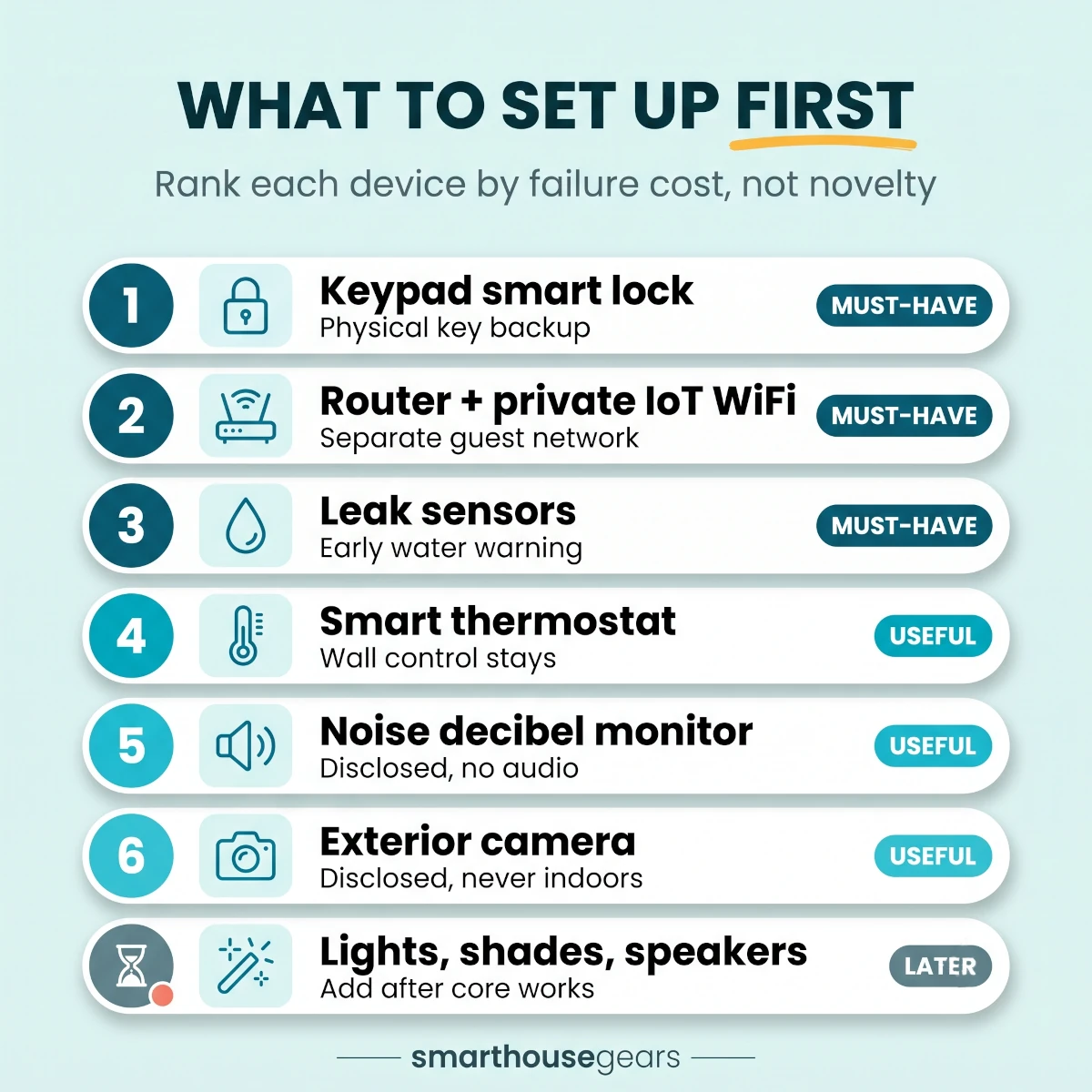
Automate access first, water and climate risk second, and turnover tasks third. Start with a keypad lock, separate device network, smart thermostat, leak sensors, and privacy-safe noise monitoring. Add exterior cameras, outdoor lights, and yard systems only when the property needs them. Skip decorative gadgets until the core setup survives an outage test.
The order below follows failure cost, not novelty. A lockout can ruin check-in. A leak can damage the building. An empty house at 60°F or 82°F for days can waste money or create risk. A colored light scene does none of those things.
TableVacation Rental Device Priority Matrix
Which smart-home devices deserve attention first in a US short-term rental
Priority
Device or system
Host value
Guest rule
Required fallback
1
Keypad smart lock
Unique access and fewer key handoffs
No app required
Physical key in secure lockbox
2
Router and private IoT network
Keeps owner devices isolated and reachable
Separate guest SSID
Local controls plus support contact
3
Leak sensors
Early warning at water-risk points
No guest action for normal use
Local shutoff instructions and nearby contact
4
Smart thermostat
Vacancy savings and freeze or heat alerts
Wall control stays available
Normal HVAC operation without cloud access
5
Noise decibel monitor
Early warning before a neighbor complaint
Disclosed and never records audio
House rules and human contact
6
Exterior camera or doorbell
Arrival and perimeter awareness
Disclosed and never indoors
Ordinary locks and exterior lighting
Later
Lighting, shades, speakers, appliances
Convenience and turnover help
Manual operation must remain obvious
Switch, remote, or physical control
1
Device or system
Keypad smart lock
Host value
Unique access and fewer key handoffs
Guest rule
No app required
Required fallback
Physical key in secure lockbox
2
Device or system
Router and private IoT network
Host value
Keeps owner devices isolated and reachable
Guest rule
Separate guest SSID
Required fallback
Local controls plus support contact
3
Device or system
Leak sensors
Host value
Early warning at water-risk points
Guest rule
No guest action for normal use
Required fallback
Local shutoff instructions and nearby contact
4
Device or system
Smart thermostat
Host value
Vacancy savings and freeze or heat alerts
Guest rule
Wall control stays available
Required fallback
Normal HVAC operation without cloud access
5
Device or system
Noise decibel monitor
Host value
Early warning before a neighbor complaint
Guest rule
Disclosed and never records audio
Required fallback
House rules and human contact
6
Device or system
Exterior camera or doorbell
Host value
Arrival and perimeter awareness
Guest rule
Disclosed and never indoors
Required fallback
Ordinary locks and exterior lighting
Later
Device or system
Lighting, shades, speakers, appliances
Host value
Convenience and turnover help
Guest rule
Manual operation must remain obvious
Required fallback
Switch, remote, or physical control
The first purchase is not always the lock. If the property uses an old ISP gateway in a basement corner, fix the network before adding five cloud devices. Every later device depends on that foundation.
For a condo, entry and climate may cover most of the value. A lake house adds leak sensors, exterior cameras, and freeze protection. A desert property cares more about air-conditioning alerts. A large rural home may need mesh WiFi, well-pump monitoring, and a local contact who can reach the equipment.
Use one test for every proposed device: what expensive call, safety issue, or repetitive task does this remove? If the answer is only that it looks impressive in the listing, put it at the bottom of the budget.
Vacation rental device priority: rank each smart-home device by failure cost and guest value, from must-have entry and network to skip-for-now extras.
Build the Network and Account Foundation Before Buying Devices
The foundation is an owner-controlled account structure, a private network for smart devices, a separate guest network, and enough backup power to keep the modem and router alive through a short outage. Build this first because every lock integration, alert, and remote command becomes unreliable when account recovery or WiFi depends on a guest or contractor.
Own every account from day one
Create the router, lock, thermostat, camera, hub, and sensor accounts under an address the property owner controls. Use a business or role-based address, not a cleaner's personal email and not an installer account you cannot recover later.
Turn on two-factor authentication. Store recovery codes in a password manager and one offline location away from the rental. Add a second trusted administrator only if the platform supports clear roles and an audit trail.
Do not share the owner password in a group text. Cleaners need a door code and perhaps a limited property-management login. They do not need the password that can delete cameras, unlock the front door remotely, or reset the router.
Name devices by property and location. Cabin-Living-Room-Thermostat is useful. Thermostat 2 becomes a guessing game when you add a second listing.
Separate guests from the IoT network
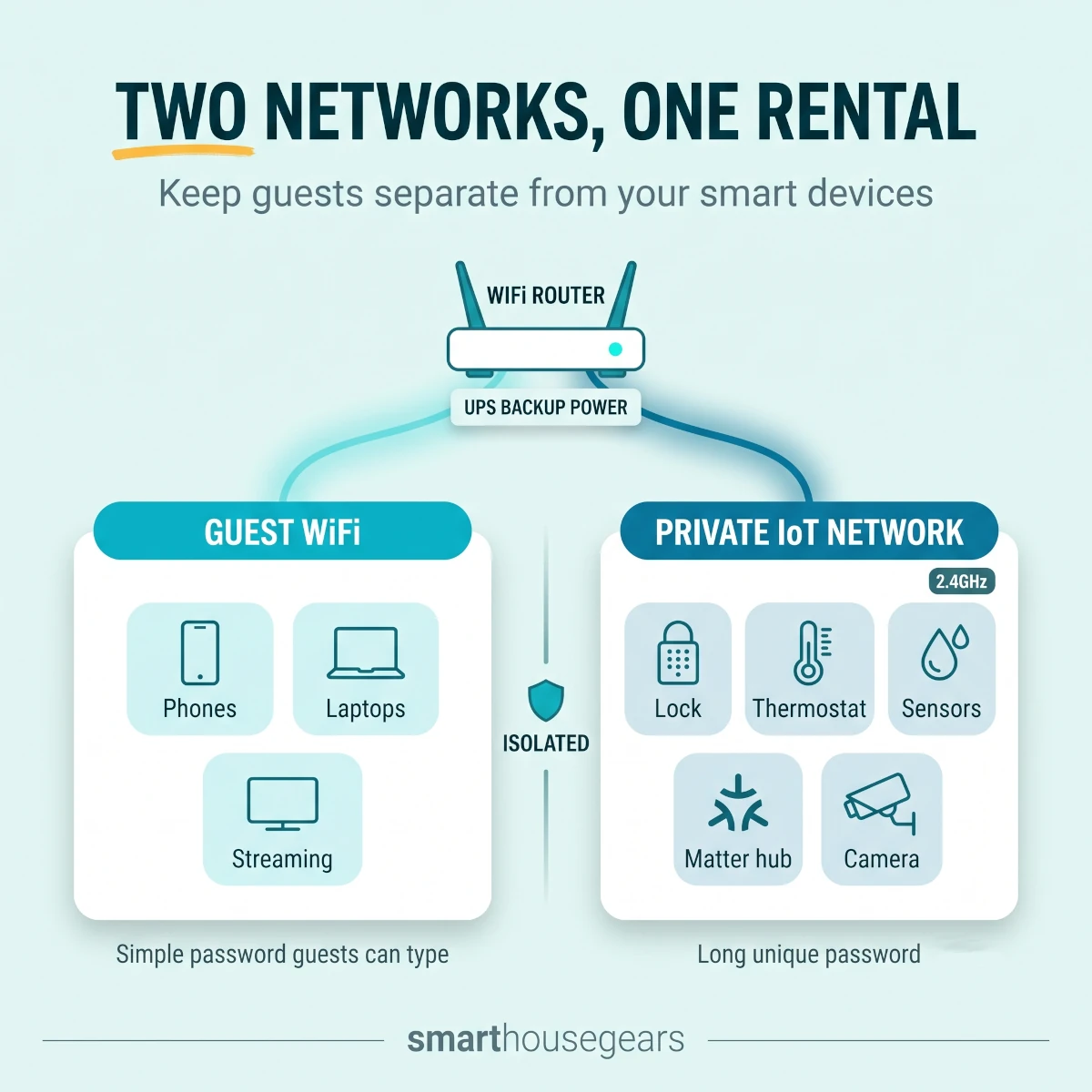
Use at least two network names. The guest SSID carries phones, laptops, tablets, and streaming boxes. The private IoT SSID carries the lock bridge, thermostat, cameras, hub, sensors, outdoor lights, and any remote-reboot device.
Many consumer routers call this a guest network. More capable routers can create a separate VLAN. Either approach is acceptable if guests cannot reach router administration or the private devices.
Keep a 2.4GHz option active on the IoT side. Many locks, plugs, cameras, and sensors still pair only on 2.4GHz even when the router also supports 5GHz and 6GHz. Dual-band routers are normal in the USA, but band steering can still break initial pairing.
Use a long, unique password for the private IoT network. The guest password can be simpler because visitors need to type it, but it should not unlock the owner network.
Do not rotate the IoT password between stays. That would disconnect every property device. Rotate the guest password only if your operations process can update the digital guide and scheduled messages without creating check-in confusion.
Put network gear where guests cannot unplug it by accident
A modem on the living-room floor will eventually lose power when a guest needs an outlet. Put the modem, router, hub, and small UPS in a ventilated owner cabinet or high utility shelf. Label the power strip Property network: do not unplug.
Do not lock the equipment inside an airtight box. Heat shortens router and battery life. Your local contact also needs a documented way to reach it during a real outage.
If the property is large, test signal at the lock, thermostat, water heater, laundry area, driveway camera, and farthest bedroom. A speed test beside the router proves little. You care about stable signal where each device lives.
Mesh WiFi can help a 2,500 to 4,000 sq ft house, but each wireless hop adds another failure point. Use Ethernet backhaul where the property allows it. In a smaller condo, one well-placed router is often more reliable than three mesh nodes.
Add short-outage power and remote recovery
A small UPS can keep the modem, router, and hub online for roughly 2 to 8 hours, depending on battery size and equipment load. That is enough for many storm flickers and neighborhood outages. It also prevents repeated reboots during unstable power.
Do not put space heaters, window air conditioners, refrigerators, or other high-load appliances on a basic smart plug or small UPS. US 120V circuits still have strict current limits, and startup loads can exceed the label draw.
For the network, a surge protector or UPS is sensible. For major HVAC and appliances, follow the manufacturer, electrician, and local code requirements.
Network and Account Readiness Check
Owner controls every primary accountNo contractor or cleaner is the only administrator
Two-factor authentication is enabledRecovery codes live outside the rental
Guest and IoT networks are separateGuests cannot reach devices or router settings
The IoT network supports 2.4GHzPair locks and sensors on the band they require
Signal is tested at every device locationInclude doors, utility spaces, yard edges, and detached areas
Network power is labeled and protectedUse ventilation and prevent accidental unplugging
The modem and router have backup powerTarget the outage window common in the area
A local contact can reach the equipmentDocument safe restart steps without sharing owner credentials
A two-network layout keeps guests on a separate WiFi while the smart lock, sensors, hub, and thermostat stay on a private IoT network, with the router and hub on backup power.
Can a Smart Lock Work When WiFi Is Down?
Yes. A vacation-rental smart lock should accept already-saved keypad codes when WiFi is down because code validation happens at the lock. Remote code changes, status updates, and booking sync may stop until connectivity returns. That is why every property also needs a physical backup key, a local contact, and an offline entry test before listing.
Choose the lock for operations, not the badge
The lock needs a keypad. Phone-only entry is a poor fit because guests arrive with dead batteries, limited service, or no interest in installing an app. A fingerprint reader can be useful for the owner, but it does not replace a code guests can type.
Prefer a lock that stores multiple codes, shows battery status remotely, logs code use, and still turns manually from inside. A keyed cylinder or a separate secure lockbox gives you a physical recovery path.
WiFi locks connect directly to the network and can be simple for one property. Z-Wave, Zigbee, or Matter-over-Thread locks may use less battery and depend on a hub or border router. The protocol matters less than the complete failure plan.
Before buying, measure the door. Check deadbolt backset, bore size, door thickness, handing, strike alignment, weather exposure, and whether the HOA controls exterior hardware. A smart lock cannot fix a door that needs a shoulder push to latch.
That sticky latch is a major battery killer. The motor fights the bolt every time, the lock reports jams, and remote locking becomes unreliable. Adjust the strike plate before installing electronics.
Use a code hierarchy
Create a unique code for every stay. It should activate at the confirmed check-in time and expire after checkout plus a short grace period. Do not reuse the same four digits for a season.
Give the cleaner a separate code. Give maintenance workers individual or temporary codes. Keep one emergency code restricted to the owner and local contact, and change it after use if it was shared outside that group.
Avoid obvious patterns such as the property address, checkout time, or the last four digits of the guest's phone number if those numbers appear elsewhere. The value of a unique code is that one compromised stay does not expose the next one.
Airbnb's direct smart-lock connection is available to eligible listings in the United States and Canada. As of July 2026, its supported families include specified Schlage Encode, August, and Yale models with the required WiFi and keypad hardware.
The direct connection creates a unique code for a confirmed booking and shares it through Airbnb messages, email, and the trip guide. The default code expiry is 30 minutes after checkout, with eligible settings from 15 minutes to 2 hours.
That is useful, but it does not remove the host's responsibility. Confirm model eligibility before purchase, keep firmware current, and check status before each arrival. If a property-management system owns the integration, monitor battery and connectivity in that system because Airbnb may not receive real-time device health.
Build backup entry before the first booking
Put a physical key in a weather-rated lockbox that is not attached to the smart lock itself. A jammed lock, swollen door, failed motor, or damaged keypad can make a perfectly valid code useless.
The lockbox code should not appear in routine check-in instructions. Store it in the platform's backup-entry flow or in a secure operations document. Share it only when the normal lock path fails, then change it after use.
Keep spare approved batteries on site. Do not mix old and new batteries, and do not assume any rechargeable cell is acceptable. Lock makers often specify alkaline or lithium primary cells because voltage behavior affects the battery gauge.
Your local contact needs permission to enter, a working code, and the physical-key location. A contact who lives 45 minutes away is not a complete 11 PM plan unless you have also given the guest a safe backup path.
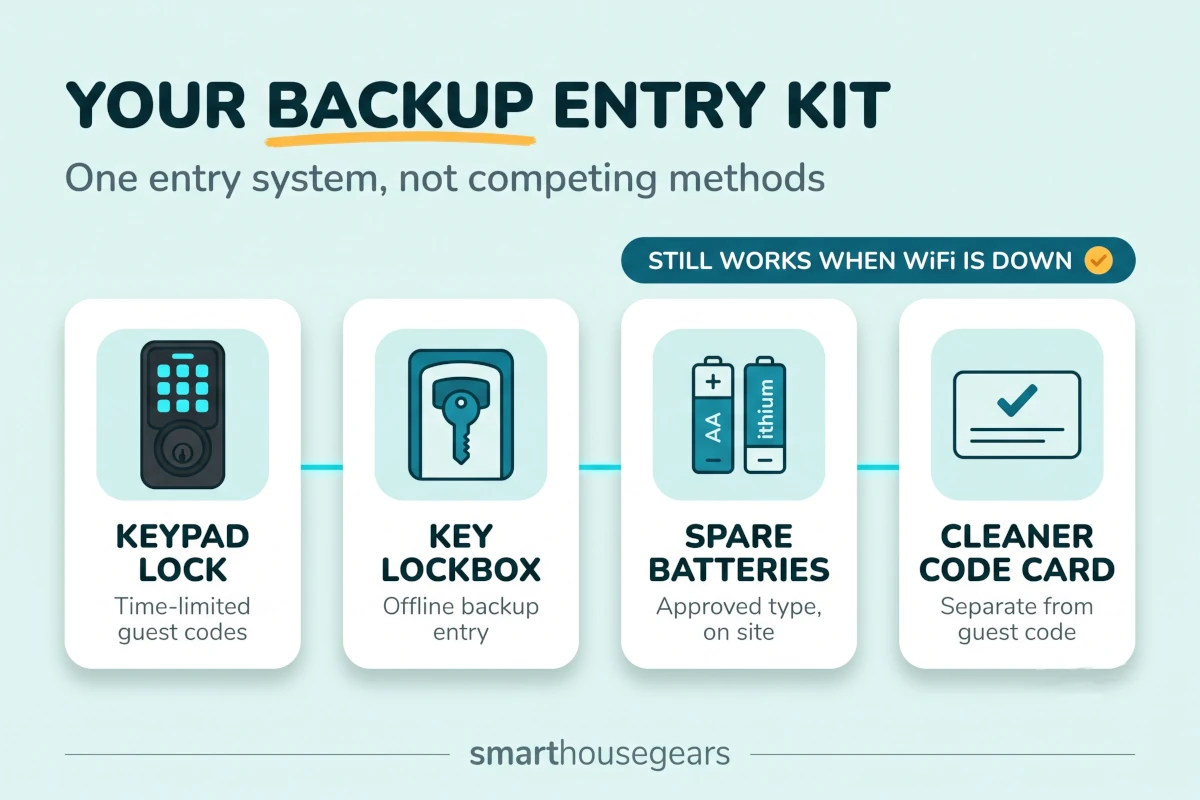
A vacation rental smart lock and its backup kit work as one system: keypad entry, a secure physical-key lockbox, approved spare batteries, and separate cleaner codes.
Keep check-in instructions shorter than the technology
The guest needs the door location, where to wake the keypad, the code, which button confirms entry, how to lock when leaving, and one backup contact. That should fit on a phone screen.
Do not send a manual for the lock. Add one clear photo of the keypad if the property has multiple doors. Test the instructions with someone who did not install the system.
Set Up Climate Control Without Fighting Your Guests
A vacation-rental thermostat should reduce energy use between stays, warn you about unsafe temperatures, and remain fully adjustable at the wall during a booking. Use conservative vacancy settings and broad guest limits. Do not create routines that reset the temperature every hour, disable local control, or make a comfortable stay depend on occupancy detection.
Start with HVAC compatibility. US thermostats commonly control 24V systems even though the home uses 120V branch circuits for other equipment. Check wire labels, C-wire availability, heat-pump stages, auxiliary heat, dual-fuel equipment, and any proprietary communicating system before buying.
If the existing thermostat has only two wires, or the HVAC brand uses a communicating wall controller, do not assume a common smart thermostat will work. Ask an HVAC technician or use the brand compatibility checker.
For compatible central systems, compare the best smart WiFi thermostats for US homes by HVAC support first and ecosystem second. A beautiful app does not compensate for missing heat-pump or accessory control.
The property should have four climate states:
Vacant. Use an energy-saving setting that still protects pipes, finishes, pets allowed by policy, and humidity-sensitive rooms. The right range changes by climate and building.
Pre-arrival. Bring the home toward a comfortable temperature before check-in. Start early enough that the HVAC does not run at maximum output as the guest opens the door.
Occupied. Let the guest control the wall thermostat inside a reasonable safety range. Avoid repeated host overrides during a stay. They feel intrusive and can trigger comfort complaints.
Checkout. Return to the vacant setting only after the confirmed checkout window. Do not shut cooling or heat off completely while cleaners are working.
Set alerts for extreme indoor temperature, prolonged HVAC runtime, loss of connection, and unusual humidity if the thermostat supports them. Alerts should trigger a decision, not an automatic panic message to the guest.
Window and portable air conditioners need a different plan. Use the unit's own controls or a supported smart AC with safe restart behavior. Do not power-cycle a compressor through a basic smart plug. If your rental uses room units, our smart air conditioners for US apartments explains the control and sizing tradeoffs.
Are Security Cameras Allowed in an Airbnb?
Airbnb does not allow hosts to use security cameras or recording devices that monitor any indoor area, even when the device is turned off or disconnected. Disclosed exterior cameras are allowed away from private spaces. Disclosed noise decibel monitors may be used in permitted common areas if they do not record audio.
This is a hard line, not a design preference. As of July 2026, an indoor camera in a hallway, living room, entry, shared space, or guest house breaks Airbnb's home-monitoring policy. A disabled camera still counts.
Remove indoor cameras before listing. Do not put one in an owner closet facing outward. Do not use an indoor camera as a pet monitor between stays if it remains in the space during a booking.
Exterior cameras must be disclosed in the listing description and placed away from areas where a guest expects privacy. That rules out enclosed outdoor showers and similar spaces. Describe each camera location clearly.
A front-door camera can confirm arrival and document packages. A driveway camera can show vehicle entry. A pool camera may have separate safety value, but it needs especially careful placement, disclosure, and local legal review.
Choose from our outdoor security cameras with no monthly fee if local storage and lower recurring cost fit the property. Confirm that the camera can exclude a neighbor's windows and any guest-private area from its view.
Noise monitors measure levels, not conversations
Airbnb allows disclosed noise decibel monitors inside common areas if they assess sound level and duration without recording audio. They cannot be in bedrooms, bathrooms, or sleeping areas. You must disclose their presence, though Airbnb does not require the exact location in the listing.
Set a threshold and duration that catches a sustained party, not a dropped suitcase or a crying baby. One high reading should not automatically accuse a guest. Use the alert to check context and send a neutral message about quiet hours.
The monitor is not permission to record speech. Verify the device and plan do not store audio clips. Also check city, county, state, HOA, and insurance rules because platform permission does not override local law.
Leak sensors usually deliver more value than another camera
Put leak sensors at the water heater, under kitchen and bathroom sinks, beside the washing machine, near the dishwasher, below an HVAC condensate line, and in any basement area with a history of water.
Hosts considering a portable kitchen appliance should read our countertop dishwasher guide for small rental kitchens. It explains tank filling, faucet limits and drain security before guest instructions enter the equation.
A countertop oven is the other appliance guests expect in a well-equipped rental, and our best smart countertop ovens with air fryer guide covers the 1,800W circuit question first. That matters in a rental, where a tripped kitchen breaker becomes a guest message at 8 PM.
A sensor alert is useful only when someone can act. Label the main water shutoff. Photograph it. Give the local contact the location and a safe response process.
A smart shutoff valve can stop major damage, but installation changes the plumbing and may require a licensed professional. Test it on a schedule and make sure a manual valve remains available.
Smoke and carbon monoxide alarms are not optional smart accessories. Install and maintain them to the code and rules that apply to the property. Smart notifications can add remote awareness, but they do not replace required local alarms, battery backup, inspections, or emergency instructions.
For cabins and large homes exposed to wildfire smoke, an air-quality monitor can tell you when to close outdoor-air intake and run filtration. Pair it with one of the smart air purifiers for large rooms only if the purifier also has obvious local controls. A guest should be able to change fan speed without your app.
Privacy and Safety Check
No camera or recording device monitors any indoor areaTurned-off and disconnected indoor cameras are still prohibited by Airbnb
Every exterior camera is disclosedState the location and keep private outdoor areas out of view
Noise monitors are disclosed and audio-freeUse allowed common areas, never bedrooms, bathrooms, or sleeping spaces
Local law and HOA rules have been checkedPlatform policy is not the only rule that applies
Leak alerts have a human response pathDocument the shutoff and the nearest person who can act
Smoke and CO alarms meet local requirementsSmart alerts do not replace code-compliant life-safety devices
Do You Need a Hub for a Vacation Rental?
You do not need a hub for a small rental with a direct-WiFi lock, thermostat, and a few sensors. A hub becomes useful when you want local automations, lower-power sensors, one dashboard, or devices using Matter, Thread, Zigbee, or Z-Wave. Choose it for reliability and remote recovery, not for the number of logos on the box.
Direct WiFi is the simplest path for one condo. The lock, thermostat, camera, and leak sensors each use their own service. The tradeoff is several apps, several cloud dependencies, and several subscription decisions.
SmartThings can bring Z-Wave, Zigbee, Matter, and selected cloud services into one system. Apple Home is attractive when the owner uses iPhone and supported HomeKit or Matter devices. Google Home and Alexa cover broad consumer compatibility. Home Assistant gives advanced local control but demands more maintenance than many one-property hosts should accept.
The best hub is the one a second person can recover without the person who wrote the automation. A custom server with undocumented rules is not reliable remote-property infrastructure.
Matter can reduce ecosystem lock-in. A supported lock, sensor, plug, or light may join more than one major platform, and local commands can keep working when the vendor cloud is unavailable.
Matter does not make every product feature universal. Camera support, energy data, access-code management, vendor alerts, and booking integrations can still live in brand apps. It also does not eliminate paid cloud storage or a noise-monitor subscription.
Our comparison of the best Matter smart home hubs in the USA explains which hubs include Thread border-router support and which ecosystems fit an existing device mix. For a rental, prefer documented recovery, Ethernet when practical, and an export or backup path.
Keep voice assistants optional
Alexa, Google Home, or a HomePod can help a guest play music or control a lamp. They can also expose personal calendars, shopping, calls, or account history if configured carelessly.
Use a property-only account. Disable voice purchasing and personal communications. Do not connect the host's private calendar, contacts, photos, or music profile.
Airbnb allows smart-home devices and encourages hosts to disclose them and let guests unplug or disable them. Treat that as a sensible operating rule. If unplugging a speaker breaks the lights, the system is too dependent on the speaker.
Automations That Help Guests Instead of Annoying Them
Good vacation-rental automations handle work between stays and stay quiet while the property is occupied. Focus on code timing, pre-arrival temperature, checkout reset, leak and noise alerts, exterior lighting, and vacancy protection. Avoid surprise light changes, repeated thermostat overrides, app-only controls, and any rule that treats normal guest behavior as a problem.
Pre-arrival
Activate the guest code at the confirmed check-in time. Bring the property toward a comfortable temperature, but do not unlock the door or turn on every interior light before anyone arrives.
Turn on the porch or path lights near sunset. For a remote driveway or dark entry, our guide to permanent outdoor lights for a house helps you compare local controls, weather resistance, and scheduling.
Send check-in instructions 24 to 48 hours before arrival. Include the address, parking, entry code, keypad photo, WiFi name, thermostat note, and support number. Keep the smart-home details to the controls the guest will actually touch.
Occupied
Pause vacancy routines. Let the wall thermostat, switches, remotes, and appliance controls behave normally. Send the host an alert for a leak, unsafe temperature, lock jam, or sustained noise event, not for every door opening.
Never infer an emergency from one motion event or a brief connection loss. Cloud devices drop offline. Guests unplug speakers. A useful alert tells you what changed, when it changed, and what to check next.
Checkout
Expire the guest code after the checkout grace period. Keep the cleaner code separate. Return climate control to the vacant range after the guest window ends, not while someone is still packing.
Turn off decorative lights and nonessential plugs only if their local state is known. Do not cut power to a refrigerator, router, water heater controls, HVAC equipment, sump pump, or life-safety device through a generic checkout scene.
Vacancy
Use vacancy mode for freeze or heat protection, leak alerts, exterior lighting, and basic yard care. A rural or high-value property may also need well, septic, pool, or generator monitoring installed by the right trade.
For a large lawn, a weather-aware controller can reduce emergency visits between stays. Compare smart sprinkler controllers for large yards by zone count, local control, weather behavior, and service fees before tying irrigation to a booking calendar.
How Do You Install a Vacation Rental Smart Home Setup in Order?
Install the system from infrastructure to risk control: audit the property, secure the owner accounts, separate the networks, prove offline entry, add climate control, place privacy-safe sensors, connect booking rules, then test for 48 hours. Do not connect calendar automation until each device works locally and its manual fallback is documented.
Vacation Rental Smart Home Setup Order
1
Audit the property and guest-critical controls
Walk every entry, HVAC zone, water source, outdoor approach, and utility space. List what a guest must operate and what a host must monitor. Mark any failure that could cause a lockout, water damage, unsafe temperature, or privacy problem.
Pro tip: Photograph door hardware, thermostat wiring, router labels, and the main water shutoff before ordering devices.
2
Create owner-controlled accounts
Set up property accounts with unique passwords and two-factor authentication. Store recovery codes outside the rental. Give cleaners and maintenance workers only the access their role needs.
Warning: Do not let an installer or contractor remain the only account owner.
3
Build separate guest and IoT networks
Place guest devices on a guest SSID and smart-home equipment on a private 2.4GHz-capable network. Test signal at the front door, thermostat, utility areas, yard edge, and any detached space.
Pro tip: Add UPS power to the modem, router, and hub before installing cloud-dependent devices.
4
Install smart entry with a physical fallback
Align the deadbolt, install the keypad lock, create separate guest and staff codes, and secure a physical key in a backup lockbox. Disconnect WiFi and prove that a saved code still opens the door.
Warning: Never make a phone app the only entry method.
5
Add climate control and keep the wall usable
Confirm HVAC compatibility, install the thermostat, and define Vacant, Pre-arrival, Occupied, and Checkout states. Test heat, cooling, fan, auxiliary heat, and recovery after power loss as applicable.
Pro tip: Use broad guest limits and conservative vacancy settings based on the building and climate.
6
Place privacy-safe sensors
Add leak sensors at water-risk points, then a disclosed audio-free noise monitor in an allowed common area. Install only disclosed exterior cameras, with no view into indoor or private spaces.
Warning: An indoor camera is prohibited by Airbnb even when it is turned off.
7
Connect booking and turnover rules
Connect the compatible Airbnb or property-management integration. Build simple code, pre-arrival, checkout, cleaning, and vacancy actions. Confirm time zones and early or late reservation changes.
Pro tip: Keep every automation reversible from one owner dashboard.
8
Run the 48-hour reliability test
Live through a mock booking. Test code activation and expiry, cleaner access, dead batteries, lost internet, a short power outage, manual controls, alerts, and backup entry before a paying guest arrives.
Warning: Fix every unexplained alert or recovery step before publishing the listing.
Do the work at least several days before the first booking. Firmware updates, HVAC wiring surprises, and a misaligned deadbolt are easier to solve when nobody is waiting outside.
Which Vacation Rental Smart Home Setup Fits Your Budget?
A practical US vacation-rental smart home costs about $450 to $800 for a starter setup, $900 to $1,600 for a reliable remote-host system, and $1,800 to $3,000 for a larger property with more sensors, network coverage, and professional installation. Recurring plans can add $10 to $80 per month, so price hardware and service separately.
TableVacation Rental Smart Home Budget Tiers
Typical 2026 US hardware and service ranges for one vacation rental
These are planning ranges, not shopping-cart totals. Door work, HVAC wiring, plumbing valves, long Ethernet runs, and local labor can push the project higher.
Budget for batteries, one spare sensor, and occasional local service. A $20 to $40 discount is not valuable if the replacement lock takes four days to reach a remote mountain town.
Review every subscription at the end of the trial. Ask which feature stops: video history, person detection, lock-code automation, noise alerts, cellular backup, or only optional reports. Keep plans that reduce a real operating risk.
What Happens During a Power, Internet, or Storm Outage?
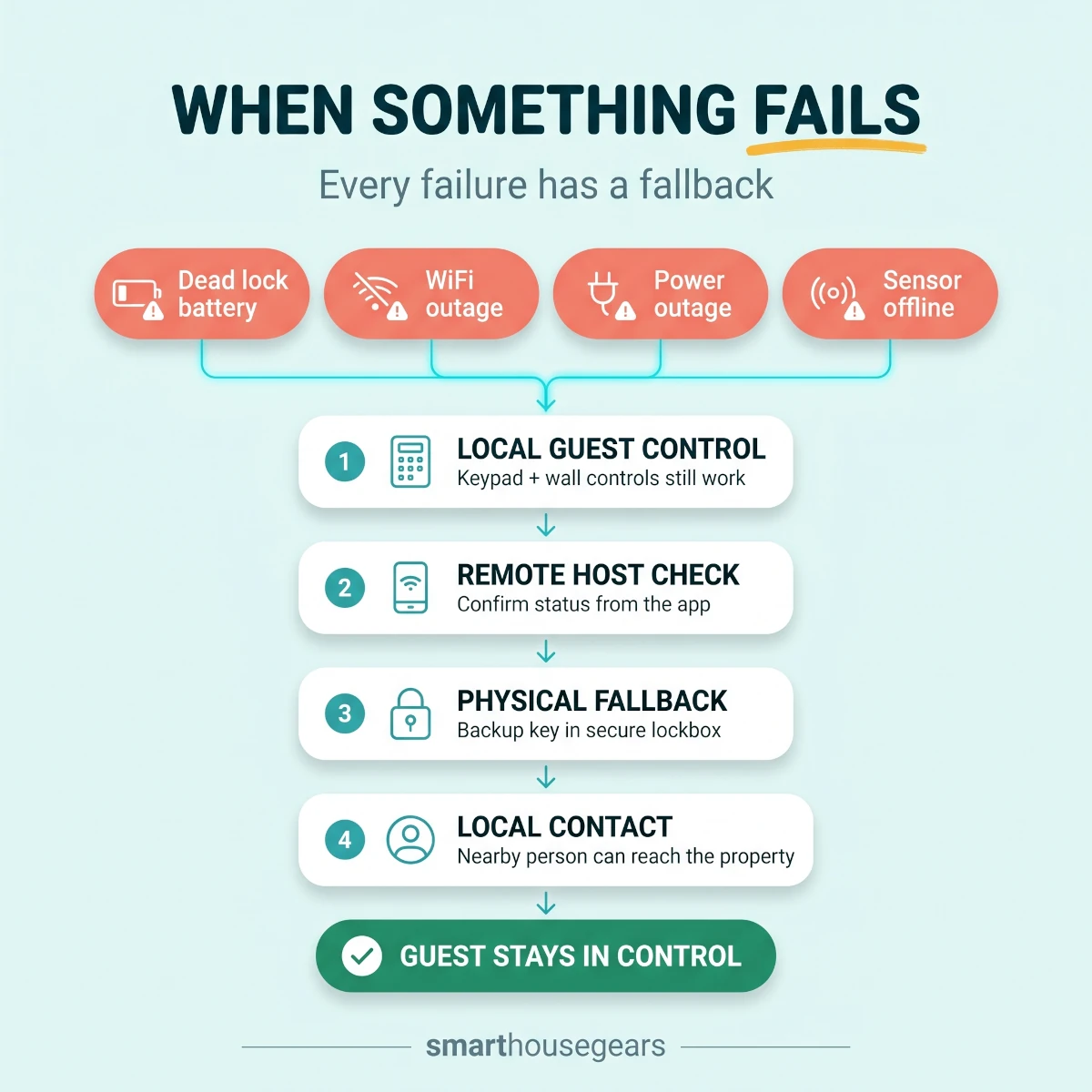
During an outage, saved keypad codes and manual thermostat controls should still work locally, while remote updates and cloud alerts may stop. Keep the modem, router, and hub on short-term backup power, document a physical entry path, protect pipes and HVAC with local settings, and give a nearby person a tested recovery checklist.
Internet down, power still on. The guest uses the keypad, switches, thermostat, and appliance controls normally. The host may lose remote status. Contact the guest only if the outage affects their stay or a critical alert disappears.
Power down. Battery locks should keep local entry. The router UPS may preserve internet for a limited time if the ISP equipment upstream still has power. HVAC, well pumps, and many appliances stop regardless of the app.
Power returns. Confirm the router, hub, thermostat, cameras, and sensors reconnect. Some devices need several minutes. Watch for an HVAC system or window AC that does not restore its expected state.
Storm threatens the property. Charge local backup batteries, confirm the emergency contact, set safe vacancy temperatures, check exterior equipment, and send guests clear instructions. Do not imply that consumer smart devices replace a weather radio, evacuation order, smoke alarm, generator interlock, or professional emergency plan.
Vacation rental failure response flow: route a dead lock, WiFi drop, or power outage through local guest control, a remote host check, physical fallback, then a local contact.
Common Vacation Rental Automation Mistakes
Making the app the key. Guests should type a code. App invitations fail when a phone is dead, email is mistyped, or cellular service is weak.
Keeping one code for everyone. Shared seasonal codes remove the access trail and stay valid after the booking. Use separate codes with defined time windows.
Automating primary lights with smart bulbs. A wall switch cuts power and leaves the bulb unreachable. Use ordinary lighting controls or switches that still work locally, installed to code.
Forcing thermostat savings during a stay. Aggressive resets produce comfort complaints and make the host look intrusive. Save during vacancies.
Putting cameras indoors. Airbnb prohibits indoor recording devices in homes even when off. Remove them, do not hide or disable them.
Sharing owner credentials with vendors. Use role access and separate door codes. Revoke access on the day the relationship ends.
Buying before fixing the network. More devices do not improve weak coverage. Test WiFi at the door and utility spaces first.
Ignoring manual recovery. Every lock, thermostat, shutoff, shade, light, and gate needs a local path a guest or contact can understand.
Building clever rules nobody documents. Name modes and automations plainly. Keep a one-page property systems sheet with device locations, battery types, account owner, and restart order.
Run a 48-Hour Reliability Test Before the First Guest
Run a mock stay for two full days using a test booking and a person who did not install the system. Test arrival, local controls, checkout, and every realistic failure. A passing test proves the property can host without the owner standing beside the router or explaining each switch.
48-Hour Vacation Rental Reliability Test
Guest code activates at the correct local timeInclude early check-in and a changed reservation
Guest code expires after the planned grace periodCleaner access remains separate
The door opens with internet disconnectedBackup key instructions are accurate
Low-battery alerts reach the right personApproved spare batteries are on site
Thermostat works from the wallHeat, cooling, fan, and recovery match the HVAC system
Ordinary switches and remotes still workNo guest action depends on a voice assistant
Leak and noise alerts show the correct propertyThe response contact knows what to do
Exterior cameras match every disclosureNo private or indoor area is visible
Router and hub recover after power lossMeasure backup runtime and reconnection time
The cleaner can enter and finish turnoverNo owner password or guest code is needed
A guest can disable an optional speakerCore devices continue working
The local contact can follow the recovery sheetTest the instructions instead of assuming they are clear
Fix every unexplained alert. If a device disconnects twice during the test, do not call it random. Improve signal, power, placement, firmware, or the device choice before the listing goes live.
Repeat a shorter version every quarter and after a router, lock, thermostat, hub, or booking-integration update. Test before peak summer, winter heating, wildfire-smoke season, and local storm season.
Turnover cleaning deserves the same planning as access and climate. Hardwood is the surface guests notice first and the one a rushed clean damages fastest, so pick the equipment with our cordless wet dry vacuum picks for hardwood floors before you hand a cleaner a mop and a bucket.
Final Recommendation
Build the property in layers. Start with account ownership and separate WiFi, then install a keypad lock with a physical backup. Add climate control, leak detection, privacy-safe noise monitoring, and only the exterior cameras the property genuinely needs.
Hosts who want the entry camera and the keypad in one device should read our guide to the best smart locks with a camera for front doors. It covers guest codes, local storage and the disclosure rules that come with pointing a lens at a rental door.
The best vacation rental smart home setup does not show off during a stay. The guest enters with a code, changes the temperature at the wall, uses ordinary switches, and never wonders which app controls the house.
Your advantage appears between bookings. Codes expire, the climate returns to a safe vacancy range, leaks and sustained noise produce useful alerts, and the network recovers from a short outage without a drive to the property.
Spend more on entry fallback, WiFi coverage, and local response than on decorative automation. Then run the 48-hour test with the internet disconnected and the owner out of the room. If a first-time user can still enter and operate the home, the setup is ready for guests.
Quick answers
Frequently Asked Questions
What does a reliable vacation rental smart home setup include?
A reliable vacation rental smart home setup includes a keypad lock with physical backup entry, separate guest and IoT WiFi, guest-controlled climate, leak sensors, and privacy-safe monitoring. Start with access, network reliability, water risk, and temperature before adding decorative devices. Every essential control should still work without the guest installing an app.
How long should an Airbnb guest code remain active after checkout?
The code should usually expire shortly after the confirmed checkout time, with a small grace period for a guest who is loading a car. Airbnb's direct smart-lock setup defaults to 30 minutes after checkout and lets eligible hosts choose a window from 15 minutes to 2 hours. Cleaner access should use a separate code, never the departing guest's code.
Can I put an Alexa speaker inside a vacation rental?
Yes, Airbnb allows smart-home devices, but it encourages hosts to disclose them and let guests unplug or disable them. Turn off voice purchasing, personal communications, calendars, and any private account features before the first stay. A voice speaker should be optional convenience, not the only way to control lights or temperature.
Should a vacation rental have separate WiFi for guests and devices?
Yes. Put guest phones, laptops, and streaming devices on a guest network while locks, cameras, sensors, hubs, and thermostats stay on a private IoT network. This reduces accidental device access and keeps a guest from changing the systems you need for remote management. The router must still support the 2.4GHz band used by many smart devices.
What backup power does a remote vacation rental need?
Start with a small UPS for the modem, router, and any hub that controls local automations. Size it for roughly 2 to 8 hours based on local outage patterns and the equipment load. Locks should retain keypad access on their own batteries, and life-safety alarms must use their required battery backup rather than depending on the smart-home UPS.
Do Matter devices remove vacation rental subscriptions?
Matter improves cross-platform control, but it does not remove a manufacturer's cloud fee, camera storage plan, noise-monitor service, or property-management subscription. It can reduce ecosystem lock-in and support more local control when the hub and device both allow it. Check the paid features separately before buying any Matter badge.
How often should a host replace smart lock batteries?
Replace them on a schedule before the app reaches a critical warning, not after a guest reports a dead keypad. Busy properties often need a check every turnover and planned replacement every 3 to 6 months, though lock type, battery chemistry, weather, and booking frequency change the interval. Store the approved battery type on site and train cleaners to report the percentage.
Can cleaners use a permanent smart lock code?
Cleaners can have a dedicated code, but a permanent shared code is a weak practice. Use an individual code or a schedule-limited code that works only during normal turnover hours, then remove access when a vendor relationship ends. Separate codes create a useful audit trail without exposing the host or guest code.
Are noise monitors allowed inside an Airbnb?
Airbnb allows disclosed noise decibel monitors in common areas as long as they do not record audio and are not placed in bedrooms, bathrooms, or sleeping areas. The listing must disclose that a noise monitor is present. Local privacy and short-term-rental rules can add stricter requirements, so check the property jurisdiction too.
What should a host do if a guest unplugs the router?
First contact the guest neutrally and ask whether the internet has failed. Keep essential access and climate controls usable locally so the stay does not depend on an immediate router restart. Protect the modem, router, hub, and UPS from accidental unplugging in a ventilated owner cabinet, but do not make the equipment inaccessible to an emergency contact.
Discussion
Be the first to comment
Have a question or experience to share? Scroll down to leave a comment.
Discussion
Be the first to comment