A smart home with no monthly fees is not a compromise in 2026. It is the smarter way to build, and it is easier than the brands want you to believe. If you have priced out a connected home recently, you have probably noticed the trick. The hardware looks affordable, then a camera quietly stops saving clips, a doorbell forgets what it saw an hour ago, and the only fix is a recurring plan.
That is subscription creep, and it has crept into every corner of the smart home. The good news is that for almost every device you want, there is now a version that does the same job and charges you nothing each month. We have wired up no-fee setups across apartments and houses, and the daily experience is the same as a subscription home. You just keep the money.
This guide shows you exactly which devices stay free, which ones bury a fee in the fine print, and how to build a full house that runs on local control. By the end you will have a clear shopping rule and a build order that keeps your monthly cost at zero.
Why a No Monthly Fee Smart Home Is the Smart Play in 2026
Stack up the plans most people end up paying and the numbers get silly fast. A camera plan here, a doorbell plan there, an alarm monitoring contract, maybe a second camera brand because the kit did not match. Each one looks small at $5 to $20 a month. Together they run $500 to $840 or more a year, every year, forever.
You are not buying a product at that point. You are renting access to footage your own camera already captured.
The market finally pushed back. After cameras and locks paywalled basic features in 2024 and 2025, buyers got loud, and the 2026 lineup is full of brands that compete on what stays free instead of what they can charge for. Local storage, on-device processing, and open standards turned "no monthly fee" from a gimmick into a real category.
Two technologies did most of the heavy lifting. Matter gave devices a common language so they pair with a hub you already own. Thread gave them a low-power local mesh that keeps running without a cloud server in the loop. Between them, the case for a brand subscription got a lot weaker.
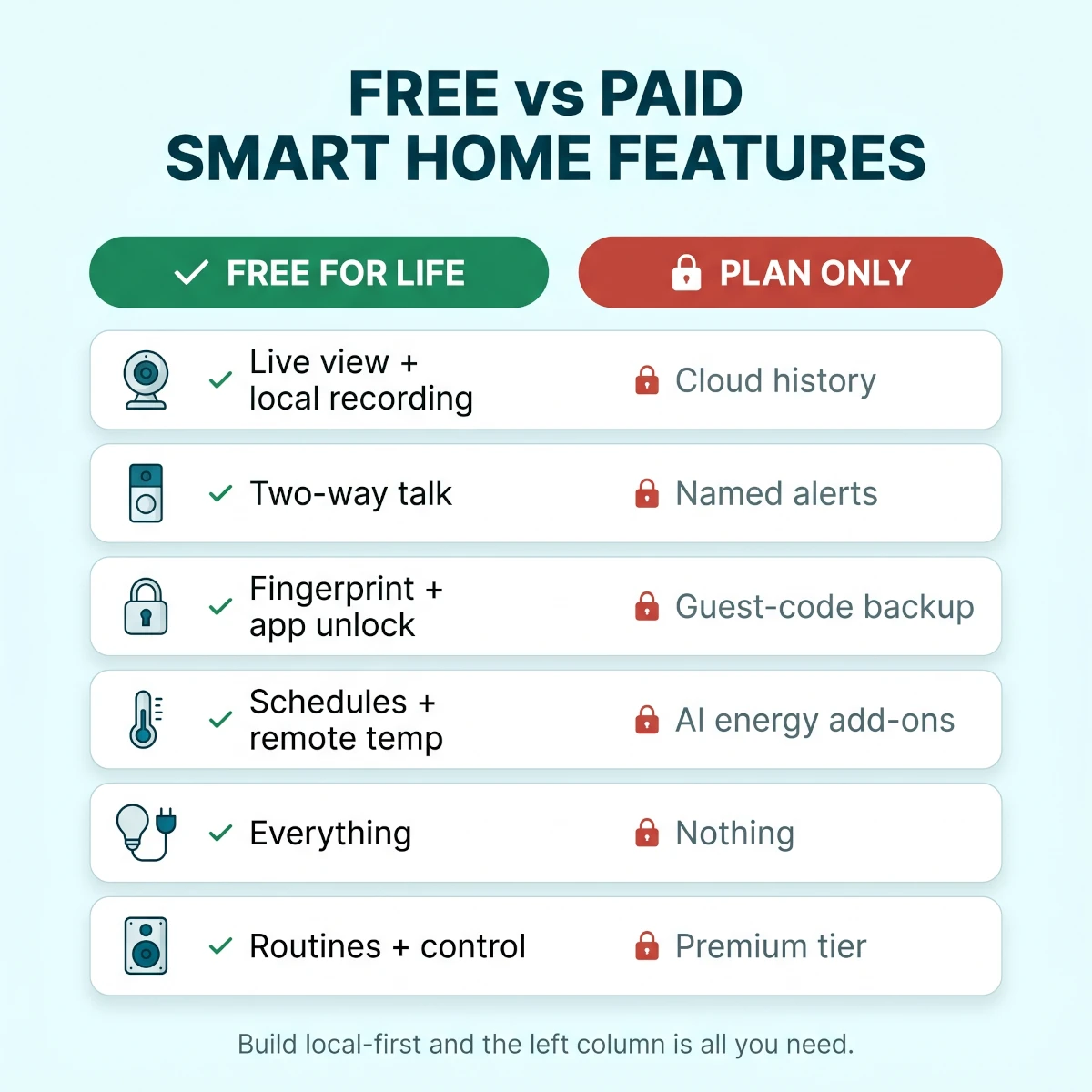
What stays free for life versus what brands lock behind a monthly plan, mapped by device category.
There is also a quieter benefit that matters more every year. A local-first home keeps working when a company changes its pricing, sunsets an app, or goes out of business. Your footage, your codes, and your automations live in your house. That is real ownership, and it is the opposite of a monthly bill.
This is not about being cheap. It is about not paying a tax for something the hardware already does on its own.
What You Actually Lose Without a Smart Home Subscription
Let us be honest, because pretending you lose nothing is how bad guides lose your trust. You do give up a few things when you skip the plans. The point is that almost none of them are daily-use features.
The short answer: you lose cloud convenience, not core function.
You keep live view, motion alerts, local recording, automations, voice control, scheduling, and remote access. You give up long-term cloud video history, AI alerts that name a person or a package, professional 24/7 monitoring, and some cross-camera timeline tricks. For most homes, the free column covers how you actually use the system.
TableWhat's Free vs What Needs a Plan, by Device
Free tier versus subscription-only features across common smart home device categories in 2026
Device
Free for life
Plan only
Security cameras
Live view, motion alerts, local microSD or NVR recording
Cloud history, AI person and package alerts
Video doorbell
Live view, two-way talk, local or short rolling clips
Long cloud event history, named detection
Smart lock
Fingerprint, keypad, app unlock, local log
Unlimited guest codes, cloud log backup
Thermostat
Schedules, app control, geofencing, remote temp
Some utility or AI energy bundles
Lights and plugs
Everything, no fee ever
Nothing required
Voice and hub
Routines, schedules, device control
Optional premium assistant tier
Security cameras
Free for life
Live view, motion alerts, local microSD or NVR recording
Plan only
Cloud history, AI person and package alerts
Video doorbell
Free for life
Live view, two-way talk, local or short rolling clips
Plan only
Long cloud event history, named detection
Smart lock
Free for life
Fingerprint, keypad, app unlock, local log
Plan only
Unlimited guest codes, cloud log backup
Thermostat
Free for life
Schedules, app control, geofencing, remote temp
Plan only
Some utility or AI energy bundles
Lights and plugs
Free for life
Everything, no fee ever
Plan only
Nothing required
Voice and hub
Free for life
Routines, schedules, device control
Plan only
Optional premium assistant tier
The one feature genuinely worth weighing is professional monitoring. That is the service where a call center sees your alarm and dispatches police or fire when you cannot. If your home sits empty for long stretches, that is the rare subscription that earns its keep, and we cover when to pay for it near the end.
Everything else on the paid side is a nice-to-have. AI that tells you the motion was a person and not a cat is pleasant, but a free motion alert plus a two-second glance at the clip does the same job.
The Local-First Rule That Kills Monthly Fees
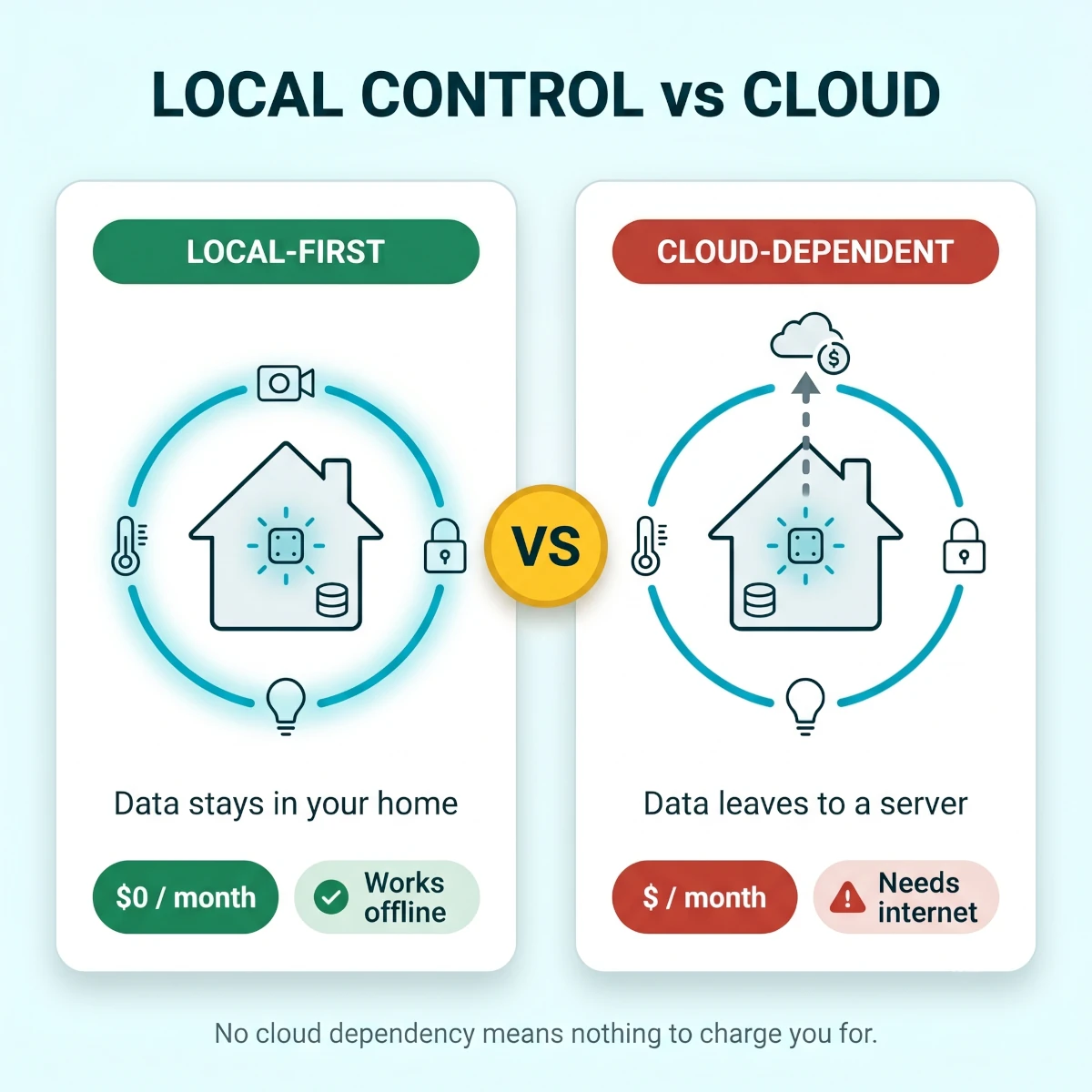
Here is the single idea that makes a no-fee home possible. If a device stores its data and runs its logic inside your house, there is nothing for a company to charge you rent on. Subscriptions exist to cover a brand's cloud servers. Cut out the cloud dependency and the fee has no reason to exist.
So the rule is simple. Favor devices that record locally and automate locally. Treat the cloud as an optional convenience, never a requirement.
Local control still needs a network that reaches every room, and that is the one piece people skip. Our large-home Wi-Fi 7 mesh guide compares systems whose core routing and mesh features stay free, so the hardware you buy once does not quietly add a plan later.
Local control keeps data and automations inside the home, so there is nothing for a brand to charge a monthly fee on.
Why Matter and Thread Keep Your Home Running Locally
Matter is an open standard that lets a device from one brand pair with a hub from another and run on your network. No brand cloud required for the basics. Thread is the low-power radio mesh that connects small battery devices and self-heals when one node drops.
The payoff is that a Matter device controlled by a hub in your home keeps responding even when your internet is down, and the brand has nothing to bill you for. You still get app access and remote control, but those ride on free infrastructure you already own.
A capable hub is the anchor of the whole setup. Many people already own one without realizing it, since an Echo, a Nest speaker, an Apple TV 4K, or a HomePod mini can act as a Thread border router and Matter controller. If you want to choose deliberately, our guide to the best Matter smart home hubs breaks down which ones run automations locally and which lean on the cloud.
Local Storage Beats Cloud Recording for Most Homes
Cloud recording is the feature that drives more subscriptions than anything else. It is also the easiest to replace.
A camera that writes to a microSD card, a base station with a built-in drive, or a network video recorder keeps your footage in the house. You scrub back through events in the app exactly like a cloud plan, except the clips never left your network and nobody charges you to keep them.
For a few cameras, a 64GB to 256GB card holds weeks of motion clips. For a whole-house setup, a base station or recorder with a 1TB to 2TB drive holds months. The recordings are private, fast to load on your own network, and immune to a price hike.
The only real tradeoff is offsite backup. If a burglar steals the camera, they take the card with it. The fix is a hybrid: a camera with local storage plus an optional, occasional cloud clip for high-value spots, or simply placing the recorder somewhere a thief will not find in the first 30 seconds.
Subscription-Free Security: Cameras, Doorbells, and Locks for $0 a Month
Security is where the fees hit hardest and where a no-fee build saves the most. It is also the category with the most traps, so go in with the local-first rule front of mind.
The quick version: buy cameras and doorbells that record locally, and a lock whose entry methods are free for life. Do that and your entire security layer costs zero dollars a month while still alerting your phone in real time.
Cameras That Record Without a Cloud Plan
The brands that built their reputation on no fees are the safe picks here. eufy, Reolink, Lorex, and Aqara all record to local storage and keep live view and motion alerts free. Reolink in particular leans into wired and PoE cameras that record to a recorder for as little as a one-time hardware cost.
For a large property that needs continuous local footage, our guide to the best PoE camera systems for large homes compares complete NVR kits, included drive capacity and realistic camera counts without adding a required cloud plan.
Ring, Nest, and Arlo all make good cameras, but their free experience is deliberately thin. Without a plan, recorded history is limited or gone, which turns a camera you own outright into a live-view-only device. If you already own one, you can still use it in a free home, just know its clips will not stick around.
For the full shortlist of cameras built for this exact job, our roundup of wireless outdoor cameras with no monthly fee ranks the eufy, Reolink, Lorex, and Aqara models by storage type, solar options, and real night performance.
Video Doorbells With No Required Subscription
A doorbell is just a camera at your door, and the same rule applies. Look for one that stores clips locally or to a hub, supports a wired or battery install, and rings an indoor chime without a plan.
The feature people miss when they cut the cord is rich package detection. A free doorbell still alerts you to motion and lets you talk to whoever is there. It just will not announce "package detected" by name. A motion alert plus a glance covers the same need for almost everyone.
Battery doorbells with local or rolling local storage are the renter-friendly pick, since they mount with adhesive and pack up clean at move-out. Wired doorbells that record to a hub are the set-and-forget pick for owners.
Smart Locks That Stay Free for the Life of the Lock
Smart locks are one of the best no-fee categories because the features you use every day are free on almost every brand. Fingerprint unlock, keypad codes, app lock and unlock, and a local event log cost nothing for the life of the hardware on Aqara, Eufy, SwitchBot, and Schlage.
What a few brands charge for is the extra layer: unlimited rotating guest codes, cloud backup of your access history, or advanced alerts. None of that is needed to get in your door reliably.
Pick a Matter-capable lock and it pairs straight into the hub you already own, so lock and unlock automations run locally. That means a "good night" routine that locks the door fires even if your internet is down, and it never depends on a paid tier.
Lights, Plugs, and Switches: The Always-Free Foundation
Here is the easy part of the whole build. Lights, plugs, and switches have never charged a subscription, and they are not about to start. This is the foundation you can pour without reading any fine print.
A smart plug turns any lamp, fan, coffee maker, or space heater into a scheduled, voice-controlled, app-controlled device. A smart bulb screws into the socket you already have. A smart switch or plug-in dimmer handles the fixtures you cannot easily swap. All of it runs free.
Reliable US picks that stay fully free include TP-Link Kasa and Tapo, Wyze, Govee, and Philips Hue. Hue uses its own bridge but charges nothing to run it. Kasa and Wyze plugs are the cheapest reliable on-ramp at roughly $8 to $15 each.
This is also where outdoor lighting lives. Permanent eave lights and string lights run entirely on free apps and local schedules, with brands like Govee and eufy supporting Matter and local control. If you want to light the exterior, our guide to the best permanent outdoor lights for the house covers which ones hold up through real weather without any recurring charge.
The Always-Free Smart Home Foundation
Smart plugsSchedule lamps, fans, and appliances. No fee, ever. From about $8 each.
Smart bulbsDrop into existing E26 sockets. Color or white, fully app and voice controlled.
Smart switches and dimmersFor ceiling fixtures you cannot easily swap. Local control, no plan.
LED light stripsPeel-and-stick accent lighting behind a TV or counter. Free schedules.
Outdoor and permanent lightsLocal schedules and color scenes with no recurring charge.
SensorsMotion, door, and contact sensors trigger free local automations.
Build your lighting and plug layer out as far as you like. None of it adds a dollar to your monthly cost, and it is the part of the home you will interact with most.
Climate Control Without a Recurring Charge
Climate is where a no-fee home quietly pays you back. A smart thermostat lowers your energy bill, and the features that do the saving are free.
Scheduling, app control, geofencing, and remote temperature changes cost nothing on ecobee, Nest, and Honeywell Home. You set a schedule, the thermostat pulls back when you are out, and you nudge it from your phone on the drive home. No plan involved.
The savings are real and they stack with how US utilities bill in 2026. Many homes are now on time-of-use rates where power costs far more from about 2 PM to 7 PM. A smart thermostat can pre-cool in the cheaper morning hours and coast through the expensive window, which trims both your bill and your peak demand. ENERGY STAR certified models save roughly 8 to 15 percent on heating and cooling, all without a subscription.
For picks that deliver this on the free tier, our roundup of the best smart thermostats compares ecobee, Nest, and Honeywell on what stays free and which ones include room sensors in the box.
If you cool with a window or portable unit instead of central air, the same logic applies. A WiFi air conditioner schedules and pre-cools on a free app. Our guide to the best smart air conditioners for apartments covers the renter-friendly models with no recurring fee.
Rooms with no ductwork are the gap in most no-fee climate plans. A ductless heat pump controls from a free app with no subscription attached, and our picks for the best mini split heat pumps for garages flag which units include smart control in the box rather than as a paid dongle.
Air quality rounds out the climate layer. A smart air purifier runs its schedules and auto modes for free, with no plan needed to clean the air during allergy or wildfire-smoke season. The best smart air purifiers for large rooms all control fully from a free app, and the only real ongoing cost is the replacement filter, not a subscription.
Floor cleaning follows the same pattern, which surprises people. Mapping, scheduling, no-go zones, and self-emptying all run on the free tier, so the best self-emptying robot vacuums for pet hair cost nothing per month to operate. Dust bags and filters are consumables, exactly like a purifier filter, not a service charge.
Leak, Smoke, and Safety Sensors That Cost Nothing to Run
The sensors that protect your home from water damage and fire are some of the best no-fee devices you can buy. They are cheap, they run locally, and the alert comes straight to your phone.
A water leak sensor sits under the sink, behind the washer, or next to the water heater and pings you the second it gets wet. Brands like Aqara, SmartThings, and Govee sell them for about $15 to $25 each, and they fire free local automations. Pair one with a smart shutoff valve and a leak can close the main line on its own, with no subscription in the loop.
Freeze and temperature sensors do the same job for cold snaps. If a room or a pipe drifts toward freezing, you get a warning in time to act. That is the kind of alert that saves a burst pipe and a five-figure repair, and it costs nothing each month to run.
Smoke and carbon monoxide is the one place to read carefully. A smart listener that hears your existing alarm and alerts your phone is free. A fully monitored smoke and CO service that dispatches the fire department is a paid plan, and it is one of the few worth weighing if your home is often empty.
Door, window, and motion sensors round out the set. They trigger free automations like switching on lights, arming a camera, or sending a push alert, and they are the backbone of a self-monitored security setup with no contract.
Voice and Hubs: Free by Default, With One or Two Catches
The brain of the home is free. Alexa, Google Home, and Apple Home all control your devices, run routines, and take voice commands at no charge. This is the part people worry about needlessly.
Pick the assistant that matches the phones in your house. Apple Home is the natural fit for an all-iPhone household and leans hard into local control through a HomePod or Apple TV. Alexa has the widest device support and the most flexible routine builder. Google Home sits in between and pairs cleanly with Android.
There are a couple of catches worth naming so they do not surprise you. Amazon now sells an optional Alexa+ premium tier for advanced conversational features, and some add-on services like Ring video or music streaming cost extra. None of that is required to run lights, plugs, locks, cameras, or a thermostat. The base smart home experience on all three assistants is genuinely free.
The hub choice ties back to the local-first rule. A hub that doubles as a Thread border router lets your small battery devices run on a local mesh, and a Matter controller keeps automations firing on your network. Use a speaker or streaming box you already own and you add a powerful local brain for no extra hardware and no fee.
Build Your No Monthly Fee Smart Home in This Order
Order matters. Buy in the wrong sequence and you end up with a camera that needs a plan or a hub that cannot run your locks locally. Follow this build order and every piece lands in a fee-free home.
The Subscription-Free Build Order
1
Audit each category for hidden fees first
Before buying anything, list the categories you want and check each brand free tier against what it locks behind a plan. The decision rule is one line: if the core feature needs a subscription, pick a different brand.
2
Set up a local-first hub
Anchor the home on a Matter and Thread capable hub. An Echo, Apple TV 4K, or HomePod mini you already own works. This is the local brain everything else will run through.
Pro tip: A hub that is also a Thread border router future-proofs you for battery sensors and locks.
3
Add security with local storage
Install cameras and a doorbell that record to a microSD card, base station, or recorder. Confirm motion alerts and live view work before you mount anything permanently.
Warning: Decline the cloud plan trial during setup so it does not auto-bill after the free period.
4
Add a fee-free smart lock
Pick a Matter lock with free fingerprint, keypad, and app unlock. Pair it to the hub so lock and unlock automations run locally and survive an internet outage.
5
Build out lights, plugs, and the thermostat
Add smart bulbs and plugs in the rooms you use most, then a thermostat for the bill savings. None of this carries a fee, so expand it freely.
6
Connect everything and move automations local
Add all devices to one free assistant, build your routines inside the hub app, and test each automation with the internet unplugged to confirm nothing depends on a paid cloud tier.
The reason this order works is that the hub comes before the gadgets. Once the local brain is in place, every device you add slots into free, local automations instead of a brand cloud. Add one category at a time, live with it for a few days, then move to the next.
Renters Get the Most From a No-Fee Setup
If you rent, a no monthly fee smart home is almost made for you. Everything here is plug-in, screw-in, or peel-and-stick, so it moves with you and leaves no holes behind. Skipping subscriptions only helps, since you are not stuck canceling and restarting a contract every time you move.
The math is friendlier for renters too. You buy the hardware once, carry it to the next place, and pay nothing in between. A monitored alarm contract often ties you to an address and a term that does not survive a move, which is exactly the kind of cost a renter should avoid.
Stick to devices that need no drilling and no landlord conversation. Smart bulbs, smart plugs, a battery doorbell with local storage, an indoor camera on a shelf, and a portable WiFi air conditioner cover most apartments. Each one packs into a box at the end of the lease and sets up again in an afternoon at the next place.
Self-monitoring fits renters perfectly here. Alerts come to your phone, you arm and disarm from the app, and there is no call center contract attached to a unit you do not own. If you ever want professional dispatch later, you can add it month-to-month without rewiring anything.
What a No Monthly Fee Smart Home Costs to Set Up
The phrase "smart home" makes people picture a huge bill. A no-fee build is mostly modest upfront hardware and then nothing each month.
Starter tier ($150 to $300). A hub you may already own, two local-storage cameras, a smart lock, three smart bulbs, and two smart plugs. This covers the front door, key entry points, and the lighting and outlets you use most.
Comfort tier ($350 to $650). Add a video doorbell, a smart thermostat, two more cameras, and a handful of extra bulbs and switches. Now you have full entry coverage, climate savings, and lighting through the main rooms.
Whole-home tier ($700 to $1,200). Add an air purifier, outdoor and permanent lighting, more sensors, and a network video recorder for months of local footage. This is what a connected house grows into over a year.
The number that matters most is the one underneath all of this: zero dollars a month. Compare that to the plans a typical subscription home pays.
TableThe Monthly Plans You Skip
Common smart home subscription plans and their yearly cost, all avoided by a local-first no monthly fee build
Typical plan
Monthly
Per year
Camera cloud history (per brand)
$5 to $15
$60 to $180
Video doorbell history
$5 to $10
$60 to $120
Multi-camera or premium plan
$10 to $20
$120 to $240
Professional alarm monitoring
$10 to $30
$120 to $360
Your no-fee build
$0
$0
Camera cloud history (per brand)
Monthly
$5 to $15
Per year
$60 to $180
Video doorbell history
Monthly
$5 to $10
Per year
$60 to $120
Multi-camera or premium plan
Monthly
$10 to $20
Per year
$120 to $240
Professional alarm monitoring
Monthly
$10 to $30
Per year
$120 to $360
Your no-fee build
Monthly
$0
Per year
$0
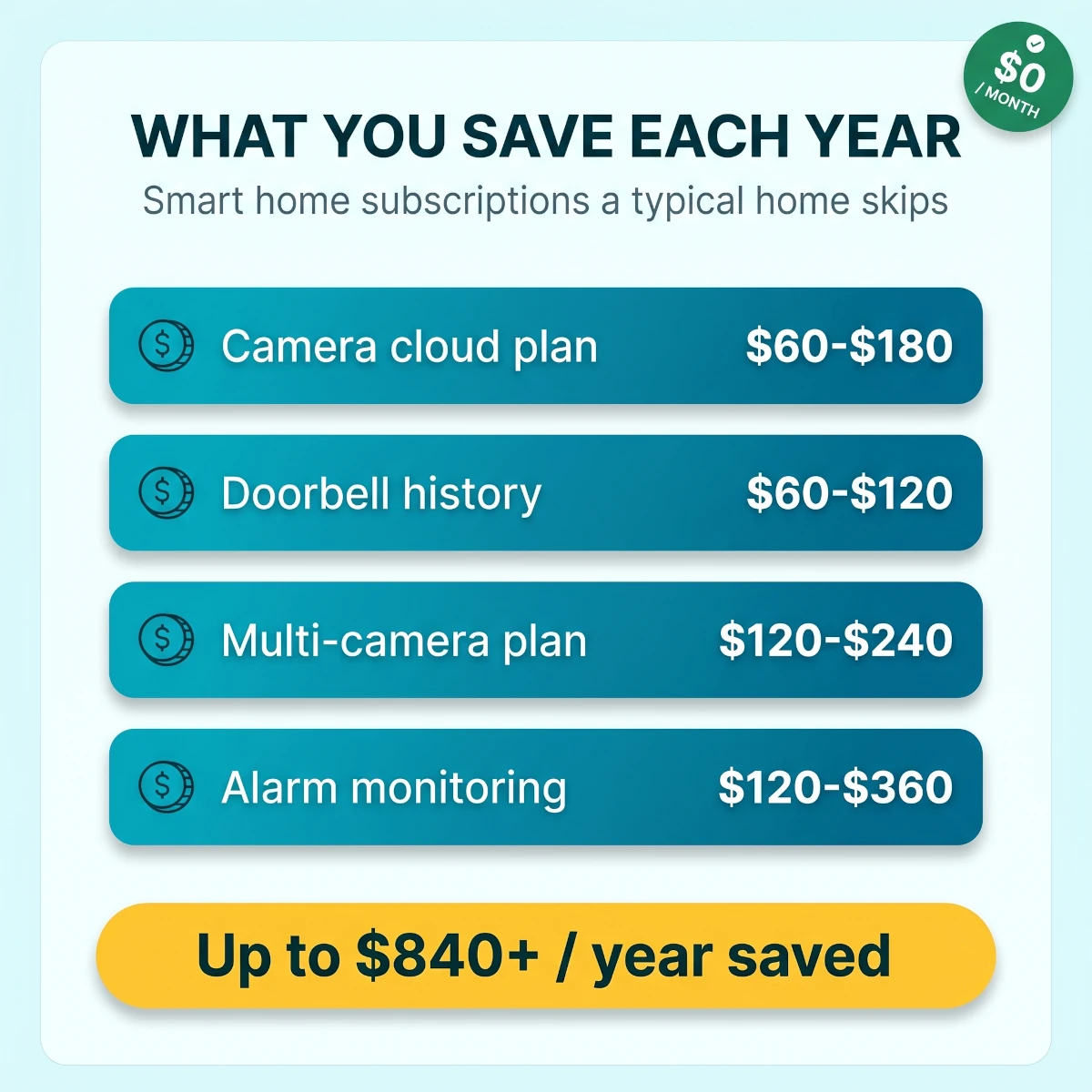
Stack the plans a typical home pays and a no monthly fee build saves $500 to $840 or more every year.
Run the math and the picture is clear. A household carrying two or three plans saves $500 to $840 a year by going local-first. The hardware difference between a free camera and a subscription camera is usually small, so the savings often cover the gear inside the first year and keep paying you after that.
Play it out over three years and the gap gets hard to ignore. A subscription home paying two plans at $12 a month spends roughly $864 across that span and owns nothing extra at the end. A no-fee home spends its money once on hardware, owes nothing monthly, and still owns every device and every saved clip three years later. The longer you keep the setup, the wider that gap grows.
Mistakes That Quietly Add Subscriptions Back In
A no-fee home is easy to keep free, but a few habits sneak the charges back in. We see the same ones over and over.
Buying the camera before reading the free tier. This is the big one. A camera that looks cheap can be useless without a plan. Always check what recording you get for free before you add to cart, not after.
Letting a trial auto-convert. Many devices push a free plan trial during setup. If you do not cancel it, it bills you in 30 days. Decline it at setup or set a reminder the day you activate.
Mixing brands that each want their own plan. Three camera brands can mean three subscriptions. Standardize on one or two local-storage brands so you never juggle multiple plans or apps.
Treating cloud as the only backup. You do not need a monthly plan to protect footage. A local recorder plus smart camera placement covers theft risk, and you can add an occasional cloud clip only for the highest-value spot.
Ignoring local control during an outage. A home that dies when the internet drops is a home that depends on someone else's servers. Build local-first, and while you are at it, read our guide to smart home power outage preparation so your no-fee setup also rides out storms.
Avoid those five and your monthly cost stays exactly where it started, at zero.
When Paying for a Smart Home Subscription Is Actually Worth It
A good guide tells you when the subscription is the right call, not just how to dodge it. There are a few honest cases.
Professional monitoring is the strongest one. If your home sits empty for long stretches, a monitored alarm that dispatches police or fire when you cannot is worth the $10 to $30 a month. Self-monitoring sends the alert to your phone, but it cannot make the call for you at 3 AM when you are asleep or away.
Cloud video history can be worth it for a single high-risk spot, like a detached garage or a vacation property you rarely visit, where local storage could be stolen or physically unreachable. Pay for one camera, not the whole house.
Remote hosts also need to separate subscription savings from guest reliability. Our vacation rental smart home setup guide shows how to combine local controls, timed lock codes, separate guest WiFi, and outage backups without making a paid cloud plan the only way into the property.
AI package and person detection is a genuine convenience for a busy front porch with constant deliveries. It is a want, not a need, so treat it that way and only add it where it earns the cost.
The principle holds even here. Pay for the specific service that solves a real problem, on the one device that needs it, and keep the rest of the home free. That is a deliberate choice, not subscription creep.
Final Recommendation
A smart home with no monthly fees is the default you should build toward in 2026, not a downgrade you settle for. The hardware is as good as the subscription tier, the daily experience is identical, and you keep $500 to $840 a year that would otherwise vanish into plans.
Start with the rule that decides everything: buy devices whose core features stay free for life, and favor anything that stores and automates locally. Anchor the home on a Matter and Thread hub, build security on local-storage cameras and a fee-free lock, then add lights, plugs, and a thermostat that never charge a dime to run.
Add professional monitoring only if your home sits empty, and pay for cloud history only on the one spot that truly needs it. Everything else stays local and free.
The same buy-once logic can guide entertainment gear. Our guide to the best AR glasses for movies and gaming focuses on wired display products that do not require a monthly service just to use the screen.
It applies to wearables too. If you want health tracking without adding another app bill, our guide to the best fitness trackers without subscription fees compares Garmin, Apple, Samsung, Fitbit, and smart ring options by what stays free after the trial ends.
Audio works the same way. Core Bluetooth listening and device switching cost nothing per month, and our guide to the best multipoint earbuds for laptop and phone separates the hardware features you buy once from the streaming and cloud-assistant services that bill you every month.
Buy the hub and your first camera this week. Build out one category at a time. Keep the receipts in your house and the fees out of your bank account.
Quick answers
Frequently Asked Questions
Can you really run a full smart home with no monthly fees?
Yes. Every core smart home function has a fee-free option in 2026. Cameras can record to local storage, smart locks keep fingerprint and app unlock free for life, lights and plugs never charged a subscription, and Alexa, Google Home, and Apple Home all run your devices for free. You only pay monthly if you choose cloud video history, professional monitoring, or AI alerts. Build around local-first devices and your running cost stays at zero dollars a month.
Which smart home devices have hidden subscription fees?
The fees almost always hide in three categories: security cameras, video doorbells, and professionally monitored alarm systems. Brands like Ring, Nest, and Arlo gate basic recorded video history behind a plan, so a camera you bought outright stops saving clips after a few hours without one. Smart locks, lights, plugs, switches, thermostats, and voice assistants are almost always free to run. Read the free tier before you buy any camera or doorbell.
Do security cameras require a monthly fee?
No, not if you pick the right ones. Cameras from eufy, Reolink, Lorex, and Aqara record to a microSD card, a base station, or a network video recorder with no monthly charge. You keep motion alerts, live view, and saved footage for free. Ring, Nest, and Arlo cameras work but limit or remove recorded history without a plan. Choose local storage and you keep everything that matters at zero dollars a month.
Does Matter or Thread cost a monthly fee?
No. Matter and Thread are open connectivity standards, not paid services. A Matter device pairs with a hub you already own and runs locally on your network for basics like on, off, status, and automations. Thread is a low-power mesh that needs a border router, which many Echo, Nest, Apple TV, and HomePod devices already include. Neither standard charges a subscription, and both reduce your reliance on a brand cloud.
How much can you save per year by skipping smart home subscriptions?
A typical household stacking camera, doorbell, and lock plans pays $500 to $840 or more per year. Ring Protect, Nest Aware, and Arlo Secure each run roughly $5 to $20 a month per plan, and many homes carry two or three. Replace those with local-storage hardware and the yearly cost drops to zero. The hardware often pays for itself inside the first year compared to renting access to your own footage.
Do smart locks need a subscription?
Almost never for the features you actually use. Fingerprint unlock, keypad codes, app lock and unlock, and a local event log stay free for the life of the lock on brands like Aqara, Eufy, SwitchBot, and Schlage. A few brands charge for unlimited guest codes, cloud backup of access logs, or advanced alerts, but those are optional extras. Pick a lock whose core entry methods are free and you never owe a monthly charge to get in your door.
What features do you give up without a smart home subscription?
Mostly cloud convenience, not core function. You typically lose long-term cloud video history, rich AI alerts that name a person or package, professional 24/7 monitoring, and some cross-camera timeline features. You keep live view, motion alerts, local recording, automations, voice control, and scheduling. For most homes those free features cover daily use, and local storage already keeps the footage you would actually go back and watch.
Does Alexa, Google Home, or Apple Home charge a monthly fee?
No. All three assistants control your smart home devices for free, including routines, schedules, and voice commands. Amazon sells an optional Alexa+ premium tier for advanced conversational features, and some services like Ring or music streaming cost extra, but none of that is required to run lights, plugs, locks, cameras, or a thermostat. The base smart home experience on every major assistant is free.
Can you self-monitor a security setup without a contract?
Yes. Self-monitoring means alerts come straight to your phone instead of a paid call center, and most 2026 systems support it out of the box. Kits from Abode, eufy, and others let you arm, disarm, view cameras, and get push alerts with no contract and no monthly fee. You give up the professional dispatch that calls police or fire for you, which is the one feature genuinely worth paying for if nobody is usually home.
What internet and storage do you need for a local recording setup?
Less than you think. Local cameras save to a microSD card inside the camera, a hub with a built in drive, or a network video recorder on your home network, so cloud upload is optional. A standard home router and a 64GB to 256GB card or a 1TB to 2TB drive cover weeks of motion clips for several cameras. You still want internet for remote viewing and alerts, but the recordings themselves never leave your house.
Do smart thermostats have subscription fees?
The thermostat itself does not. Scheduling, app control, geofencing, and remote temperature changes are free on ecobee, Nest, and Honeywell Home. Optional extras can cost money, like Nest Aware bundles or some utility demand-response perks, but you never pay just to set a schedule or change the temperature from your phone. A smart thermostat is one of the safest fee-free upgrades you can make, and it usually lowers your energy bill on top.
Discussion
Be the first to comment
Have a question or experience to share? Scroll down to leave a comment.
Discussion
Be the first to comment