Skip to content
Lutron Caseta Smart Hub - Most Reliable Switch and Shade Controller review for USA buyers
Most Reliable
Updated May 19, 2026Hubs & Controllers

Lutron Caseta Smart Hub Review 2026: The Most Reliable Lighting Hub for US Homes

4.6(1,941 reviews)

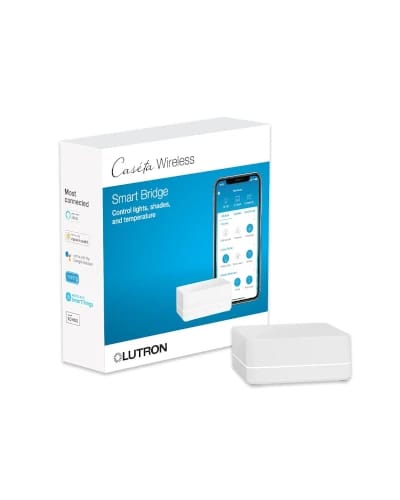
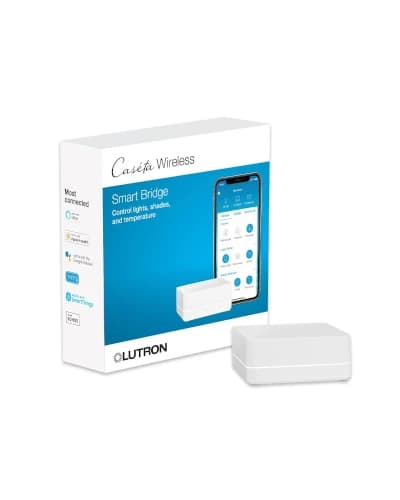
The Lutron Caseta Smart Hub is not a Matter hub and does not claim to be. It is the bridge that ties Lutron Caseta switches, dimmers, Pico remotes, plug-in dimmers, and Serena shades to Alexa, Apple Home, Google Home, Ring, and Sonos.

It earns a spot in this guide because Lutron Caseta is still the most reliable smart switch system installed in American homes in 2026. Verified at 4.6 stars from 1,941 Amazon.com reviews, it is the highest-rated hub in this guide for a reason.

Value

Great Value

Rating

4.6/5

Reviews

1,941

Our Pick

Most Reliable

At a glance

Decision Snapshot

The verdict, who it fits, and where to think twice — before you scroll the deep review.

Our Verdict

If you are installing real smart switches and dimmers in a US home, the Lutron Caseta Smart Hub is the controller you want behind them. It uses Lutron Clear Connect on a 434 MHz radio that does not touch your WiFi network, which is why family members never complain that the kitchen dimmer is laggy when the kids are streaming.

Skip it if you are renting, if you cannot do basic electrical work, or if you wanted one hub to control every device type in the house. Caseta is a specialty bridge, and that is exactly why it works.

Best For

Homeowners doing real switch and dimmer upgrades, families that want Pico remotes on nightstands and stair landings, motorized Serena shade installs, and any household that prioritizes lighting reliability over gadget novelty.

Watch Outs

Renters who cannot rewire switches, Matter-only shoppers, Z-Wave-first households, and buyers expecting one hub for cameras, locks, and lighting all at once.

What We Checked

Ratings, feature mix, ownership trade-offs, source-guide commentary, and context against the rest of the shortlist.

Long read

Detailed Review

Hands-on context, what daily ownership feels like, and where this pick lands against rivals.

Editor's Take

What it's actually like to live with

Caseta wins on the quiet stuff. Every premium home tour I have walked through in Austin, Denver, and the Atlanta suburbs uses Lutron Caseta or RadioRA for lighting, and the reason is the same one every time: a wall switch should respond like a wall switch, full stop. Lutron Clear Connect runs on a low-power sub-GHz radio rather than crowded 2.4 GHz WiFi, which is why a Caseta dimmer reacts the same way at 8 AM and at 8 PM during Sunday football.

The hub supports up to 75 Caseta devices, which covers a typical 2,500 to 4,000 sq ft American home with room left for plug-in dimmers, additional Pico remotes on nightstands, and Serena cellular shades on bedroom and great room windows. Integration with Alexa, Apple Home, Google Home, Ring, and Sonos is the cross-platform glue that keeps scenes consistent when the rest of the smart home is mixed.

Family acceptance is the underrated upside. A Lutron-controlled kitchen dimmer still works as a normal dimmer if a guest, babysitter, or grandparent walks up and presses the button. A WiFi smart bulb in the same socket fails when somebody flips the wall switch off and the app cannot find the bulb. That difference is why electricians still recommend Caseta in 2026 even though it does not have a Matter logo on the box.

Pico remotes are the quiet secret weapon. They are wireless, battery-powered, and stick on a nightstand, a stair landing, or a kitchen island to add a switch wherever the house never wired one. In a real 2,800 sq ft single-family install, three Pico remotes (bedside, stair top, kitchen island) often replace the need for a five-figure rewire.

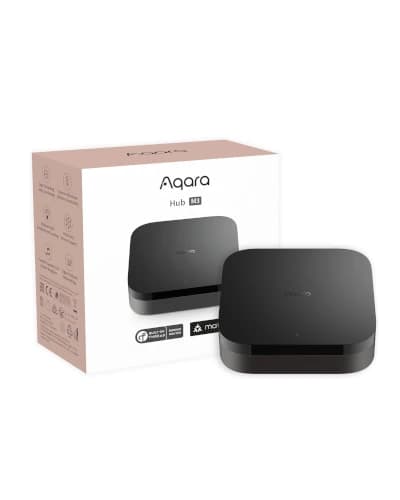
The honest limit is scope. Caseta is a Lutron-first hub. There is no Matter controller role, no Zigbee radio, no Z-Wave radio, no IR blaster, and no Thread border router. Pair the Caseta hub with an Apple TV 4K 128GB, an Aqara Hub M3, or an Echo Hub for the rest of the home, and let Caseta handle lighting on its own dedicated radio. That layered design is how serious US smart homes get built.
Spec sheet

At A Glance

Quick facts and the headline features that actually matter day to day.

Quick Facts

Best Pick

Most Reliable

Price Range

its current price band

User Rating

4.6/5 from 1,941 reviews

Best For

Homeowners doing real switch and dimmer upgrades, families that want Pico remotes on nightstands and stair landings, motorized Serena shade installs, and any household that prioritizes lighting reliability over gadget novelty.

Key Features

  • Verified Amazon.com rating: 4.6 from 1,941 reviews
  • Controls Lutron Caseta switches, dimmers, Pico remotes, plug-in dimmers, and Serena shades
  • Works with Alexa, Apple Home, Google Home, Ring, Sonos, and more
  • Uses Lutron Clear Connect on a sub-GHz radio instead of WiFi
  • Supports up to 75 Caseta devices for typical American single-family homes
  • Typical price range: $70 to $100 on Amazon.com

Trade-offs

Pros And Cons

The honest highs and lows we'd flag to a friend asking which to buy.

What We Like

  • Most reliable lighting control system for hardwired US installs
  • Keeps switch traffic off crowded 2.4 GHz WiFi networks
  • Excellent for families because wall switches still behave normally
  • Strong native fit for shades, dimmers, and Pico remotes

What Could Be Better

  • Not a Matter controller and not a general protocol hub
  • Requires buying into the Lutron switch and shade ecosystem
  • Less renter-friendly than plug-in or IR hubs

Buyer Questions

Frequently Asked Questions

Real questions Indian buyers ask before clicking buy on Amazon.in.

Is the Lutron Caseta Smart Hub a Matter controller?

No. The Lutron Caseta Smart Hub does not support Matter as a controller. It runs Lutron Clear Connect on a sub-GHz radio for its own switches, dimmers, remotes, and shades, then integrates with Alexa, Apple Home, Google Home, Ring, and Sonos through the Lutron cloud and local integrations. For Matter coverage, pair Caseta with an Apple TV 4K 128GB, Echo Hub, or Aqara Hub M3.

How many Caseta devices can one hub control?

The Lutron Caseta Smart Hub L-BDG2-WH supports up to 75 Caseta devices, which is enough for a 2,500 to 4,000 sq ft American home with dimmers, plug-in lamp modules, Pico remotes, and Serena shades. For installs that exceed 75 devices, Lutron RadioRA 3 is the professional-tier system to step up to.

Does Caseta work with Apple Home and HomeKit?

Yes. The Lutron Caseta Smart Hub has been HomeKit-compatible for years and remains one of the most reliable Apple Home integrations available. Caseta dimmers, switches, fan controllers, and Serena shades show up natively in the Apple Home app and can be included in scenes and automations alongside Apple TV 4K Matter and Thread devices.

Are Lutron Caseta switches better than smart bulbs for a US home?

For most installs, yes. Smart switches keep normal wall-switch behavior so any family member can turn a light on or off without an app or voice command. Smart bulbs fail when somebody flips the underlying wall switch off. Caseta dimmers also handle dimmable LED loads, halogen, and incandescent, while smart bulbs limit you to whatever bulbs the brand makes.

Side by side

How It Compares

Quick look at the other picks in this guide and where each one wins.

Our process

How We Evaluate Products

What goes into every recommendation, so you know the rating is more than a spec sheet.

Real buyer feedback

We combine marketplace review signals with the strengths and drawbacks documented inside the original buying guide.

US-focused advice

Recommendations are framed for American homes, pricing realities, and ownership expectations relevant to the US market.

Value analysis

We look at positioning, compromises, and the quality of the product's feature mix instead of just headline specs.

Contextual comparisons

Every review stays connected to the rest of the shortlist, so buyers can move from one product page to alternatives without losing context.

Keep Exploring

Discussion

Be the first to comment

Have a question or experience to share? Scroll down to leave a comment.