Skip to content
Philips Hue Bridge Pro review for USA buyers
Best Lighting Hub
Updated May 19, 2026Hubs & Controllers

Philips Hue Bridge Pro Review 2026: The Matter Lighting Hub for Large US Homes

4.4(317 reviews)

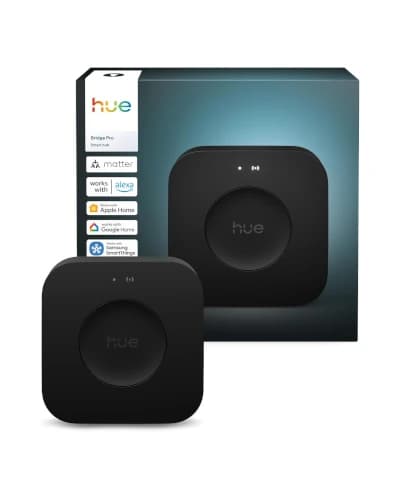
The Philips Hue Bridge Pro is the new flagship lighting bridge for Hue homes that outgrew the standard Hue Bridge. It supports 150-plus Hue lights and 50-plus accessories, which finally fits a serious multi-room US home with kitchen recessed, under-cabinet, porch, garage, and bedroom Hue gear all on one bridge.

Matter compatibility lets Hue lighting show up cleanly in Apple Home, Alexa, Google Home, and SmartThings, so the Bridge Pro doubles as a Matter lighting gateway rather than a closed Hue island.

Value

Good Value

Rating

4.4/5

Reviews

317

Our Pick

Best Lighting Hub

At a glance

Decision Snapshot

The verdict, who it fits, and where to think twice — before you scroll the deep review.

Our Verdict

The Hue Bridge Pro is the right buy for a serious Hue lighting setup, not the right buy for a general smart home. If your house already has 30-plus Hue bulbs and the original bridge is hitting its 50-light limit, Bridge Pro is the upgrade that keeps every scene and accessory working.

Skip it if you only own a handful of Hue bulbs or if Lutron Caseta switches handle most of your lighting. The standard Hue Bridge is still enough for sub-50-light installs.

Best For

Whole-home Hue setups with 50-plus bulbs, families running multi-room scenes and entertainment lighting, homeowners with Hue Play gradient strips behind TVs, and buyers who want a single bridge to expose Hue lighting to Apple Home, Alexa, Google Home, and SmartThings through Matter.

Watch Outs

Small apartments with 5 to 10 Hue bulbs, Lutron Caseta homes, and buyers expecting a universal Zigbee coordinator that pairs IKEA Tradfri or third-party sensors.

What We Checked

Ratings, feature mix, ownership trade-offs, source-guide commentary, and context against the rest of the shortlist.

Long read

Detailed Review

Hands-on context, what daily ownership feels like, and where this pick lands against rivals.

Editor's Take

What it's actually like to live with

The Hue Bridge Pro exists because the standard Hue Bridge ran out of room. The original bridge officially supports 50 lights and 12 accessories, which sounds generous until you map a real 2,500 sq ft American home. Kitchen recessed (8 bulbs), island pendants (3), under-cabinet (2 strips), pantry (1), dining (4), living room lamps (3), hallway (4), entry (2), porch (2), bedrooms (6), bathrooms (4), home office (3), garage (2), and patio (4) lands at 50 before holiday lights or a Hue Play gradient strip enter the picture.

Bridge Pro tripling that capacity to 150-plus lights and 50-plus accessories is the upgrade serious Hue households were waiting for. Beyond raw numbers, the new bridge also handles larger Zigbee meshes more reliably, which matters when scenes span the porch, the patio, and the family room at the same time.

Matter integration is the second reason the Bridge Pro shows up in a Matter hub guide. Hue chose to expose lighting through a Matter bridge model, so Apple Home, Alexa, Google Home, and SmartThings can see Hue bulbs and rooms natively without the older brand-by-brand cloud handshakes. For households that already split between Apple Home and Alexa, that is a cleaner setup story.

Reliability is where Hue keeps earning the premium. Hue runs lighting on a dedicated Zigbee mesh rather than dumping every bulb onto WiFi, so a 60-bulb whole-home install does not flood the home network with chatter. That is the boring engineering decision that keeps Hue scenes feeling instant when cheaper WiFi-bulb systems start stuttering past 20 bulbs.

Migration is the practical caveat. Moving from the older Hue Bridge to the Hue Bridge Pro can preserve scenes, rooms, and accessory pairings through the official migration flow, but plan to do it on a quiet weekday rather than 30 minutes before Thanksgiving dinner. The verified 4.4 rating from 317 Amazon.com reviews reflects a generally smooth experience with a few migration headaches worth budgeting time for.
Spec sheet

At A Glance

Quick facts and the headline features that actually matter day to day.

Quick Facts

Best Pick

Best Lighting Hub

User Rating

4.4/5 from 317 reviews

Best For

Whole-home Hue setups with 50-plus bulbs, families running multi-room scenes and entertainment lighting, homeowners with Hue Play gradient strips behind TVs, and buyers who want a single bridge to expose Hue lighting to Apple Home, Alexa, Google Home, and SmartThings through Matter.

Key Features

  • Verified Amazon.com rating: 4.4 from 317 reviews
  • Supports 150-plus Hue lights and 50-plus accessories
  • Matter-compatible bridge for Apple Home, Alexa, Google Home, and SmartThings
  • Built for serious whole-home Hue lighting systems and multi-room scenes
  • Ethernet and WiFi support for flexible placement
  • Typical price range: $98 to $120 on Amazon.com

Trade-offs

Pros And Cons

The honest highs and lows we'd flag to a friend asking which to buy.

What We Like

  • Best upgrade for large Hue setups hitting the 50-light bridge limit
  • Purpose-built lighting control beats generic-hub compromises
  • Matter exposes Hue cleanly to Apple Home, Alexa, Google Home, and SmartThings
  • Higher capacity is ideal for whole-home scenes and entertainment lighting

What Could Be Better

  • Not a general-purpose Matter controller for unrelated devices
  • Migration from the older Hue Bridge takes planning and time
  • Only makes sense if you are committed to the Hue ecosystem

Buyer Questions

Frequently Asked Questions

Real questions Indian buyers ask before clicking buy on Amazon.in.

How many lights does the Hue Bridge Pro actually support?

Philips Hue lists support for 150-plus Hue lights and 50-plus accessories on the Bridge Pro, compared with 50 lights and 12 accessories on the standard Hue Bridge. For a typical US whole-home Hue install with kitchen recessed, under-cabinet, bedrooms, porch, and patio lighting, the new capacity removes the need for a second bridge.

Does the Hue Bridge Pro work as a general Matter controller?

No. The Hue Bridge Pro is a Matter bridge for Hue lighting, not a general-purpose Matter controller. It exposes Hue bulbs, light strips, and accessories to Apple Home, Alexa, Google Home, and SmartThings through Matter, but it will not commission unrelated Matter devices like Schlage Encode Plus locks or Aqara P2 sensors.

Should I upgrade from the standard Hue Bridge to the Hue Bridge Pro?

Upgrade if you are hitting capacity limits or planning a whole-home Hue setup with more than 40 bulbs. Keep the standard Hue Bridge if your install stays under 30 bulbs and you do not run Hue Play entertainment scenes. The migration process preserves most scenes and rooms, but plan the upgrade for a weekend rather than mid-week.

Will the Hue Bridge Pro work with third-party Zigbee bulbs?

Mostly no. The Hue Bridge Pro is designed for Philips Hue and certified Friends of Hue accessories. Some third-party Zigbee bulbs from IKEA Tradfri, Sengled, or GLEDOPTO have paired historically, but Hue has tightened compatibility over the years and pairing is not guaranteed. Buy the Bridge Pro for a Hue-first setup, not as a universal Zigbee coordinator.

Side by side

How It Compares

Quick look at the other picks in this guide and where each one wins.

Our process

How We Evaluate Products

What goes into every recommendation, so you know the rating is more than a spec sheet.

Real buyer feedback

We combine marketplace review signals with the strengths and drawbacks documented inside the original buying guide.

US-focused advice

Recommendations are framed for American homes, pricing realities, and ownership expectations relevant to the US market.

Value analysis

We look at positioning, compromises, and the quality of the product's feature mix instead of just headline specs.

Contextual comparisons

Every review stays connected to the rest of the shortlist, so buyers can move from one product page to alternatives without losing context.

Keep Exploring

Discussion

Be the first to comment

Have a question or experience to share? Scroll down to leave a comment.