Skip to content

Wearables & Gadgets

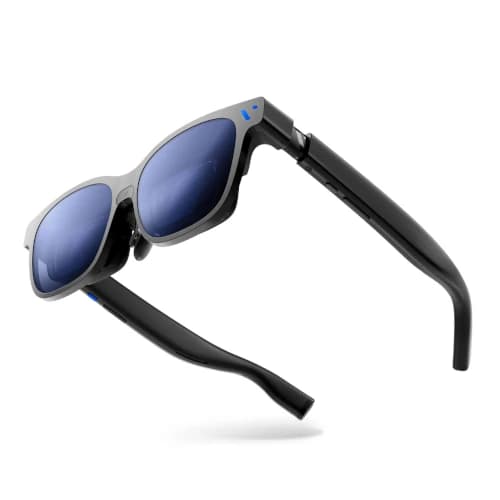
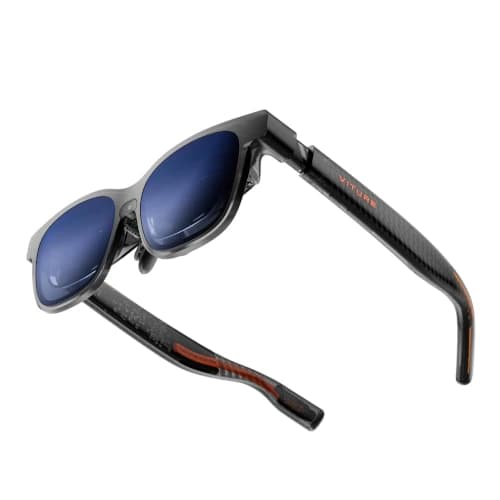
VITURE Pro XR Review for Movies and Steam Deck

Subhadeep GhoshUpdated June 15, 20264.0 rating
VITURE Pro XR review for USA buyers
Best Value
4.0(2,646 reviews)

VITURE Pro XR is the proven value choice for buyers who want bright 1080p movie playback, high-refresh gaming, electronic dimming, and a mature accessory ecosystem without flagship pricing.

Its largest advantage is not one new specification. It is the combination of a broad owner base, frequent sale pricing, established adapters, and features that still cover the core display-glasses experience well.

Value
Good value
Rating
4/5
Reviews
2,646

Summary

Our verdict

The bottom line, who it fits, and where to think twice before you scroll the full review.

Verdict

Buy VITURE Pro XR when value, compatibility accessories, and owner proof matter more than the widest image or newest panel resolution. It is the most rational first premium pair during a strong sale.

Skip it if onboard screen anchoring or crisp laptop text is essential. Newer products earn their premium in those two areas.

Best for

First-time display-glasses buyers, frequent sale shoppers, Steam Deck owners, nearsighted users within the supported adjustment range, and travelers who want electronic dimming.

Watch outs

Buyers seeking the widest cinematic field of view, users who need integrated spatial stabilization, or professionals planning dense desktop work.

Long read

Detailed review

Hands-on context, what daily ownership feels like, and where this pick lands against rivals.

Editor's take

A VITURE Pro XR review in 2026 should acknowledge that newer panels exist while explaining why this model remains relevant. Its 1080p OLED display is still sharp for streaming movies, YouTube, and ordinary game interfaces. The resolution difference becomes more visible in small computer text than in moving video, so entertainment-first buyers sacrifice less than the specification table suggests.

The moderate field of view creates a large virtual screen without pushing interface corners too far into the optical edges. It feels less dramatic than the newest flagships, but subtitles, health bars, and mini-maps are easy to take in. Buyers sensitive to edge blur may prefer this more conservative presentation.

High-refresh support keeps gaming performance current. Compatible handhelds and computers can produce smoother motion than a 60Hz display, particularly in racing games, platformers, emulation, and lighter competitive titles. Demanding games still need sensible quality settings because the source device determines the real frame rate.

Myopia adjustment and electronic dimming add practical value every session. Nearsighted users within the supported range can focus each eye independently, and lens tint can change as the environment moves from a bright airport to a dark cabin. Neither feature is decorative, and both reduce the accessories you need to carry.

The mature VITURE ecosystem is another reason the product remains easy to recommend. Charging adapters, console connection hardware, and mobile accessories have clearer support paths than those from many smaller brands. The complete setup can still become expensive, so buyers should price the dock or adapter required for their main device before comparing totals.

Spatial behavior is the important limitation. Basic use presents a fixed screen that moves with your head, while richer pinned-display options depend on compatible software or additional hardware. Buyers who know head-locked screens cause discomfort should spend more for onboard stabilization rather than hoping an accessory will feel equally simple.

The VITURE Pro XR verdict is based on mature value. It is not the technical champion, but it covers bright movies, smooth handheld gaming, vision adjustment, dimming, and broad connections at a price that often falls far below the latest flagship. That is the right compromise for many first-time buyers.
Why the Value Case Holds Up

The core entertainment experience remains strong despite newer panels.

Movies and games still look sharp on the 1080p OLED display, and high-refresh output covers the performance feature most players notice immediately.

Deep sale pricing leaves room in the budget for a powered charging adapter, prescription insert, or quality earbuds.

Focus and Lens Dimming

Two practical controls make travel use easier.

The focus dials help many nearsighted users avoid prescription inserts, although astigmatism and complex corrections still need an optician solution.

Electronic dimming lets the same glasses work in a bright terminal, shaded cabin, and dark bedroom without attaching a separate cover.

Where New Flagships Win

Resolution, field of view, and onboard spatial control are the upgrade reasons.

Choose a newer model for dense desktop text, the largest virtual screen, or spatial stabilization built directly into the frame.

Stay with Pro XR if those upgrades sound occasional rather than essential. Its value depends on paying only for features you will use.

Specs & features

At a glance

The quick facts and the headline features that actually matter day to day.

Quick facts

Best Pick
Best Value
User Rating
4/5 from 2,646 reviews
Best For
First-time display-glasses buyers, frequent sale shoppers, Steam Deck owners, nearsighted users within the supported adjustment range, and travelers who want electronic dimming.

Key features

  • 1080p OLED display with 46-degree field of view
  • Up to 120Hz refresh rate for gaming
  • Up to 1000-nit claimed brightness
  • Built-in myopia adjustment and electronic dimming
  • Broad range of phone, console, and charging accessories

Trade-offs

Pros and cons

The honest highs and lows we'd flag to a friend asking which to buy.

What we like

  • Best combination of sale pricing and mature owner feedback
  • Bright image with useful lens dimming
  • Strong adapter ecosystem for consoles and handhelds
  • Diopter controls help many nearsighted buyers

Watch out for

  • Smaller field of view than newer flagships
  • 1080p text is less crisp than current 1200p panels
  • Stable spatial screens need additional VITURE hardware or software

Side by side

How it compares

A quick look at the other picks in this guide and where each one wins.

Our process

How we evaluate products

What goes into every recommendation, so you know the rating is more than a spec sheet.

Real buyer feedback

We combine marketplace review signals with the strengths and drawbacks documented inside the original buying guide.

US-focused advice

Recommendations are framed for American homes, pricing realities, and ownership expectations relevant to the US market.

Value analysis

We look at positioning, compromises, and the quality of the product's feature mix instead of just headline specs.

Contextual comparisons

Every review stays connected to the rest of the shortlist, so buyers can move from one product page to its alternatives without losing context.

Buyer questions

Frequently asked questions

Real questions buyers ask before clicking buy.

Is VITURE Pro XR still worth it in 2026?

Yes, especially during a sale. It retains a bright OLED display, high-refresh gaming, focus adjustment, electronic dimming, and strong accessory support.

Does VITURE Pro XR work with Steam Deck?

Yes, it can connect directly to a compatible Steam Deck USB-C video port. A pass-through charging adapter is useful for longer sessions.

Can VITURE Pro XR correct nearsightedness?

Its focus dials help many nearsighted users within the supported range. Astigmatism and complex prescriptions still require an insert.

Does VITURE Pro XR have screen anchoring?

The basic direct display is head-locked. More advanced spatial behavior depends on compatible VITURE software or accessories rather than fully integrated processing.

Keep exploring

Discussion

Be the first to comment

Have a question or experience to share? Scroll down to leave a comment.